What Is MCP? Model Context Protocol Explained
# What Is an MCP Server? Understanding MCP Architecture From Scratch
*We already have APIs. We already have tool calling. So why does everyone keep talking about MCP? Let's build it up from zero and find out.*
Say you're building an AI assistant for an online store. A customer opens the chat and types:
**"Where is my order #1024?"**
The model gets the question right away. It knows what an order is, what "shipped" means, and how to explain a delivery date in friendly language. What it doesn't know is anything about order #1024. Has it shipped? Was it cancelled? Is it sitting on someone's porch right now? No idea.
That's not a bug. A Large Language Model is good at language, but it has no built-in access to your database. If you want it to answer questions about real business data, you have to give it a way to reach that data.
The usual first fix is Tool Calling. You write a function like this:
public Order getOrder(Long orderId) {return orderService.findById(orderId);}You register it with your AI framework, the model learns it can ask for it, and now the assistant can look up orders. Problem solved.
For a while, anyway.
Then the project grows. Now you want the assistant to talk to GitHub, PostgreSQL, Google Drive, Stripe and a handful of internal services. And you'd like a second and third AI app to reuse those same connections instead of rebuilding them. Suddenly the question isn't "how do I call one function?" but "how do I organize all of this without it turning into spaghetti?"
That's the problem **Model Context Protocol (MCP)** is aimed at. In this article we'll walk through what MCP actually solves, how its pieces fit together, and where it differs from plain APIs and ordinary Tool Calling.
## 1. Why Do We Need MCP?
### Life before MCP
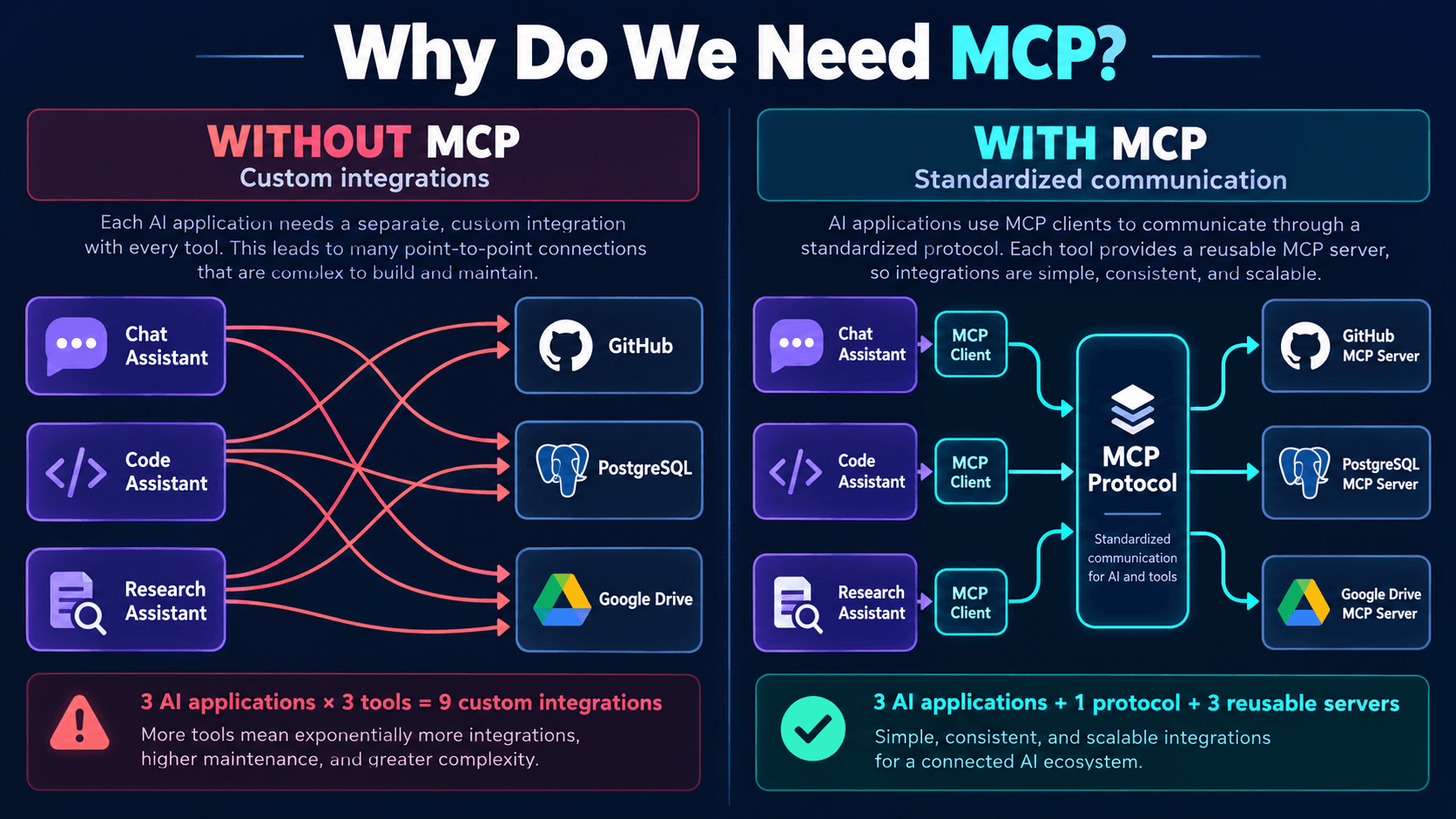
Picture three AI apps on your team's plate:
1. A coding assistant that digs through repositories.
2. A customer-support assistant that answers questions.
3. A research assistant that reads documents.
Each one needs something from the outside world. The coding assistant needs GitHub, the support assistant needs PostgreSQL, and the research assistant needs Google Drive. One integration each. Easy enough.
Then, as always, the requirements shift. The coding assistant now needs the database too. The research assistant wants GitHub. Support wants Google Drive. And you realize you're writing the same kind of glue code for the third, fourth, fifth time.
### Why that hurts
Without a shared interface, every app ends up with its own custom wiring:
Coding Assistant → Custom GitHub IntegrationSupport Assistant → Custom Database IntegrationResearch Assistant → Custom Google Drive IntegrationIt gets messier, because each integration describes its operations differently. One exposes `findRepository()`. Another calls the same idea `searchRepos()`. A third expects a request shape nobody else uses.
The services underneath may have perfectly good APIs. That's not the issue. The issue is that every AI app still needs its own adapter to translate those APIs into something its model can use. Add more apps and more services, and the number of adapters you maintain grows fast.
### Where MCP comes in
Model Context Protocol gives you one standard way to connect AI applications to outside capabilities. Instead of inventing a new format for every integration, you build MCP-compatible servers:
GitHub MCP ServerDatabase MCP ServerGoogle Drive MCP ServerAny AI app with an MCP client can connect to them, ask what they offer, and talk to them using the same protocol.
### An analogy that helps
Think back to when every gadget came with its own charger. One cable for the phone, a different one for the keyboard, something else again for the monitor. A shared connector standard didn't make the devices any smarter. It just made them much easier to plug in.
MCP works on the same idea. **It's a common communication standard for connecting AI applications to external capabilities.**
One thing it is not: a replacement for GitHub, PostgreSQL or your REST APIs. It's a layer that sits between your AI app and those systems so they can talk in a predictable way.
## 2. MCP Host vs MCP Client vs MCP Server
If you only remember one section of this article, make it this one. Mixing up these three roles is where most of the early confusion about MCP comes from.
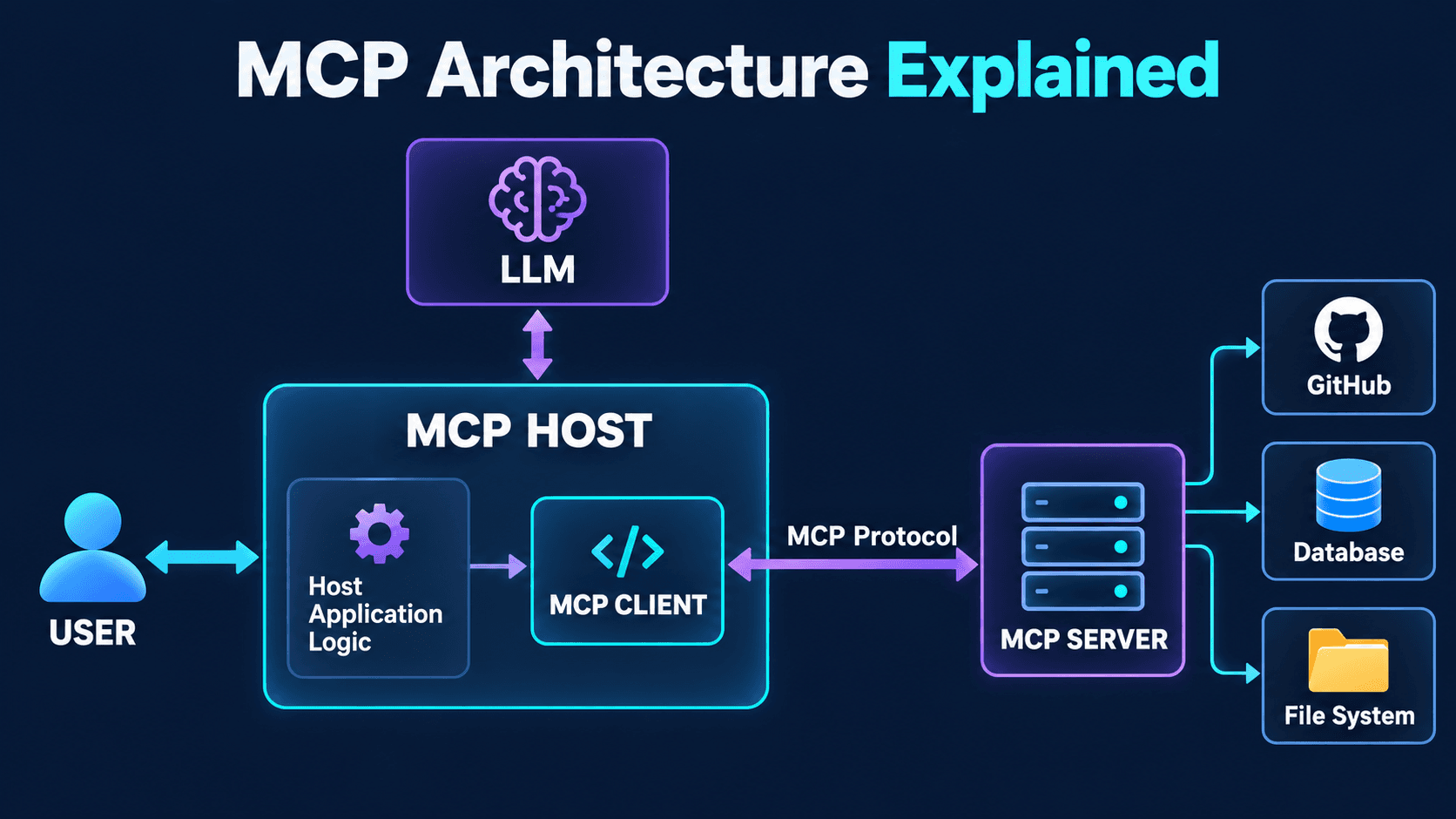
An MCP setup has three main pieces:
- MCP Host
- MCP Client
- MCP Server
There's usually a language model involved too, but the model is not any of these three. Keep that in mind; we'll come back to it.
### The MCP Host
The host is the application that runs the whole AI experience. Say you're writing an assistant in Java. Your app takes in user messages, talks to the LLM, keeps track of which tools are available, coordinates tool calls and sends back the final answer.
If that app also supports MCP connections, it's acting as an MCP Host. AI-enabled IDEs, coding assistants and custom agent apps are all common examples. The host is the conductor: it decides what happens and in what order.
### The MCP Client
Now the host wants to talk to a GitHub MCP Server. How does the request actually get there? Through an MCP Client.
The client is a protocol component that lives inside the host, or is managed by it. Its job is to:
1. Open a connection to an MCP Server.
2. Agree on which protocol features both sides support.
3. Find out what tools, resources and prompts the server offers.
4. Send requests.
5. Receive responses.
Think of it as the bridge between host and server. In practice, a host usually keeps one client connection per server:
MCP Client A → GitHub MCP ServerMCP Client B → Database MCP ServerThe host juggles both.
### The MCP Server
An MCP Server is a program that exposes capabilities through the MCP protocol. A GitHub server might offer:
listRepositories()getRepository()createIssue()listPullRequests()A database server might offer:
listTables()describeTable()executeReadOnlyQuery()Notice what the server doesn't do: it doesn't read the user's question. It never sees "hey, what's going on with my PRs?" It receives structured protocol requests and runs the matching operation. That's it.
### So where does the LLM fit?
Take the request "Find all open pull requests in my repository."
The LLM reads it and may decide a tool would help. But the model doesn't open an MCP connection, and it doesn't run the server's code. The work is split like this:
- The **host** handles the conversation with the model.
- The **client** handles the protocol.
- The **server** actually performs the operation.
### Quick check
You're building a Spring Boot AI app that connects to a PostgreSQL MCP Server. Which component actually runs the database operation?
A. The LLM executes the SQL itself.
B. The MCP Server runs the authorized operation.
C. The MCP Client produces the database result.
It's B. The client carries the request over, but the server is the one that does the work through its own implementation.
## 3. How Does the MCP Server Know Which Tool to Run?
So we have the architecture. The obvious next question: **how does the system decide which tool to call?**
Back to our store. The customer asks, "Where is my order #1024?" and our MCP Server offers three tools:
getOrder(orderId)searchProducts(keyword)checkInventory(productId)How does the AI land on `getOrder()`? Let's trace the whole trip.
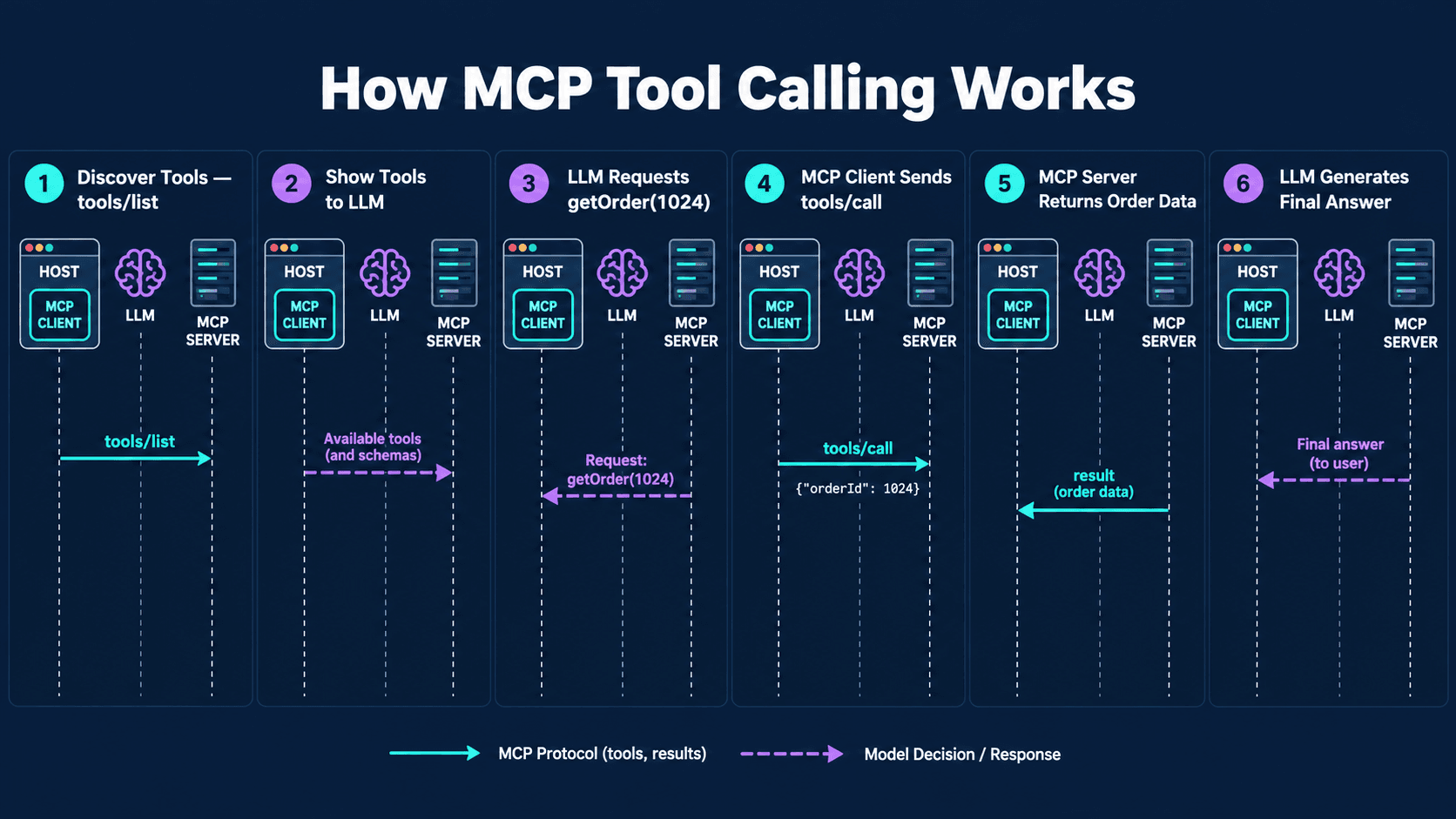
### Step 1: Discover the tools
This usually happens before the user even types anything. The host connects to the MCP Server, and during setup the client and server agree on which protocol features they support. Then the client asks the server what tools it has:
{"jsonrpc": "2.0","id": 1,"method": "tools/list"}The server answers with a description of each tool. A simplified one looks like this:
{"name": "getOrder","description": "Retrieve an order using its ID","inputSchema": {"type": "object","properties": {"orderId": {"type": "integer"}},"required": ["orderId"]}}Three parts matter here:
- **Name** identifies the tool.
- **Description** says what it does.
- **Input schema** defines the arguments it expects.
Don't skip over that last one. The schema is how both the app and the model know what a valid call looks like. A vague description or a sloppy schema is one of the most common reasons a model picks the wrong tool, or calls the right one with garbage.
### Step 2: The host shows the tools to the LLM
The host passes the relevant tool definitions to the model along with the user's question. The model looks at "Where is my order #1024?", looks at what it's allowed to ask for, and decides `getOrder` fits.
It then produces a structured tool-call request, roughly like this:
{"name": "getOrder","arguments": {"orderId": 1024}}Here's the part people often miss: the model hasn't fetched anything. It has only *asked* for an operation.
### Step 3: The host sends the call through the MCP Client
The host figures out which server owns `getOrder`, and the MCP Client sends the request over the protocol:
{"jsonrpc": "2.0","id": 2,"method": "tools/call","params": {"name": "getOrder","arguments": {"orderId": 1024}}}The key line is `method: tools/call`. That's the client telling the server, "please run this specific tool."
### Step 4: The server does the work
The MCP Server receives the request and finds its registered `getOrder` tool. It validates the arguments and checks that the caller is allowed to do this. Then it runs the real logic, which might be as simple as:
orderService.findById(1024L);The order service pulls the record from the database. Let's say it comes back as:
{"orderId": 1024,"status": "SHIPPED","estimatedDelivery": "2026-10-29"}(Made-up values, obviously.)
### Step 5: The server sends the result back
The server returns a structured response to the client. MCP tool results can carry text and other supported content types. The host receives it.
### Step 6: The LLM writes the answer
The host adds the tool result to the model's conversation context. Now the model finally has real data, and it can reply:
"Your order #1024 has shipped and should arrive on October 29."
### A detail worth knowing
Does the server hand its source code to the model during discovery? No. Discovery shares metadata: names, descriptions, input schemas. The implementation stays hidden.
So the model knows `getOrder` takes an order ID, but it has no idea whether the server uses PostgreSQL, MongoDB or some third-party REST API behind the scenes. And it doesn't need to. That's one of the nicer architectural properties of MCP: you can swap out what's behind a tool without the AI side ever noticing.
## 4. Tools vs Resources vs Prompts
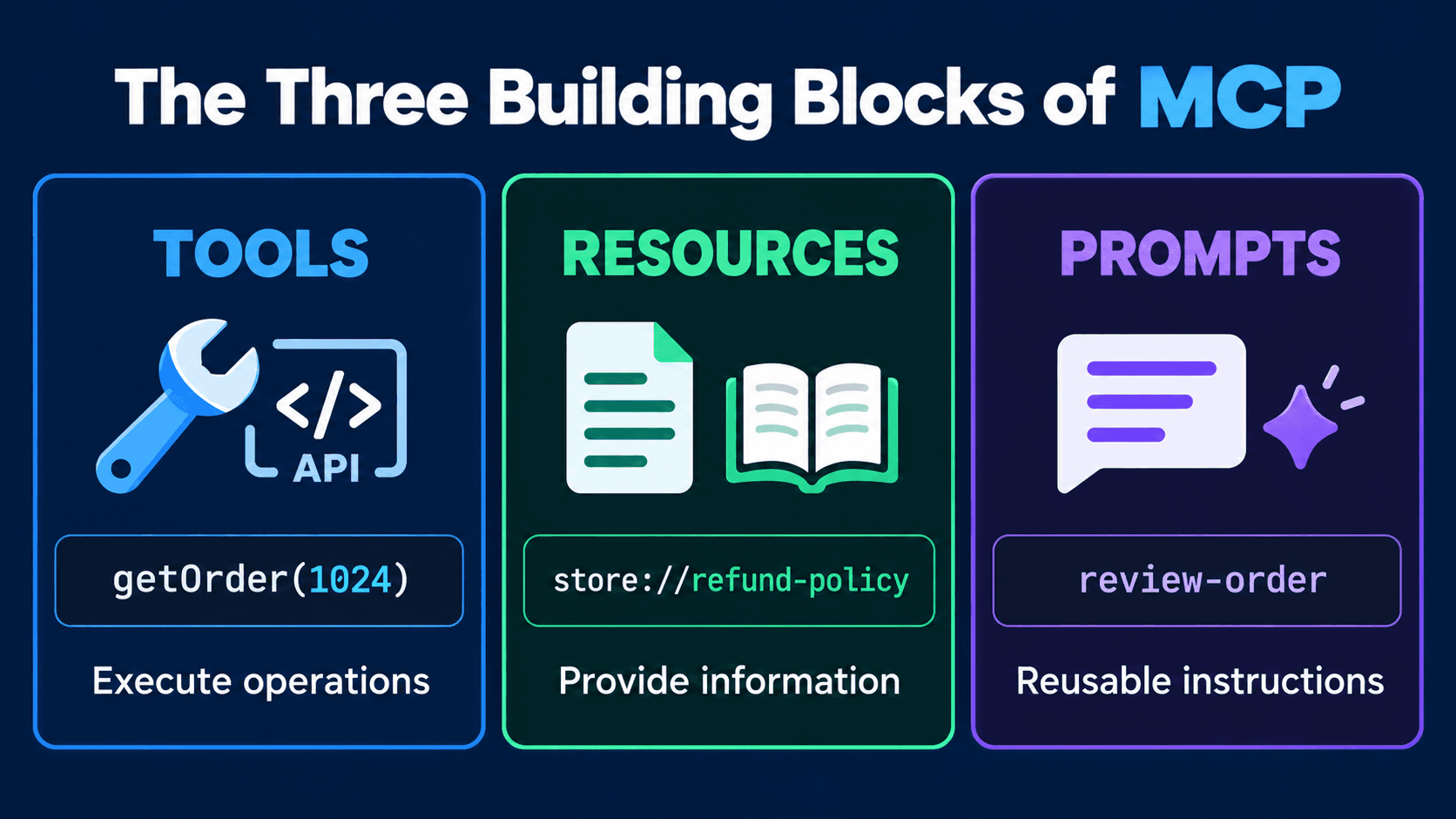
Up to now we've only talked about tools. But an MCP Server can expose more than things to execute. There are three core primitives:
1. Tools
2. Resources
3. Prompts
They sound alike at first. They aren't.
### Tools: doing things
A tool is an operation the server can run. `getOrder(1024)` fetches an order and returns its status. `createSupportTicket(orderId, message)` opens a ticket.
A tool doesn't have to change anything. Some just read data, others have real side effects:
getOrder() → Reads informationcancelOrder() → Changes order stateBoth are perfectly valid MCP tools. But you'd be wise to treat the second one very differently, with stronger authorization and probably an "are you sure?" step for the user. Nobody wants an assistant that cancels orders because it misread a sentence.
### Resources: reading things
A customer asks, "What's your refund policy?" You have that policy written down somewhere. An MCP Server can expose it as a resource:
store://policies/refundsThe client requests the resource, gets its content back, and the host can feed the relevant parts to the LLM.
Where tools are about actions, resources are about context: material the AI can read. A store might expose a few of them:
store://documentation/shippingstore://catalog/categoriesstore://policies/refundsThey're especially handy when an app needs organized, predictable access to documents and other content.
### Prompts: reusable instructions
Say your support team reviews delayed orders all the time. And every time, someone types out the same thing: "Review this order, check its delivery status, find any problems, and explain the next steps clearly."
Instead of retyping it forever, the MCP Server can offer it as a reusable prompt template, something like `reviewOrder(orderId)`. When a user picks it, the client fetches the template:
Review order {orderId}.Identify delivery problems.Explain the result clearly.Recommend an appropriate next step.The payoff is consistency. Everyone on the team runs the same instructions instead of their own slightly different version.
### Who's usually in charge of what
A useful rule of thumb:
- **Tools** are typically requested by the model.
- **Resources** are typically chosen or managed by the application.
- **Prompts** are typically picked by the user through the host.
These are conventions, not hard rules. Nothing stops you from writing a tool that happens to fetch a resource, for example.
### Putting it together
Our store assistant gets three requests:
- "Check order #1024." That's a tool: `getOrder(1024)`.
- "Show me the shipping policy." That's a resource: `store://policies/shipping`.
- "Prepare a standard order investigation report." That's a prompt: `reviewOrder`.
Once this distinction clicks, designing your own MCP Server gets a lot easier, because you stop forcing everything into the shape of a tool.
## 5. MCP vs REST API vs Tool Calling
This is the question I see most often: **"I already have REST APIs and Tool Calling. Why would I add MCP?"**
Fair question. The answer gets much clearer once you separate what each one is actually responsible for.
### REST API
Your store's backend has an endpoint:
GET /api/orders/1024It returns:
{"id": 1024,"status": "SHIPPED"}A REST API exposes your application's functionality over HTTP. Your frontend calls it, your mobile app calls it, other backends call it. It's the standard way software systems talk to each other, and it has nothing to do with AI.
### Tool Calling
Now you want the LLM to look up orders. The user asks, "Where is my order?" The model has a tool definition, `getOrder(orderId)`, and it asks to call it. Your application runs the operation, which may well just call that REST endpoint under the hood.
Tool Calling is the interaction where the model requests a function it's been told about. It doesn't need MCP at all. Plenty of apps do Tool Calling with no MCP anywhere in sight.
### MCP
Now several AI apps all need to look up orders, and you want one standard way to offer that capability. So you build an MCP Server that exposes `getOrder(orderId)`.
Inside, that server might still call:
GET /api/orders/1024The REST API keeps doing the business work. The MCP Server just makes it available through the MCP protocol.
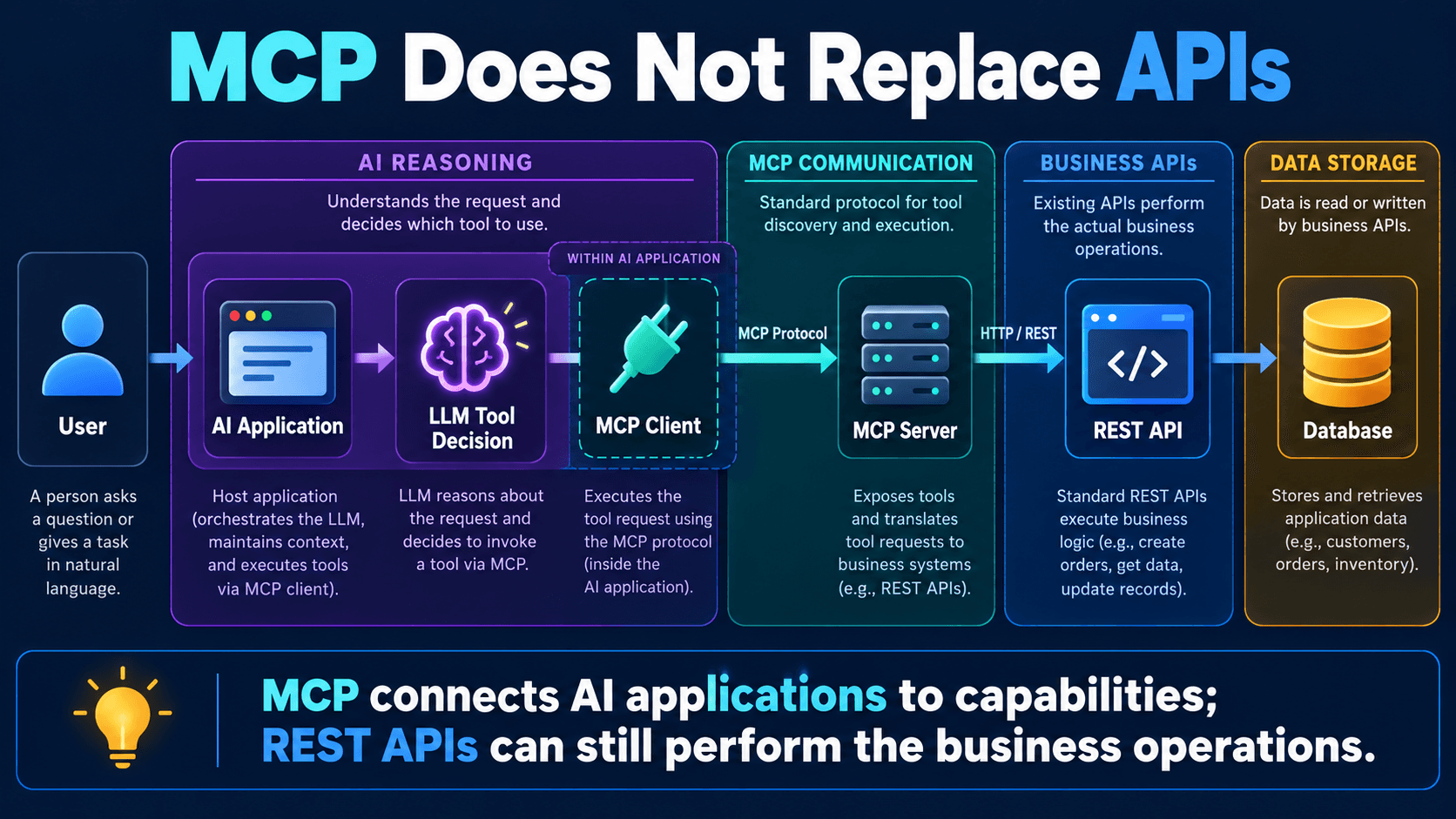
The picture shows three separate jobs:
- **LLM Tool Calling** decides which available operation the model wants.
- **MCP** standardizes how the AI app discovers and talks to outside capabilities.
- **REST API** provides the actual functionality, which an MCP Server may use internally.
They stack on top of each other. They don't compete.
### Why not just turn every endpoint into an MCP tool?
It's tempting. Don't. A business API and an AI-facing tool set are built for different purposes. Look at these:
GET /orders/{id}POST /orders/{id}/cancelPOST /orders/{id}/refundPATCH /orders/{id}/addressExpose all of them as-is and you've handed your AI app far more power than it needs. Refunds and address changes, triggered by a model's interpretation of a chat message? That's a bad day waiting to happen.
A better approach is a deliberately small interface:
getOrderStatus(orderId)getShippingInformation(orderId)Start read-only. Add sensitive operations later, once you've got proper permission checks and approval steps in place.
**The goal isn't to expose every backend endpoint to AI. It's to expose the right capabilities, safely.**
### When you don't need MCP
Say you have a small Spring Boot app with one model and one internal tool that nothing else will ever use. Just register the function directly with your AI framework. Adding MCP there is extra moving parts for no real gain.
MCP starts paying off when you need:
- Integrations that several AI apps can reuse.
- Standardized tool discovery.
- Connections to many outside systems.
- A clean split between AI orchestration and integration services.
- One common interface for tools, resources and prompts.
MCP is an architectural choice. It's not a box every AI project has to tick.
## 6. Local vs Remote MCP Servers
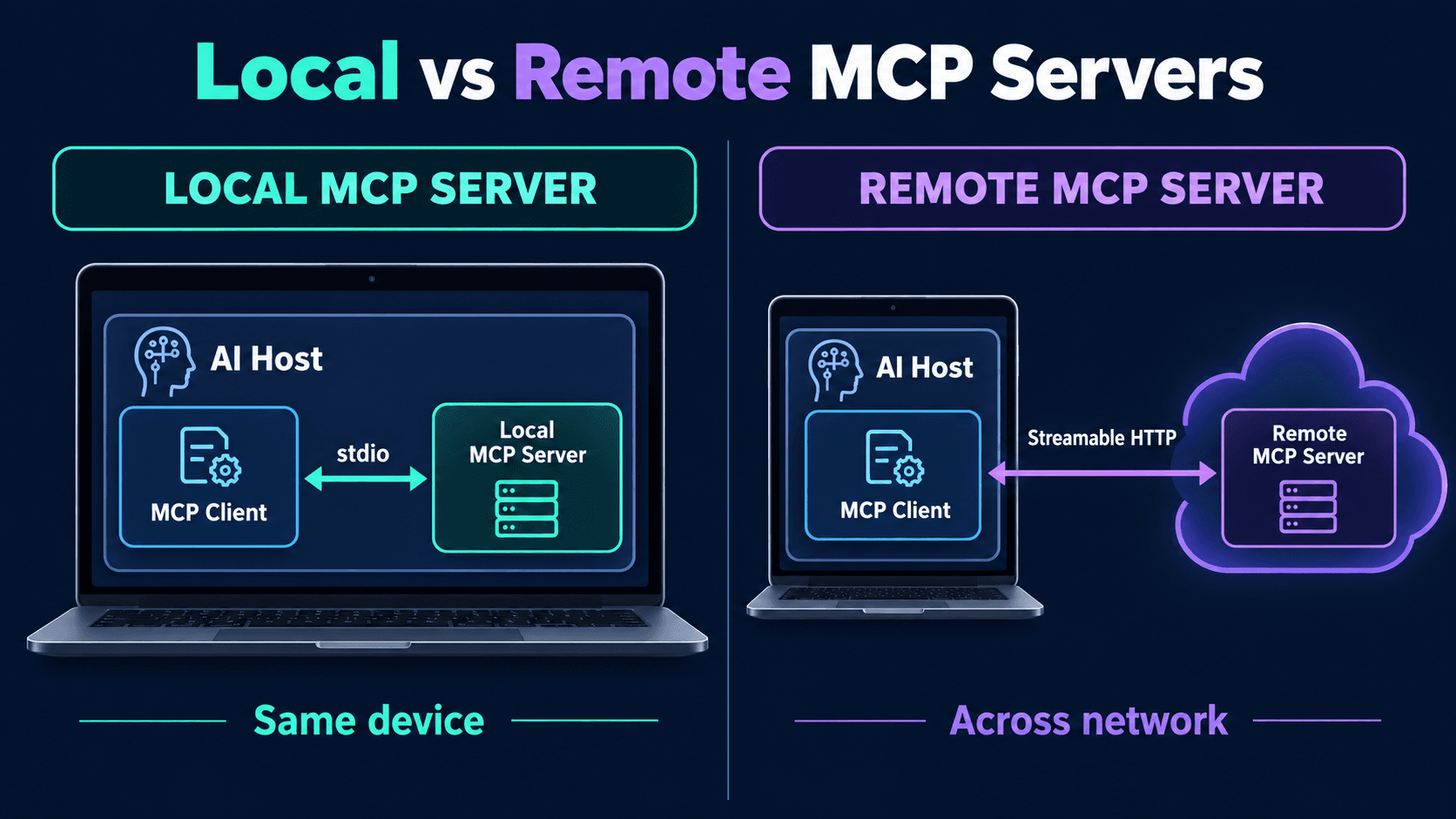
One last myth to clear up: an MCP Server doesn't have to live in the cloud. It can run right on your laptop, or on some other machine across the network. Both are normal.
### Local MCP Server
Say you're building a coding assistant that should read files in a project:
my-project/src/UserService.javaOrderService.javaPaymentService.javaYou write an MCP Server that exposes:
listJavaFiles()readJavaFile(path)searchCode(keyword)The server runs on your machine, your AI app connects to it, and it reads only the files it's been allowed to touch. The usual transport for this kind of setup is **stdio**.
### What's stdio?
Short for standard input and standard output, the two streams every program gets from the operating system. The MCP Host starts the server as a separate process, and the two exchange protocol messages through those streams:
AI Host↓ request through stdinLocal MCP Server↓ response through stdoutAI HostNo public HTTP endpoint, no open port. That makes it a natural fit for local dev tools and desktop integrations.
### Remote MCP Server
Now say you're building an assistant for an online marketplace. Customers use it from all kinds of devices, and your order service already runs on a remote server. It makes sense to put the MCP Server out there too:
AI Application↓MCP Client↓ NetworkRemote MCP Server↓Order ServiceThe current standard transport for remote MCP is **Streamable HTTP**. The client talks to the server over HTTP using the MCP protocol, so the server can run completely independently of the host.
### Which one should you pick?
Go local when:
- You need tightly controlled access to local files.
- You're building a desktop assistant.
- The integration works with local dev tools.
- You'd rather not expose a network service at all.
Go remote when:
- Several applications need the same service.
- The integration lives in a cloud environment.
- You want central deployment and monitoring.
- Your apps run on different machines.
Whichever you choose, security still matters. A local server shouldn't get free run of the whole filesystem just because it's "only on your laptop." A remote server needs to authenticate callers and check what each one is allowed to do.
## 7. So When Should You Actually Use MCP?
Theory is nice, but at some point you have to make a call. Let's make one.
You're building an AI assistant for an e-commerce platform. It needs product search, inventory checks, order tracking and customer-support info. You've got two realistic options.
### Option A: Direct Tool Calling
You build the tools straight into your AI app. This is a good fit when:
- Only one app will ever use them.
- The integration is small.
- The tools are tightly tied to that one app.
- You want the simplest thing that works.
### Option B: An MCP Server
You build a separate MCP Server that exposes your commerce capabilities. This starts to make sense when:
- Several AI apps need the same integrations.
- You want a standard interface that outside AI hosts can plug into.
- You want to manage integrations separately from the AI app itself.
- You expect the number of connected systems to keep growing.
One commerce MCP Server could then serve a shopping assistant, a support assistant and an internal ops assistant at the same time. Each of them should still get only the tools and permissions it actually needs, of course.
### The question to ask first
Before reaching for MCP, ask yourself: **what problem am I actually trying to solve?**
If the honest answer is "I need one AI app to call one Java method," direct Tool Calling is probably enough. If the answer is "I need to share capabilities across several MCP-compatible apps," that's exactly where an MCP Server earns its keep.
Standards are worth it when many systems need to talk to each other the same way. When it's just two, they're often overhead.
## Final Thoughts
We started with one small question: "Where is my order #1024?"
The model understood it perfectly and still couldn't answer, because it had no way to reach the order. Tool Calling fixed that by letting the model ask for an operation. Then a bigger problem showed up: wiring many AI apps to many outside systems means writing the same integrations again and again. MCP tackles part of that by giving everyone one common protocol to speak.
Here's the short version:
- The **MCP Host** runs the AI application.
- The **MCP Client** handles communication with MCP Servers.
- The **MCP Server** exposes tools, resources and prompts.
- **Tool Calling** is how the model asks for an operation.
- **REST APIs** keep doing the business work behind MCP Servers.
- **Local and remote servers** use different transports but follow the same protocol.
If there's one sentence to take away, it's this: **MCP doesn't make an LLM smarter. It gives AI applications a standard way to connect models to the tools and information they need.**
As AI systems get more tangled up with real software, those boundaries matter more and more. But good architecture still starts with understanding the problem in front of you. Sometimes plain Tool Calling is all you need. Sometimes MCP gives you exactly the structure you were missing. Which one fits depends on how complex your system is, how sensitive the operations are, and where you expect it to go next.
---
Follow My Content
If you enjoy content about Java, backend engineering, concurrency, computer architecture, and system design, you can follow my work on:
- Instagram:@the.code.architect
- Medium:medium.com/@sarvar55mszde
- LinkedIn: Follow me here for technical discussions, software engineering lessons, and new articles from this series.
**Further reading:**
- [Model Context Protocol — Official Documentation](https://modelcontextprotocol.io/)
- [MCP Specification](https://modelcontextprotocol.io/specification/)
Comments (0)
Loading comments...