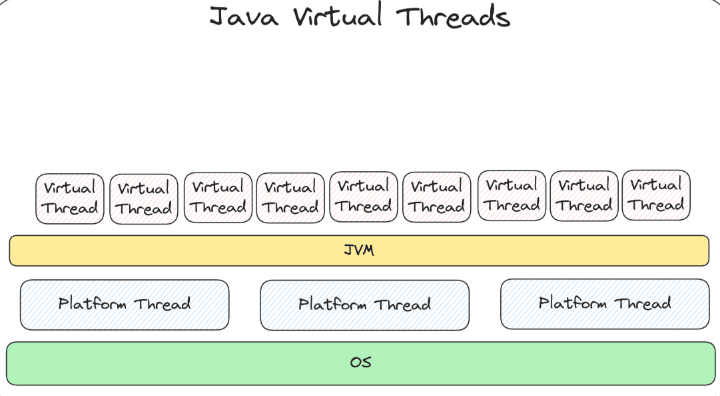
Virtual Threads in Java: How Java Handles Millions of Concurrent Tasks
Virtual Threads in Java: How Java Handles Millions of Concurrent Tasks
Imagine your backend receives 10,000 requests at almost the same moment. Each request authenticates the user, queries PostgreSQL, reads from Redis, calls a payment provider, and finally returns a response.
Here is the interesting part: for most of that time, the request is not doing any real work. It is waiting — for the database, for an HTTP response, for a network packet.
In a traditional Java application, every one of those waiting requests holds on to an operating-system thread. We end up using an expensive resource to represent tasks that spend most of their life doing nothing.
Virtual threads were created to solve exactly this problem. They became a permanent feature in Java 21 (JEP 444), and they let you keep the simple, familiar "one thread per request" style of code while handling a far larger number of concurrent tasks.
Key takeaways
- A virtual thread is still a regular
java.lang.Thread, but it is managed by the JVM instead of being tied to one OS thread. - When a virtual thread waits on I/O, the JVM frees the underlying OS thread so it can run other work.
- Virtual threads improve throughput and scalability, not the speed of individual operations.
- They shine in I/O-heavy applications and offer little benefit for CPU-heavy work.
- Don't pool virtual threads — create one per task, and limit access to scarce resources (like database connections) separately.
1. The Life of a Java Thread: Thread States
Before comparing platform threads and virtual threads, it helps to know the states a thread moves through. Every Java thread, platform or virtual, is always in one of six states, defined in the Thread.State enum:
State
What it means
NEW
The thread has been created but start() has not been called yet.
RUNNABLE
The thread is running, or is ready to run and waiting for a CPU.
BLOCKED
The thread is waiting to acquire a monitor lock (for example, to enter a synchronized block held by another thread).
WAITING
The thread is waiting with no time limit for another thread to act, for example via join(), wait() or LockSupport.park().
TIMED_WAITING
The thread is waiting, but only for a limited time, for example via Thread.sleep(1000) or join(500).
TERMINATED
The thread has finished running.
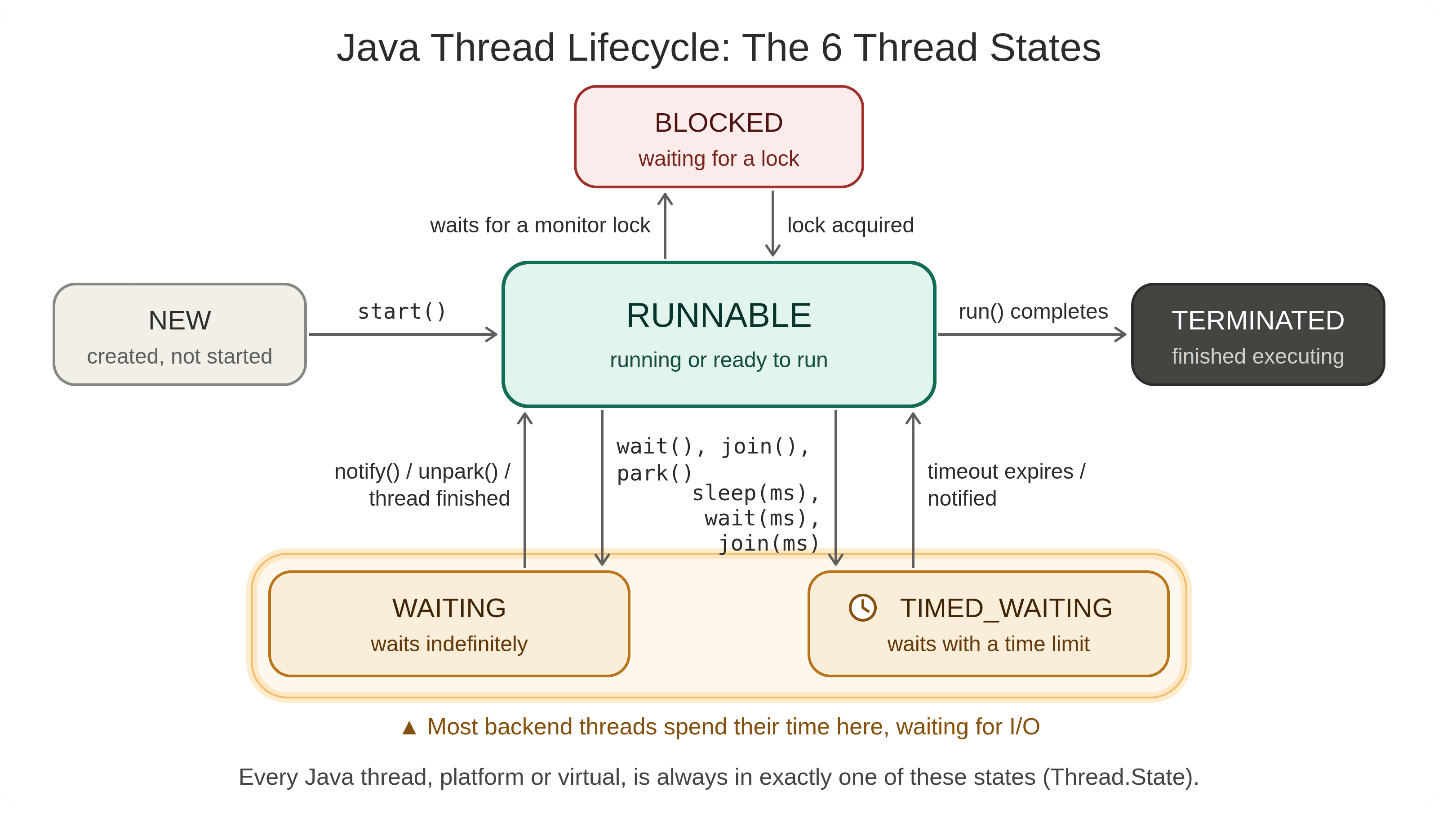
You can check a thread's state at any time:
Thread thread = new Thread(() -> {
try {
Thread.sleep(1000);
} catch (InterruptedException e) {
Thread.currentThread().interrupt();
}
});
System.out.println(thread.getState()); // NEW
thread.start();
Thread.sleep(100);
System.out.println(thread.getState()); // TIMED_WAITING
thread.join();
System.out.println(thread.getState()); // TERMINATED
Keep WAITING and TIMED_WAITING in mind. In a typical backend, threads spend most of their lives in these waiting states, and that wasted waiting time is what virtual threads are designed to reduce.
2. OS Threads, Platform Threads and CPU Cores
Three layers work together whenever Java code runs:
- CPU core: the hardware that executes instructions. One core runs one thread at any given instant.
- OS thread: a thread created and scheduled by the operating system (Linux, Windows, macOS).
- Platform thread: a Java
Threadobject that wraps exactly one OS thread.
The relationship between them looks like this:
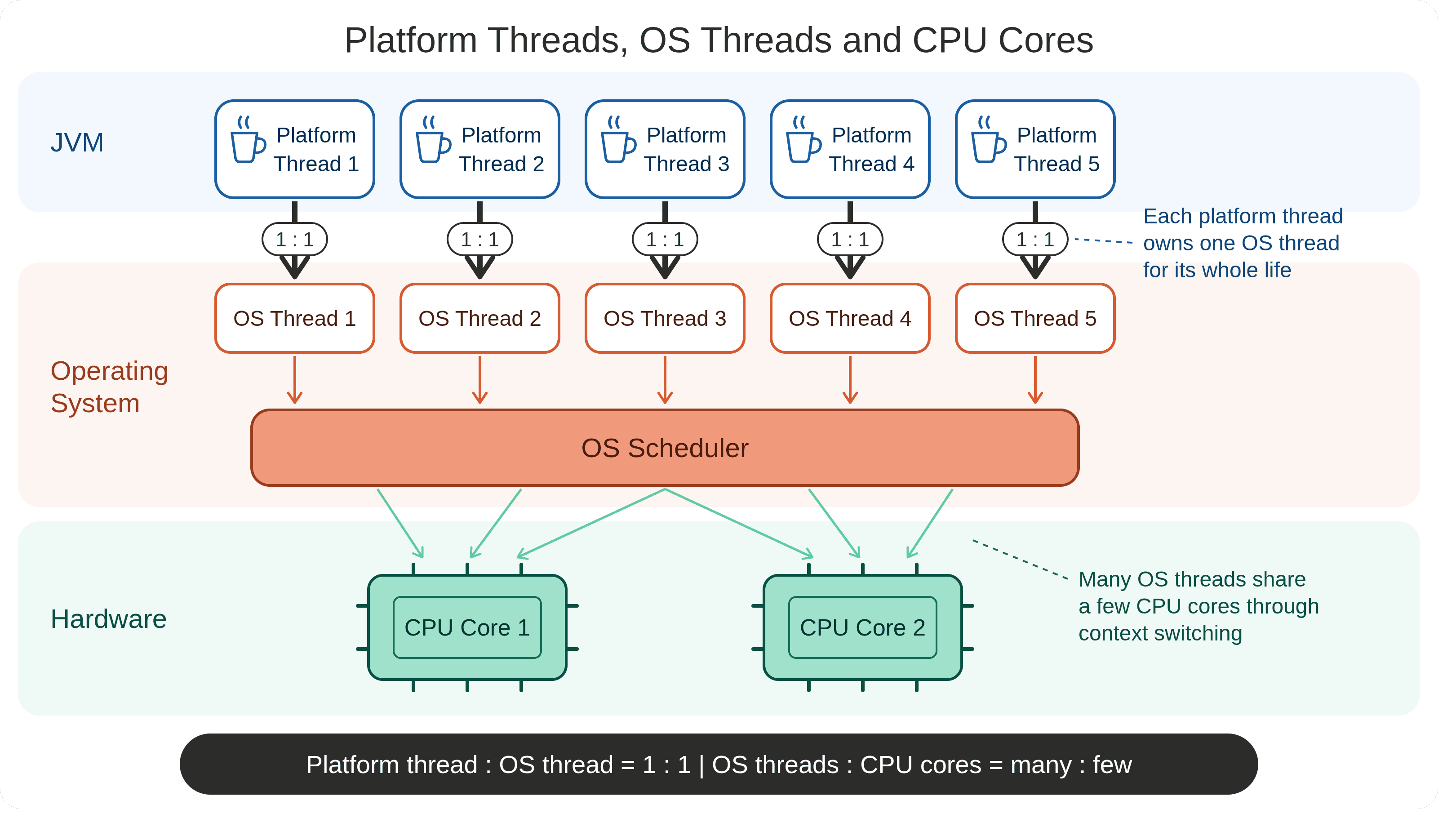
Two points matter here:
- Platform thread ↔ OS thread is one-to-one. Each platform thread owns one OS thread for its entire life. Creating 1,000 platform threads means creating 1,000 OS threads.
- OS thread ↔ CPU core is NOT one-to-one. There are usually far more threads than cores. The OS scheduler switches between threads very quickly (context switching), so many threads share a few cores.
A waiting platform thread uses no CPU, but it still holds its OS thread and that thread's memory. With thousands of threads, this cost adds up. The next sections explain why that becomes a problem, and how virtual threads solve it.
3. Start with the Traditional Thread
Here is a normal Java thread:
Thread thread = new Thread(() -> {
System.out.println("Hello");
});
thread.start();
Historically, every Java Thread has been a platform thread. A platform thread is a thin wrapper around an operating-system thread, and it keeps that OS thread for its entire lifetime.
Java Application
│
▼
Java Thread ──────► OS Thread ──────► CPU core
(1 : 1 for the thread's whole life)
The operating system schedules these threads onto CPU cores and maintains resources for each one, including a native stack and scheduling state. That makes platform threads relatively heavy, so an application can only create a limited number of them.
Rule of thumb: one Java platform thread ≈ one OS thread.
4. Why Platform Threads Struggle With Massive Concurrency
Consider a typical request:
Receive request
│
Query database → wait ~50 ms
│
Call another service → wait ~100 ms
│
Return response
The thread spends most of its lifetime waiting. In code, that waiting looks like this:
Thread.sleep(100); // explicit waiting
database.query(...); // waiting for the database
httpClient.send(...); // waiting for the network
inputStream.read(...); // waiting for data
During these calls, no useful CPU work is happening — yet the OS thread stays occupied.
This leads to an important distinction:
Concurrency is not the same thing as CPU usage.
A server may have thousands of requests in progress while only a handful are actually using the CPU at any given moment. What the application needs is lots of concurrent tasks, not lots of OS threads.
5. What Is a Virtual Thread?
A virtual thread is still a Java Thread. This is the most important thing to understand. It is not a new programming model — all the familiar APIs still work:
Thread.currentThread();
Thread.sleep(...);
thread.join();
What changes is the implementation underneath. A virtual thread is managed by the JVM and is not permanently attached to an OS thread. Instead, many virtual threads share a small number of platform threads:
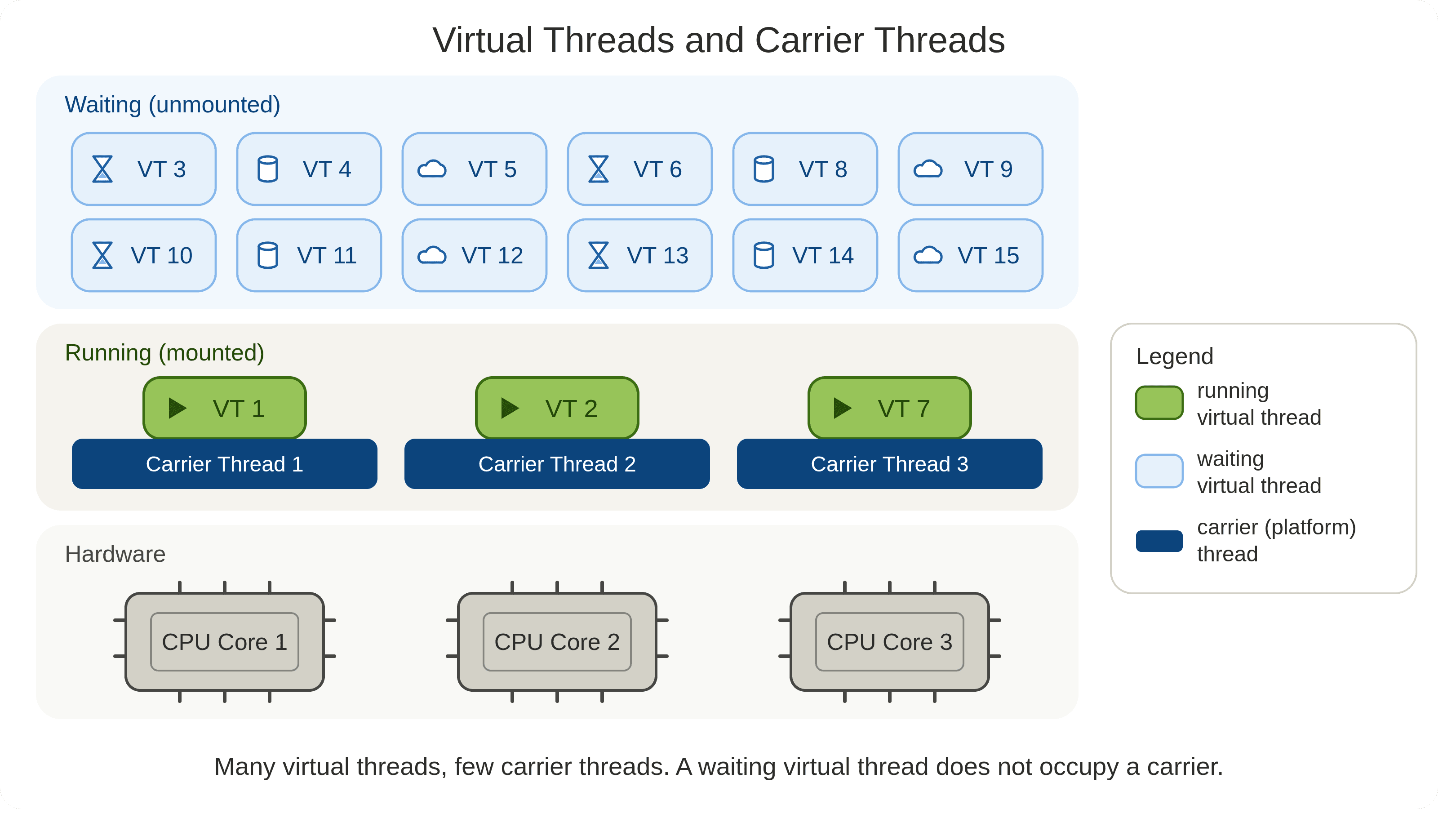
The platform thread that runs a virtual thread at a given moment is called its carrier. A virtual thread is mounted on a carrier while it runs, and unmounted when it waits — freeing the carrier to run another virtual thread.
6. What Happens When a Virtual Thread Waits?
Let's start a virtual thread:
Thread.startVirtualThread(() -> {
System.out.println("Hello from a virtual thread");
});
The JVM's scheduler places it on a carrier thread, and it runs normally:
Virtual Thread ──► JVM Scheduler ──► Carrier Thread ──► CPU
Now suppose the code makes a blocking call:
String result = database.query();
Instead of keeping the OS thread busy while the database responds, the JVM suspends the virtual thread and hands the carrier to someone else:
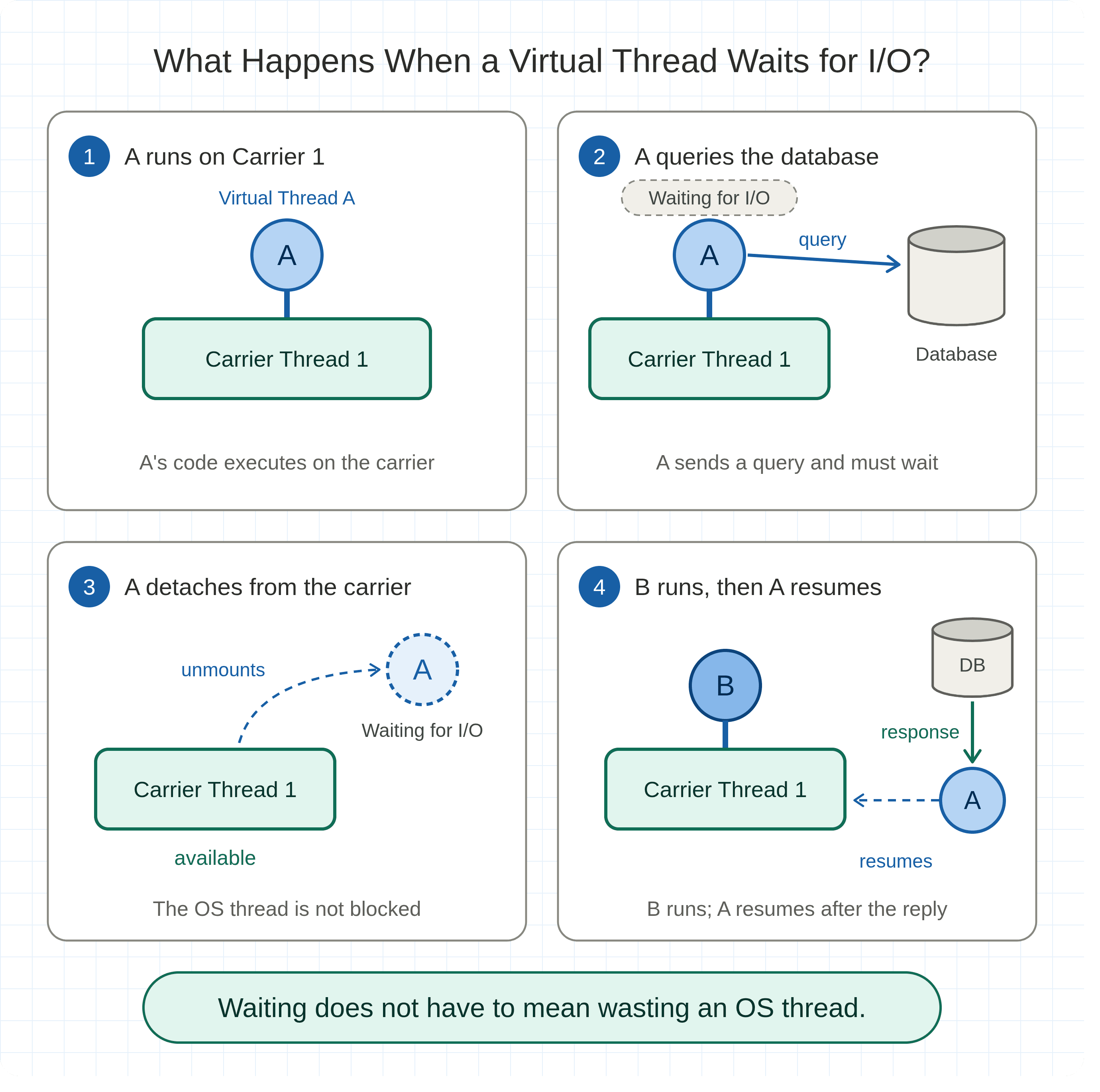
1. Virtual Thread A is running on Carrier 1
2. A calls the database and starts waiting
3. A is unmounted — Carrier 1 is now free
4. Virtual Thread B runs on Carrier 1
5. The database responds — A is scheduled to run again
Waiting no longer means wasting an OS thread. That is the core idea behind virtual threads.
7. Creating Your First Virtual Thread
The simplest options:
// Option 1: builder API
Thread thread = Thread.ofVirtual().start(() -> {
System.out.println("Running in a virtual thread");
});
thread.join();
// Option 2: shortcut
Thread.startVirtualThread(() -> {
System.out.println("Hello");
});
You can check whether the current thread is virtual:
System.out.println(Thread.currentThread().isVirtual()); // true
These APIs are available from Java 21 onward.
8. Creating Thousands of Virtual Threads
Here we start 10,000 virtual threads, each waiting for one second:
public class Main {
public static void main(String[] args) throws Exception {
for (int i = 0; i < 10_000; i++) {
Thread.startVirtualThread(() -> {
try {
Thread.sleep(1000);
System.out.println(Thread.currentThread().threadId());
} catch (InterruptedException e) {
Thread.currentThread().interrupt();
}
});
}
Thread.sleep(2000); // give the virtual threads time to finish
}
}
The number itself isn't the point. The point is that virtual threads are cheap enough to create in very large numbers — a single JVM can run millions of them for the right workload.
This removes an old assumption:
"I have 10,000 tasks, so I need 10,000 OS threads."
You don't. You need 10,000 concurrent tasks, and virtual threads let you represent each one as a thread without paying for an OS thread per task.
9. Virtual Threads Are Not Faster Threads
This is the most common misunderstanding.
Virtual threads do not make code run faster. This loop takes exactly as long on a virtual thread as on a platform thread:
long result = 0;
for (long i = 0; i < 10_000_000_000L; i++) {
result += i;
}
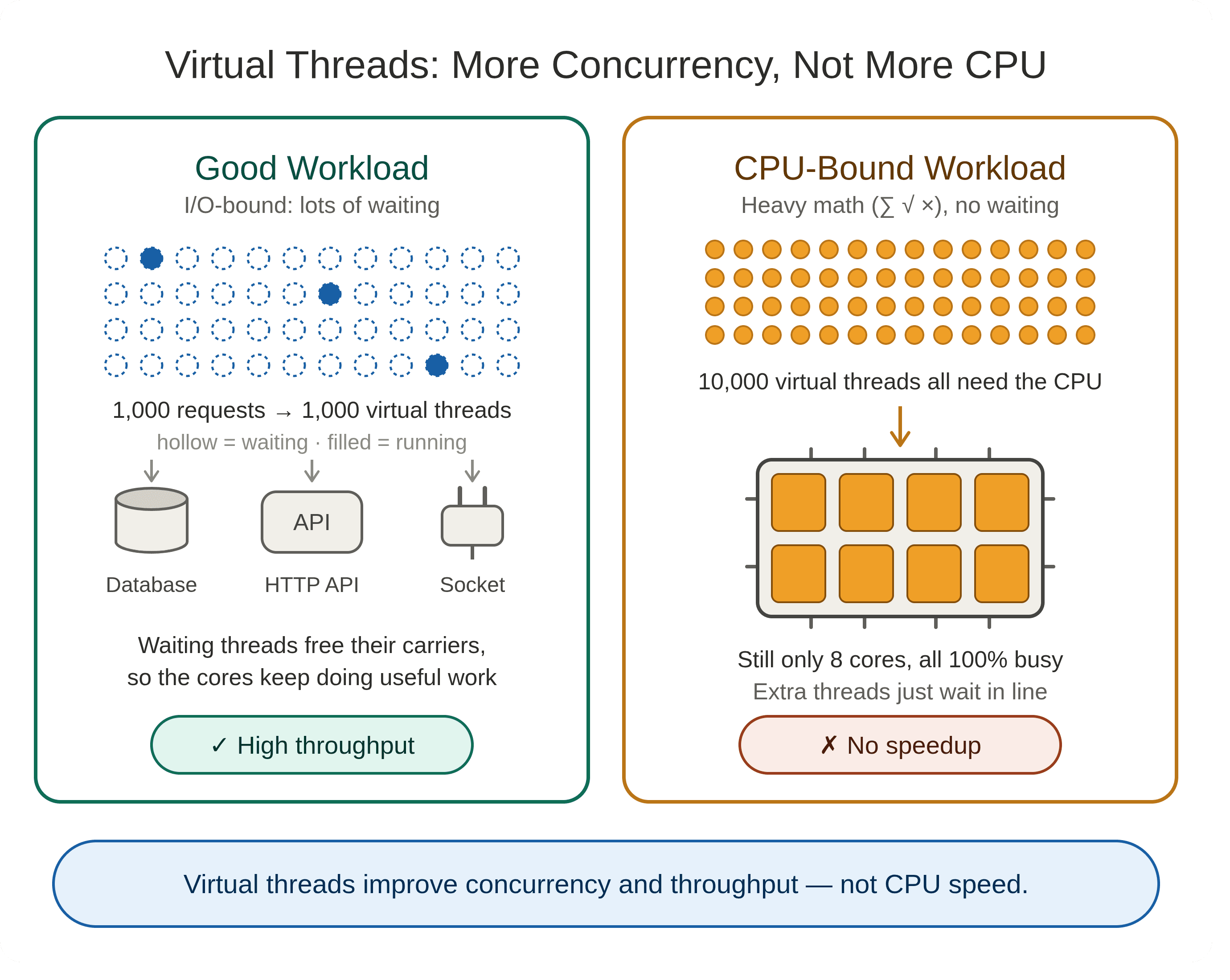
It is pure CPU work. If your machine has 8 cores, a million virtual threads still share those same 8 cores.
As Oracle's documentation puts it, virtual threads are meant to improve scale and throughput, not the latency of individual operations.
Virtual threads ──► more tasks waiting efficiently ──► higher throughput ✅
Virtual threads ──► faster CPU ❌
10. The Ideal Use Case: I/O-Heavy Backends
Take a typical request to a Spring Boot service:
GET /orders/123
Controller → Authentication → PostgreSQL → Redis → Payment Service → Response
There is very little computation — most of the time is spent waiting. That is exactly where virtual threads help.
Instead of restructuring everything into asynchronous callbacks because threads are expensive, you can keep plain, readable code:
public OrderResponse getOrder(Long id) {
Order order = orderRepository.findById(id).orElseThrow();
Payment payment = paymentClient.getPayment(id);
return new OrderResponse(order, payment);
}
When this code blocks on the database or the payment client, the virtual thread waits without holding on to a carrier thread. You keep the simple thread-per-request model while supporting much higher concurrency.
11. Before Virtual Threads: Thread Pools
Because platform threads are expensive, backends traditionally reused a fixed number of them:
ExecutorService executor = Executors.newFixedThreadPool(100);
executor.submit(() -> processOrder());
Thread Pool (100 threads)
┌─────────┬─────────┬─────────┐
Thread 1 Thread 2 Thread 3 ...
│ │ │
Request Request Request
This protects the system, but it creates a ceiling. If all 100 threads are stuck waiting on slow database queries, the next 500 requests have to queue — even though the CPU is mostly idle.
Virtual threads change the economics:
Thread pool
Virtual threads
Threads for 500 requests
100 platform threads, 400 requests queued
500 virtual threads
OS threads used
100
A few carriers (by default, about one per CPU core)
Blocked request holds an OS thread?
Yes
No (in most cases)
12. The New Approach: One Virtual Thread per Task
Java provides an executor built for this:
try (ExecutorService executor = Executors.newVirtualThreadPerTaskExecutor()) {
for (int i = 0; i < 10_000; i++) {
executor.submit(() -> {
try {
Thread.sleep(1000);
System.out.println("Task completed");
} catch (InterruptedException e) {
Thread.currentThread().interrupt();
}
});
}
} // close() waits for all submitted tasks to finish
Notice the name: per task. You don't keep a pool of virtual threads and recycle them. Each task gets its own brand-new virtual thread, which ends when the task ends.
Platform threads → pool them
Virtual threads → create one per task
13. Real Example: Calling Multiple Services in Parallel
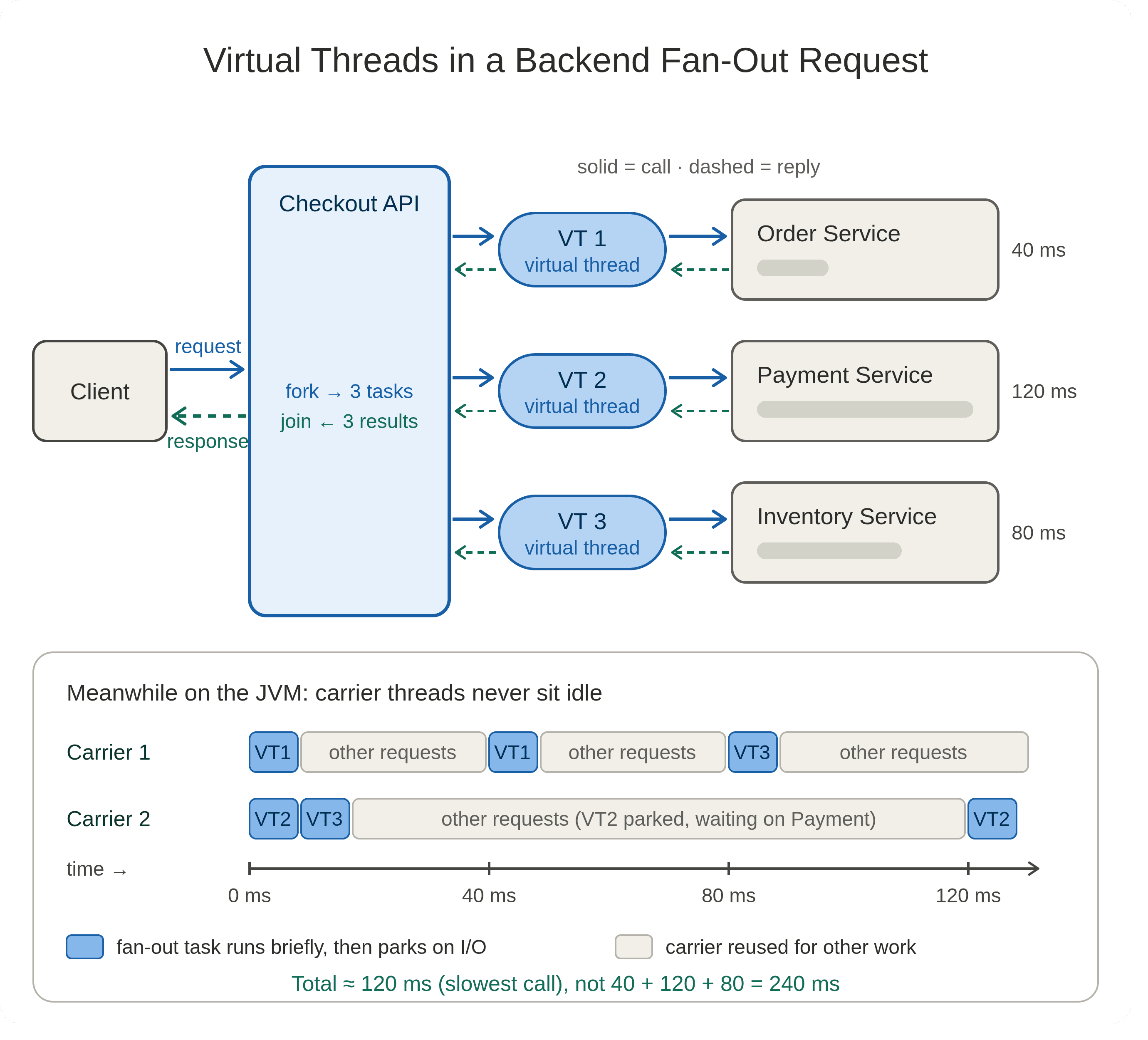
A checkout endpoint needs data from three independent services:
GET /checkout/123
Calling them one after another wastes time. With virtual threads, we can call them concurrently:
try (ExecutorService executor = Executors.newVirtualThreadPerTaskExecutor()) {
Future<Order> order = executor.submit(() -> getOrder(123));
Future<Payment> payment = executor.submit(() -> getPayment(123));
Future<Inventory> inventory = executor.submit(() -> getInventory(123));
CheckoutResponse response = new CheckoutResponse(
order.get(),
payment.get(),
inventory.get()
);
}
┌──► Order Service
│
Client ──► Checkout ──┼──► Payment Service
│
└──► Inventory Service
This pattern is called fan-out. Each call runs on its own virtual thread, and all three wait for the network at the same time — a perfect fit for virtual threads.
14. Watch Out: Virtual Threads Don't Remove Resource Limits
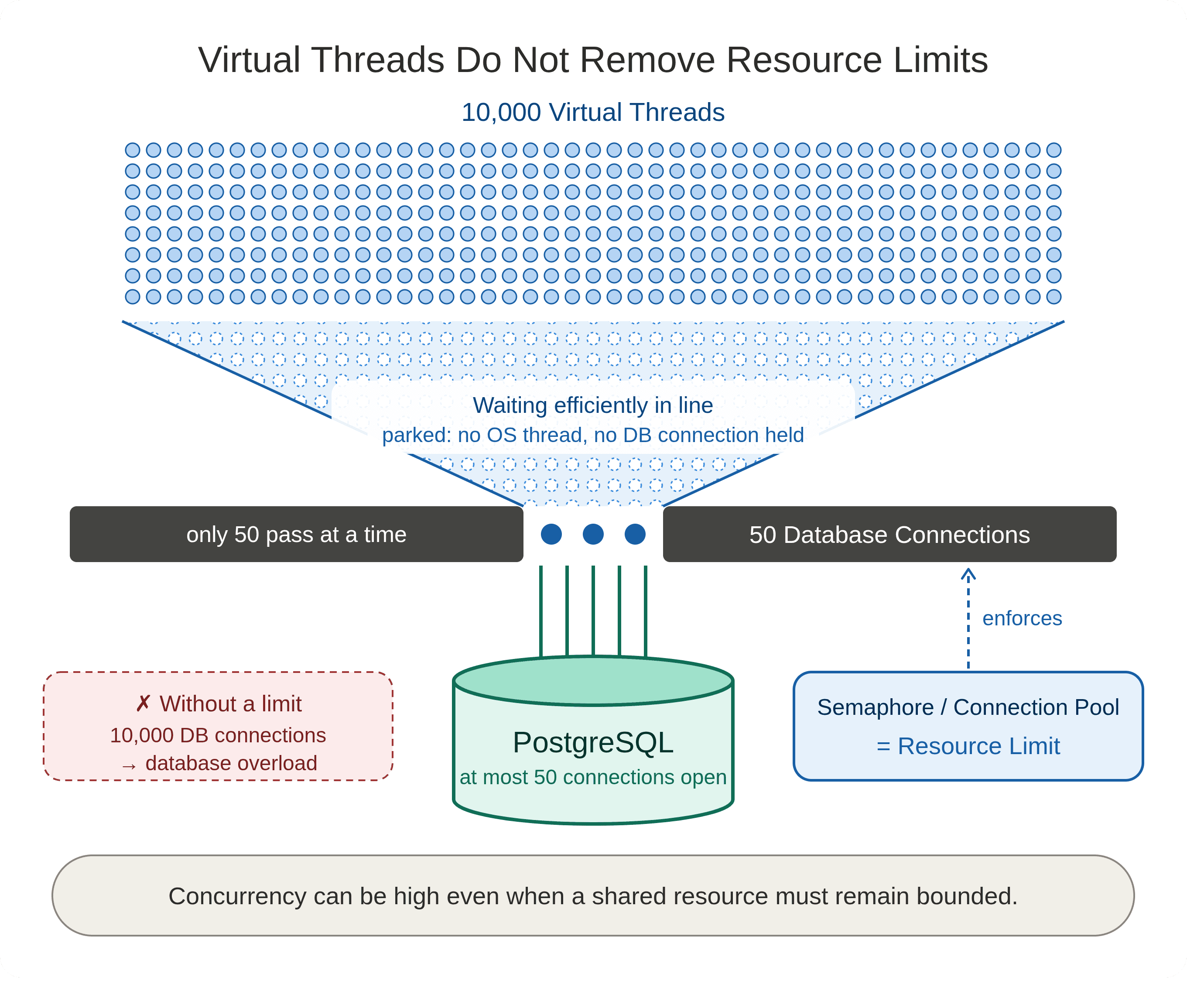
Virtual threads let you run 10,000 concurrent tasks. That does not mean your database can accept 10,000 connections.
If your PostgreSQL connection pool has 50 connections and 10,000 virtual threads all need the database, the connection pool becomes the bottleneck. That's expected: virtual threads remove one scalability limit, not all of them.
To protect a limited resource, Oracle recommends using tools like a semaphore rather than a small thread pool:
private final Semaphore dbPermits = new Semaphore(50);
void queryDatabase() throws InterruptedException {
dbPermits.acquire();
try {
database.query();
} finally {
dbPermits.release();
}
}
Thousands of virtual threads can exist, but only 50 enter this section at a time. The rest wait cheaply.
Use virtual threads for concurrency. Use resource limits for resource protection.
15. What About CPU-Bound Work?
If a task looks like this, virtual threads won't help much:
for (int i = 0; i < 1_000_000_000; i++) {
calculateSomething();
}
The right question isn't "Can I use virtual threads?" but:
"What does this task spend most of its time doing?"
Mostly waiting on…
Mostly computing…
Network, database, files, sockets, other services
Math, parsing, compression, image processing
✅ Virtual threads are a strong fit
❌ Virtual threads won't fix CPU scarcity
For CPU-heavy work, a platform-thread pool sized to your core count (or ForkJoinPool / parallel streams) remains the better tool.
16. Virtual Threads vs. CompletableFuture
Do virtual threads replace CompletableFuture? Not exactly — they solve different problems.
CompletableFutureis a tool for composing asynchronous computations.- Virtual threads are a cheap way to represent concurrent tasks.
For I/O-heavy flows, asynchronous chains can quickly become hard to read:
CompletableFuture
.supplyAsync(...)
.thenCompose(...)
.thenApply(...)
.thenAccept(...);
With virtual threads, the same logic can be written as plain sequential code:
Order order = getOrder();
Payment payment = getPayment();
Inventory inventory = getInventory();
return buildResponse(order, payment, inventory);
And when some steps are independent, you can run them concurrently (as in section 13) while still using ordinary blocking APIs. Oracle's guidance for adopting virtual threads recommends exactly this: simple synchronous code with blocking I/O, rather than mixing blocking code into asynchronous frameworks unnecessarily.
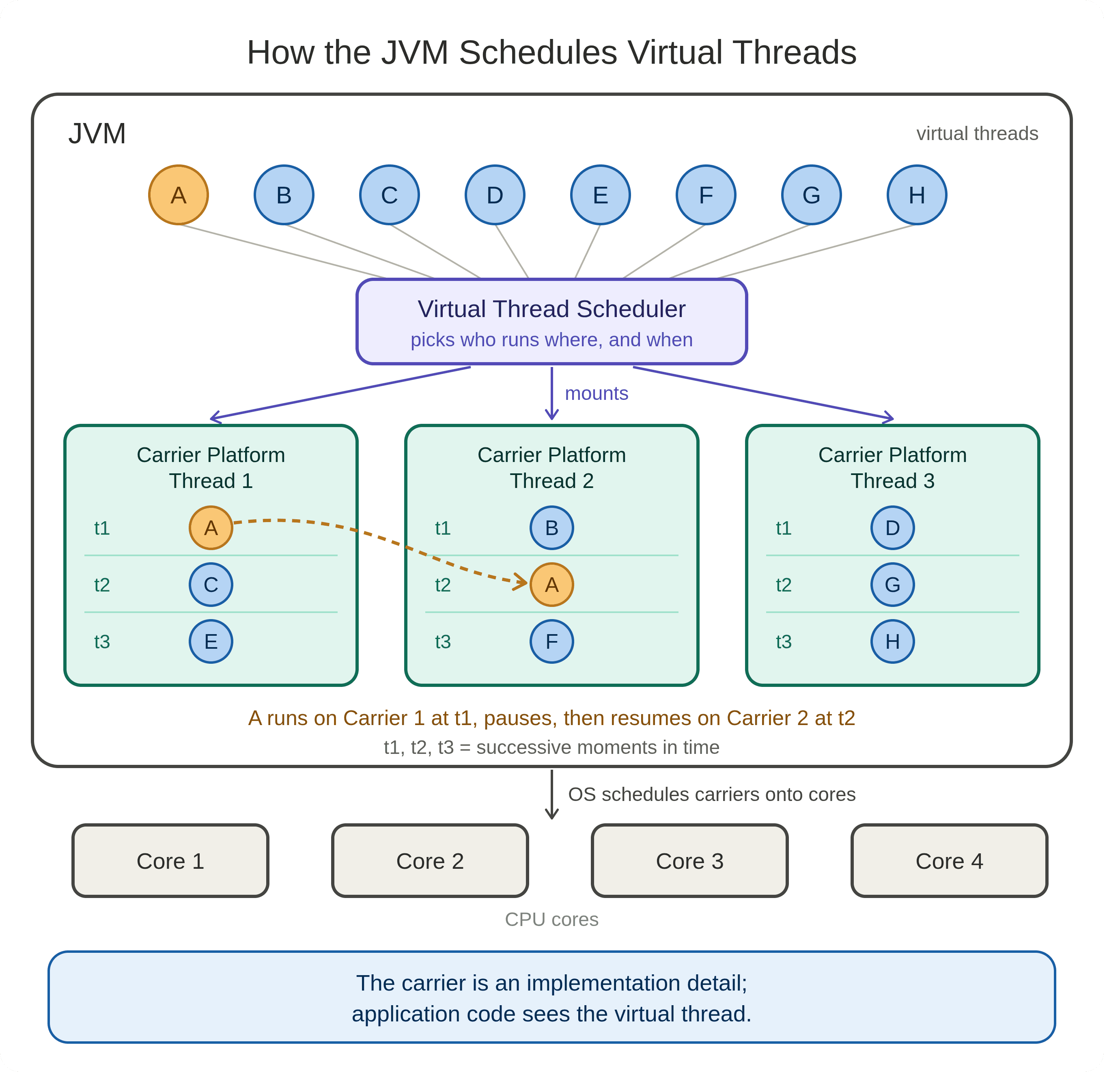
17. How the JVM Schedules Virtual Threads
The JVM has its own scheduler for virtual threads. It takes runnable virtual threads and assigns them to a small set of carrier threads:
A virtual thread is not tied to a specific carrier — it can run on Carrier 1 now and Carrier 2 later. From your code's point of view, the carrier is invisible: Thread.currentThread() always returns the virtual thread itself, never its carrier.
18. Mounting and Unmounting
You'll often hear two terms:
- Mounted — the virtual thread is currently running on a carrier.
- Unmounted — the virtual thread is waiting, and its carrier is free for other work.
Running → MOUNTED on a carrier
Waiting → UNMOUNTED (carrier is released)
Resumed → MOUNTED again (possibly on a different carrier)
This happens automatically. You never call mount() or unmount() — you write ordinary Java, and the JVM handles the rest.
19. Observing and Debugging Virtual Threads
Virtual threads work with standard JDK tooling.
To produce a thread dump that includes virtual threads:
jcmd <pid> Thread.dump_to_file -format=json threads.json
JDK Flight Recorder (JFR) also records events related to virtual threads, which is very useful for diagnosing performance issues in production.
Running millions of tasks is only valuable if you can see what they're doing, so it's worth getting familiar with these tools.
20. A Complete Example
Let's bring it all together. This program simulates three external API calls with different response times:
import java.util.concurrent.*;
public class VirtualThreadExample {
static String getUser() throws InterruptedException {
Thread.sleep(1000);
return "User data";
}
static String getOrders() throws InterruptedException {
Thread.sleep(1500);
return "Orders data";
}
static String getPayments() throws InterruptedException {
Thread.sleep(800);
return "Payments data";
}
public static void main(String[] args) throws Exception {
try (ExecutorService executor = Executors.newVirtualThreadPerTaskExecutor()) {
Future<String> user = executor.submit(VirtualThreadExample::getUser);
Future<String> orders = executor.submit(VirtualThreadExample::getOrders);
Future<String> payments = executor.submit(VirtualThreadExample::getPayments);
System.out.println(user.get());
System.out.println(orders.get());
System.out.println(payments.get());
}
}
}
All three calls wait at the same time:
Time ─────────────────────────────────────────►
User: [──── 1000 ms ────]
Orders: [────── 1500 ms ──────]
Payments: [── 800 ms ──]
Total ≈ 1500 ms (the longest call), not 3300 ms (the sum)
The APIs don't respond any faster. What changes is that your application can keep many independent tasks in progress without dedicating an OS thread to each one while it waits.
21. An Analogy: The Restaurant
Picture a restaurant with 10 waiters and 100 tables.
In the old model, each waiter is assigned to one table and stands beside it until the meal is over — even while the kitchen spends 20 minutes preparing the food.
In a smarter restaurant, the waiter takes the order, then goes to serve other tables while the kitchen works. When the food is ready, any available waiter brings it out.
Restaurant
Java
A table's meal (the job to get done)
A task / virtual thread
Waiter
Carrier platform thread
Kitchen
Database, HTTP service, disk
A waiting task doesn't need to occupy a worker. In short:
Task ≠ OS thread
That is the conceptual shift virtual threads bring to Java.
22. Should You Always Use Virtual Threads?
No. They are a tool, not a universal replacement.
Great fit when you have:
- Many concurrent tasks
- Tasks that spend a lot of time waiting
- Blocking I/O: REST APIs, database calls, HTTP clients, file and network operations, microservice calls
Poor fit when:
- The workload is mainly CPU-intensive computation
And even in an I/O-heavy system, you still need to respect real limits: database connection pools, API rate limits, memory, sockets, file descriptors, and CPU. Virtual threads make concurrency easier to express — they don't remove the physical limits of your infrastructure.
23. Common Mistake: Pooling Virtual Threads
A natural instinct is to put virtual threads into a fixed-size pool, the same way we always did with platform threads. That defeats the purpose.
Virtual threads are cheap and short-lived by design. The JDK documentation recommends creating a new one for every task:
✅ One task → one new virtual thread → task finishes → thread ends
❌ A pool of virtual threads reused forever
If your real goal is to limit concurrency, use a semaphore (see section 14), not a pool.
24. The Big Mental Shift
Before virtual threads:
Threads are expensive, so:
• limit threads
• pool threads
• avoid blocking
• use asynchronous APIs
With virtual threads:
Threads are cheap, so:
• give every task its own virtual thread
• let blocking calls block
• limit only the resources that actually need limiting
This is a much more natural way to write highly concurrent applications — which is why virtual threads are more than a performance feature. They change how we think about concurrency in Java.
The key idea is not "virtual threads make Java threads faster."
It is:
Virtual threads make it cheap to represent a very large number of concurrent tasks.
Once that clicks, most of the design around virtual threads makes sense.
Follow My Content
If you enjoy content about Java, backend engineering, concurrency, computer architecture, and system design, you can follow my work on:
- Instagram: @the.code.architect
- Medium: medium.com/@sarvar55mszde
- LinkedIn: Follow me here for technical discussions, software engineering lessons, and new articles from this series.
References
Comments (0)
Loading comments...