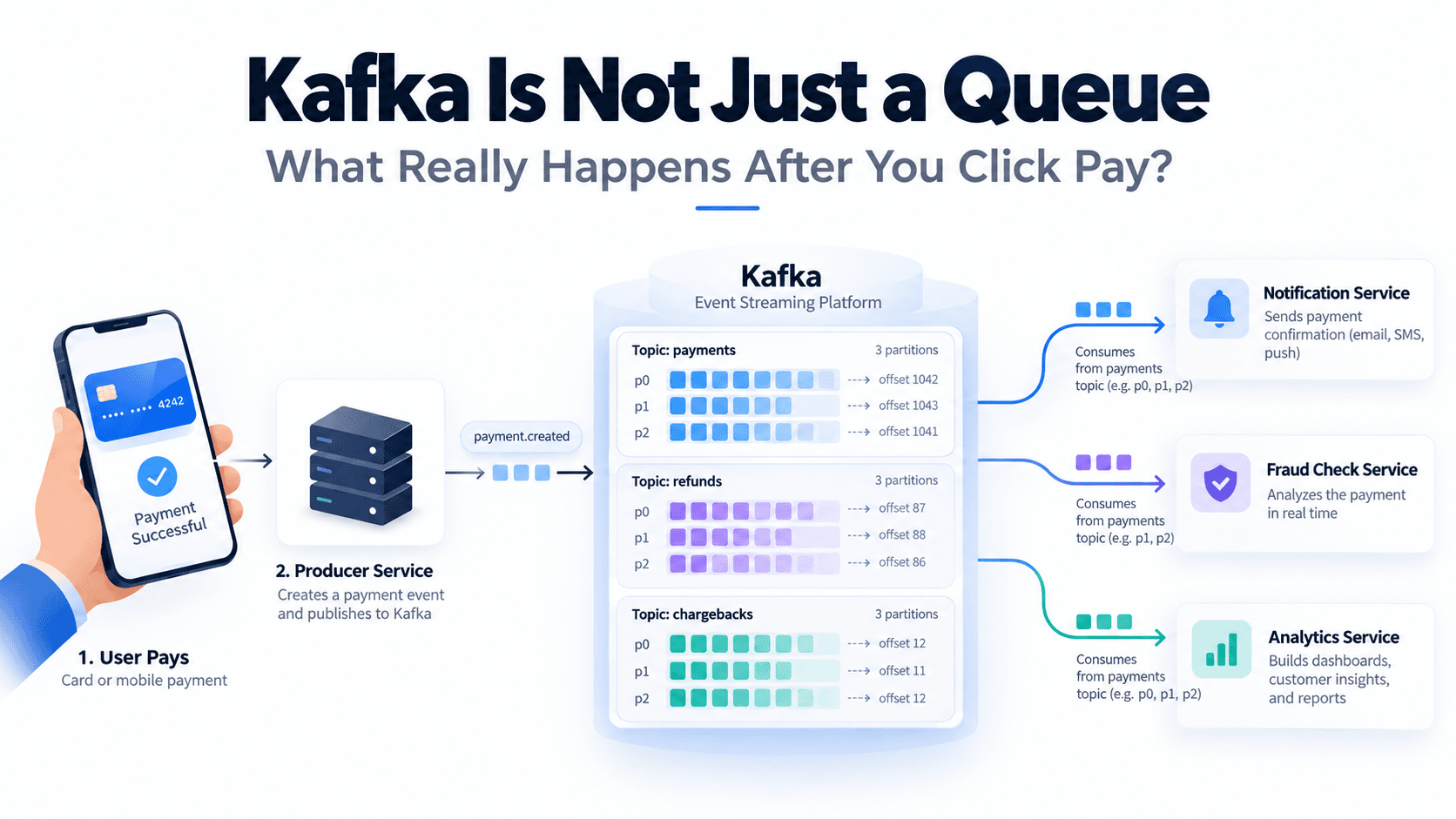
Kafka Is Not Just a Queue: What Really Happens After You Click Pay?
Imagine opening your banking application and transferring $200 to a friend. You click the Pay button, wait for a second, and see a message: "Payment successful."
A few moments later, you receive a notification confirming the transaction. Meanwhile, your bank's fraud detection system is analyzing the payment, and another system is updating financial reports.
Have you ever wondered how all these operations happen after a single button click?
At first, it might seem simple. The application receives your request, processes the payment, and sends a few HTTP requests to other services. But what happens when one of those services is unavailable? What if thousands of customers make payments at the same time? What if a system crashes while processing an event?
These are some of the problems that event-driven architectures try to solve, and Apache Kafka is one of the technologies used to build them.
However, Kafka is much more than a tool for sending messages between applications. To understand why it is powerful, we need to look at what happens behind the scenes.
1. The Problem: One Payment, Multiple Services
Let's imagine we are developing a banking application using Java and Spring Boot.
Our Payment Service is responsible for processing payment requests. Once a payment succeeds, several other services need to know about it. The Notification Service must inform the customer, the Fraud Detection Service may perform additional monitoring, and the Analytics Service needs to record information for reports.
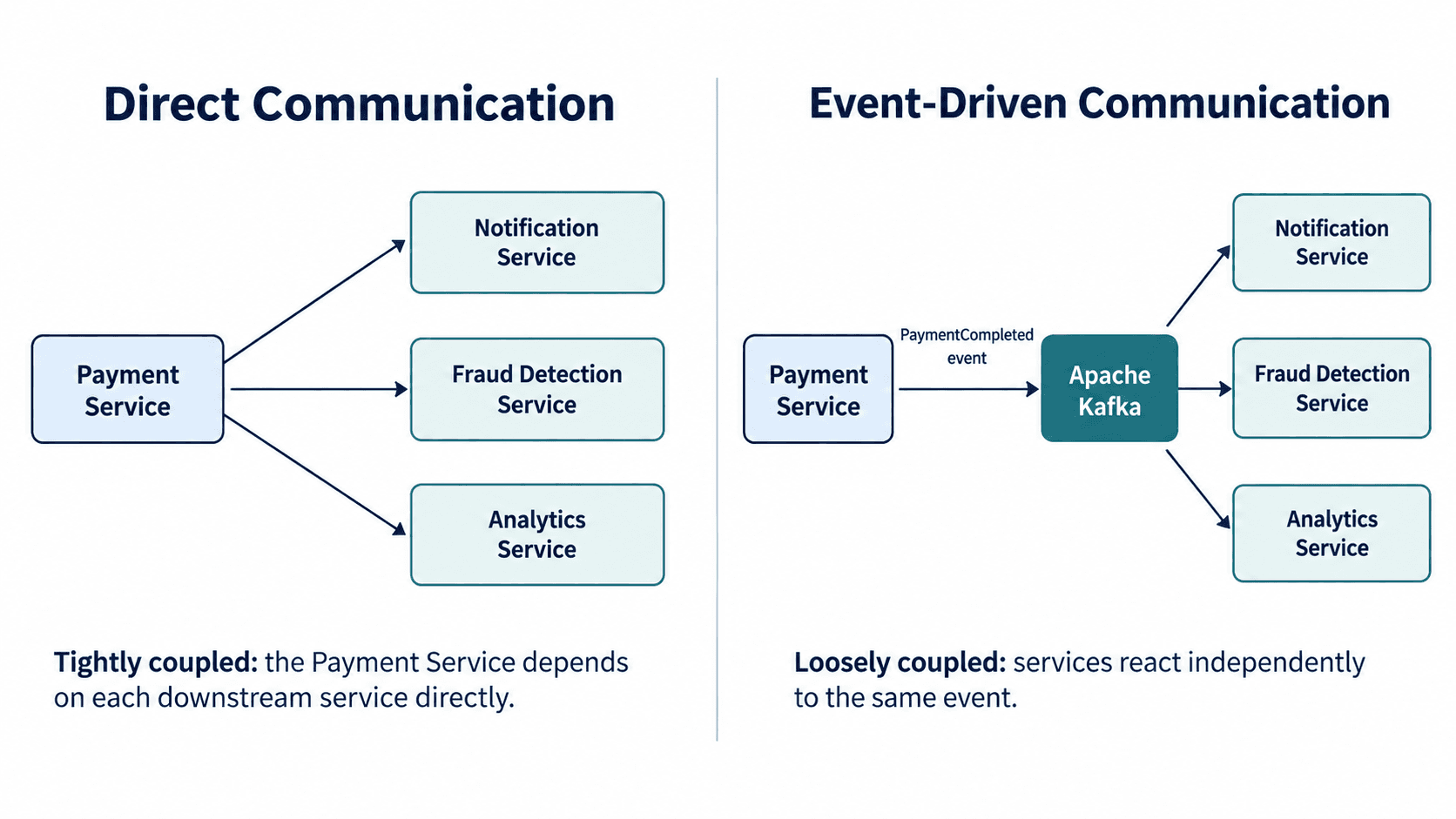
One possible solution is synchronous communication using REST APIs. After completing the payment, our Payment Service calls each service directly.
public void processPayment(PaymentRequest request) { Payment payment = paymentService.transfer(request); notificationClient.send(payment); fraudClient.analyze(payment); analyticsClient.record(payment); }This approach can work, especially in smaller applications. However, it introduces dependencies between services. If the Notification Service responds slowly, our request may take longer to complete. If one of the downstream services is unavailable, we must decide whether to retry, ignore the failure, or interrupt the workflow.
As our application grows, coordinating these interactions becomes more complicated.
Now imagine a different approach. Instead of communicating with every service directly, the Payment Service publishes an event indicating that a payment has been completed.
{ "eventId": "evt-1001", "paymentId": "pay-501", "type": "PAYMENT_COMPLETED", "amount": 200, "currency": "USD" }The Payment Service publishes this event to Kafka, and other services independently consume it.
The Notification Service can send a confirmation, the Fraud Detection Service can analyze the event, and the Analytics Service can update its reports. They don't need to know about one another.
This is one of Kafka's main advantages: it helps us decouple services by allowing them to communicate through events rather than direct dependencies.
Of course, Kafka does not remove every challenge. We still need to handle failures, duplicate events, and data consistency. And Kafka itself does not perform the money transfer or guarantee that the payment happens exactly once.
2. What Exactly Is Apache Kafka?
Apache Kafka is a distributed event-streaming platform that allows applications to publish, store, and consume streams of events.
That definition may sound complicated, so let's simplify it.
Think of Kafka as a system where applications can write events, and other applications can read those events whenever they are ready, as long as the events are still retained.
But there is an important detail: Kafka doesn't normally remove an event just because one consumer has read it. Unlike the traditional mental model of a queue where a message disappears after consumption, Kafka keeps records according to retention policies.
This means multiple independent applications can read the same records, and a consumer can even replay previously processed events.
To understand the architecture, we need to learn five important concepts: Producer, Consumer, Topic, Broker, and Cluster.
A Producer is an application that publishes records to Kafka. In our banking example, the Payment Service acts as a producer when it publishes a PaymentCompleted event.
A Consumer is an application that reads records from Kafka. Our Notification Service is a consumer because it reads payment events and sends notifications.
A Topic is a named stream of records. For example, we could create a topic named payments to store payment-related events.
A Broker is a Kafka server responsible for storing and serving event data. When our producer sends a record, a broker receives and stores it in the appropriate partition.
A Cluster is a group of Kafka servers working together. Kafka distributes partitions between brokers and can replicate data to support availability and fault tolerance.
These components form the foundation of Kafka. But there is another concept that makes Kafka particularly interesting: partitions.
3. Partitions: How Kafka Organizes Data
Imagine our banking application processes one million payment events every day. Storing every record in a single sequence might limit how much work we can distribute across servers and consumers.
Kafka addresses this using partitions.
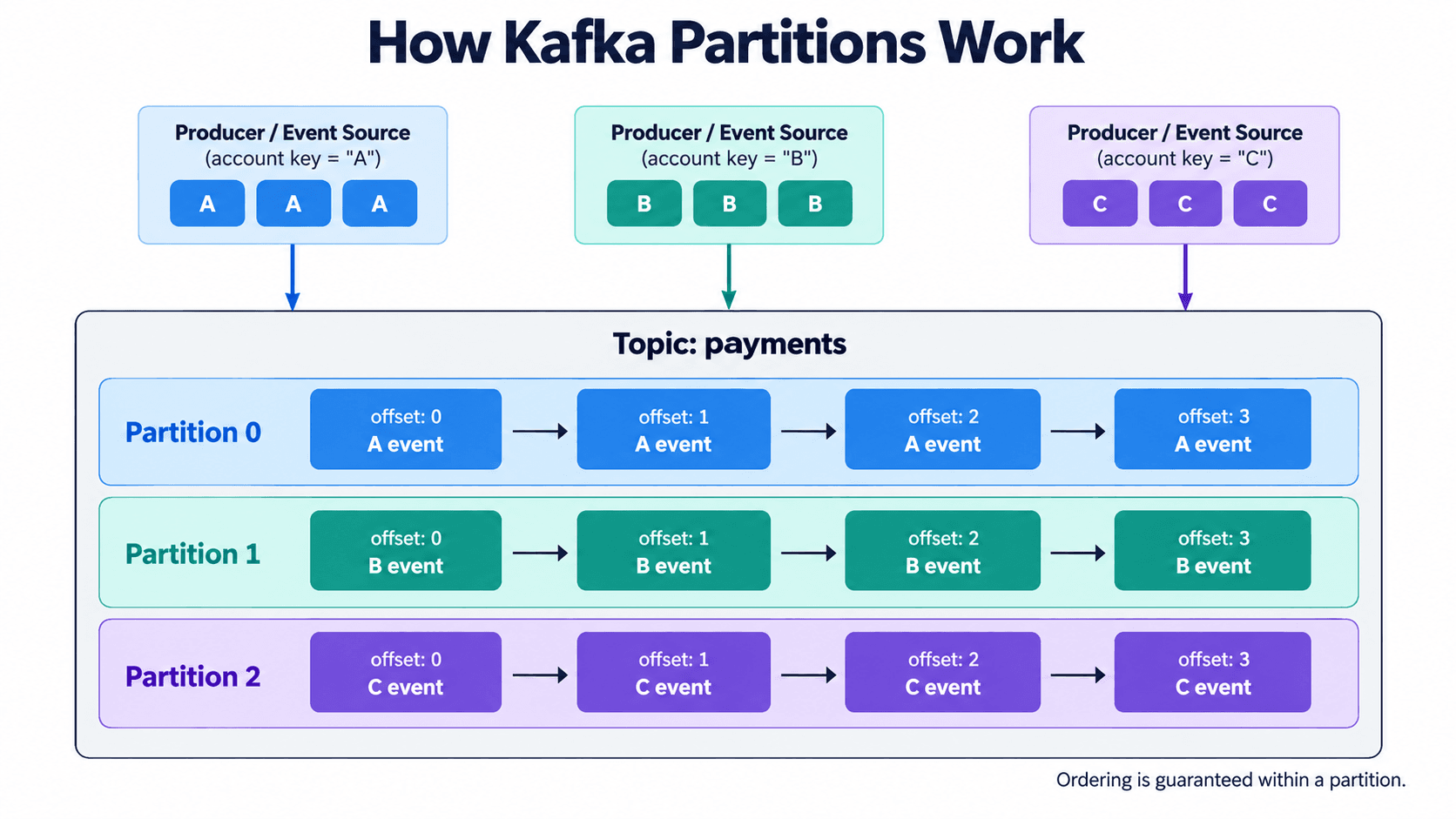
A topic consists of one or more partitions, and each partition is an append-only ordered log. When records arrive, Kafka appends them to the appropriate partition.
For example, our payments topic could contain three partitions:
Topic: payments Partition 0: [Event A] [Event B] [Event C] Partition 1: [Event D] [Event E] [Event F] Partition 2: [Event G] [Event H] [Event I]
Each partition maintains its own sequence of records. This allows different partitions to be distributed across brokers and consumed in parallel.
But how does Kafka decide which partition receives a record?
One common approach is to use a message key.
For example, if we use accountId as the key, Kafka's partitioning strategy can consistently place events for the same account in the same partition. This is useful because Kafka preserves the order of records within a partition.
Suppose Account A generates three events: PaymentCreated, PaymentApproved, and PaymentCompleted. If these events are written to the same partition in that order, consumers can read them in that order.
However, there is an important limitation: Kafka guarantees record ordering within a partition, not across an entire topic. Also, changing the number of partitions or the partitioning strategy can affect where future records for a key are placed.
For financial applications, choosing the right message key is an architectural decision, not just a technical detail.
4. Offsets: How Does Kafka Know Where a Record Is?
Every record inside a Kafka partition has an identifier called an offset.
An offset represents the record's position in its partition. As records are appended, Kafka assigns increasing offsets.
For example:
payments / partition-0 Offset 0 → PaymentCreated Offset 1 → PaymentApproved Offset 2 → PaymentCompleted Offset 3 → PaymentRefunded
Remember that offsets are local to each partition. Partition 0 can have offset 2, and Partition 1 can also have offset 2. They refer to completely different records.
Now imagine our Notification Service has processed several records successfully. How does it know where to continue after restarting?
Kafka consumers can commit offsets to track their progress.
The committed offset generally represents the next record a consumer group should read after resuming. For example, if a consumer group commits offset 3, it indicates that offset 3 is the next position to consume.
This is similar to placing a bookmark inside a book.
But there is something interesting here. Committing an offset does not delete records from Kafka. Kafka uses retention policies to determine how long records remain available.
Because of this, several consumer groups can read the same topic independently.
5. Consumer Groups: How Kafka Distributes Work
Suppose our Notification Service receives thousands of payment events every second. One consumer instance might not have enough processing capacity.
We can solve this by running multiple consumers inside a consumer group.
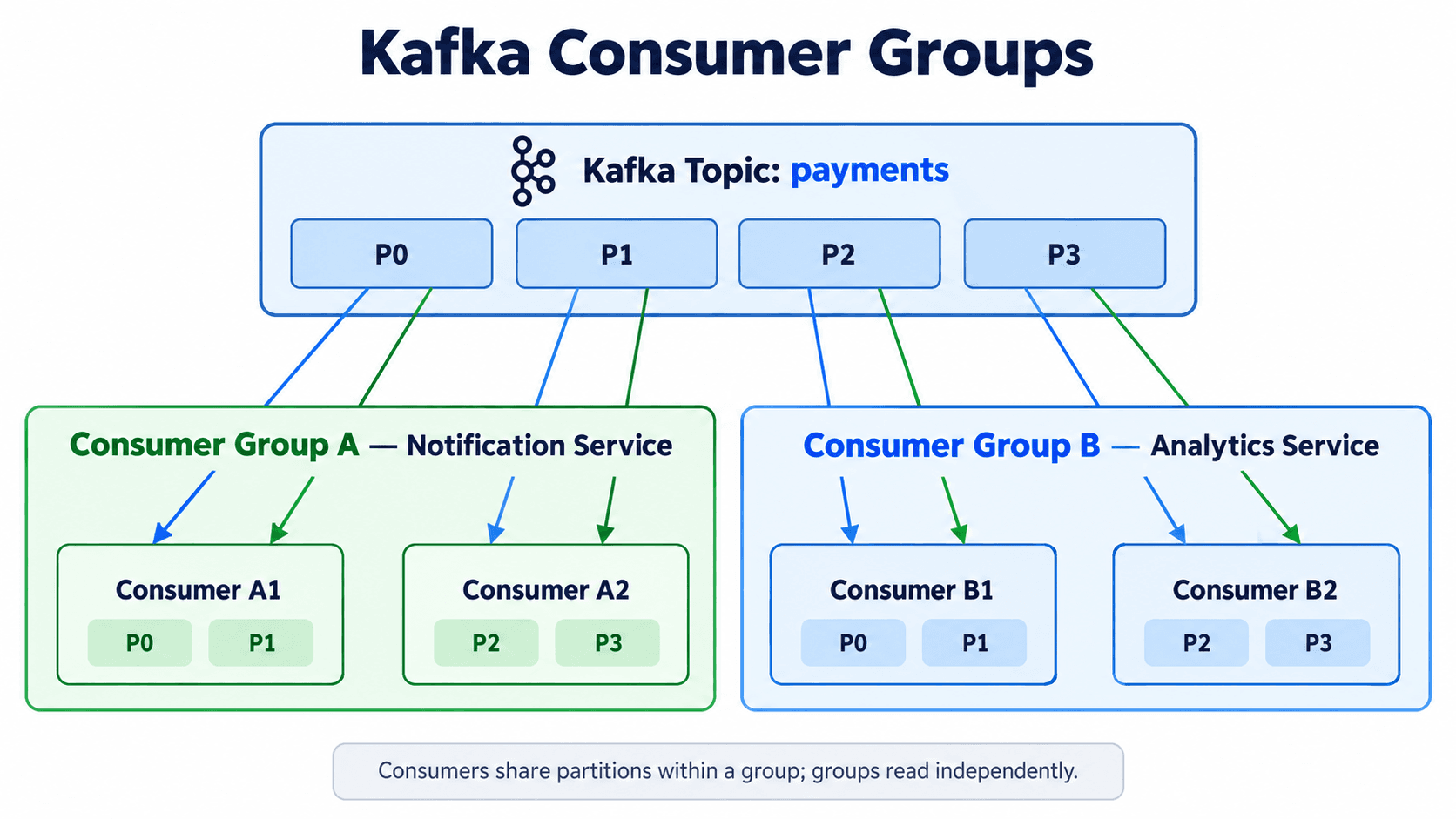
A consumer group is a collection of consumer instances that cooperate to process assigned topic partitions.
Imagine the payments topic has four partitions and our notification consumer group has two consumers. Kafka can assign Partition 0 and Partition 1 to Consumer A, while Partition 2 and Partition 3 are assigned to Consumer B.
Both consumers now process different partitions in parallel.
In the usual Kafka consumer-group model, each partition is assigned to one consumer within that group at a time. This also explains why simply adding more consumers does not always increase parallelism. If a topic has three partitions and five consumers in one group, some consumers will be idle.
Different consumer groups, however, have independent positions. The notification group and the analytics group can both consume the same event without interfering with each other.
This is one reason Kafka works well for event-driven systems with many independently deployed applications.
6. What Happens When Kafka Writes a Message to Disk?
Until now, we have discussed Kafka from an application perspective. We know that producers publish records, brokers store them, and consumers read them.
But where exactly does Kafka store these records?
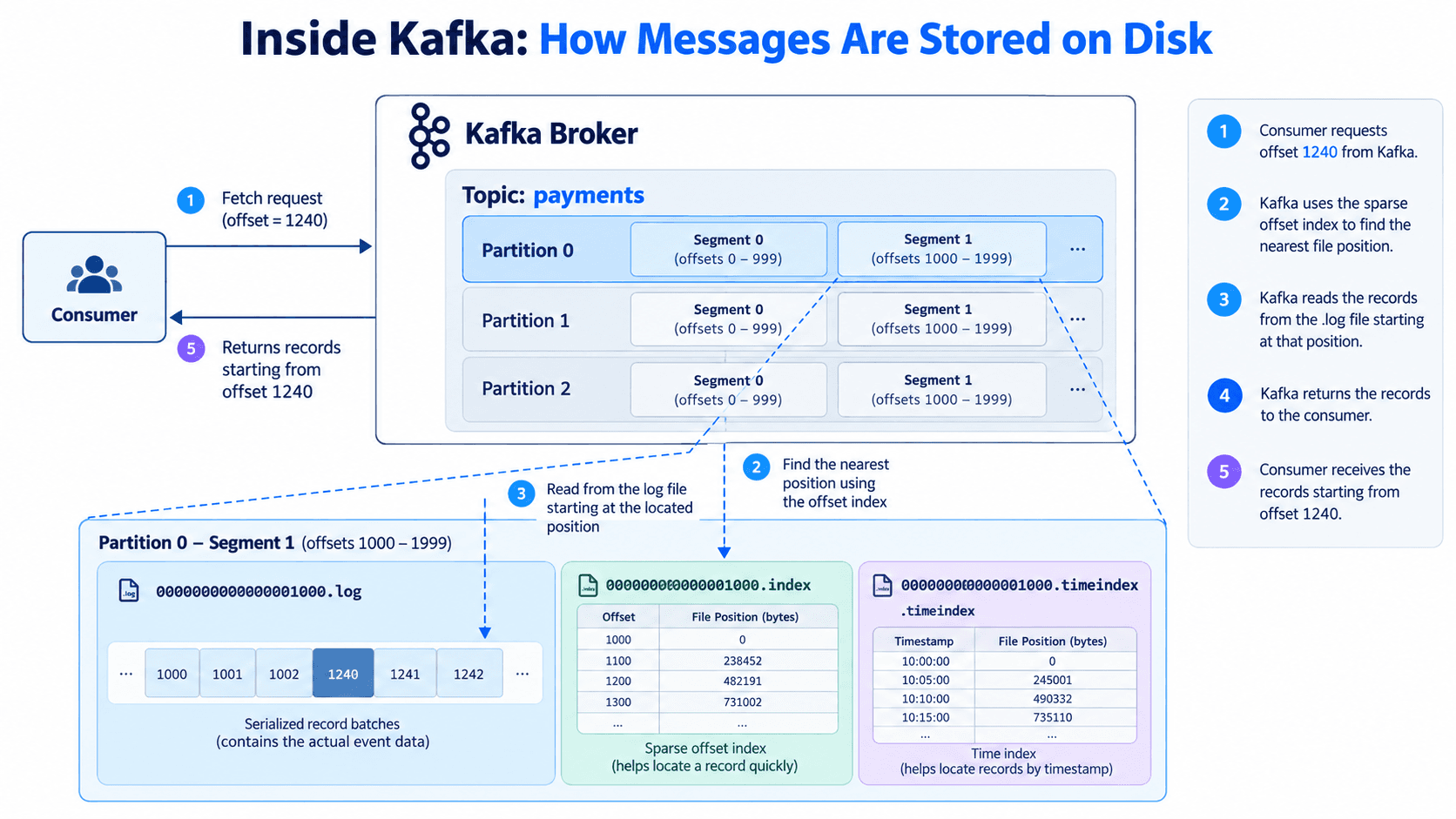
Kafka uses an append-only log structure on disk. Each topic partition has its own log, and that log is divided into smaller units called segments.
You can think of a segment as one part of a much larger sequence of records.
Instead of keeping an entire partition's history in one enormous file, Kafka organizes the log into segment files. A simplified Kafka storage directory might look like this:
kafka-data/ payments-0/ 00000000000000000000.log 00000000000000000000.index 00000000000000000000.timeindex 00000000000000001000.log 00000000000000001000.index 00000000000000001000.timeindex payments-1/ 00000000000000000000.log 00000000000000000000.index 00000000000000000000.timeindex
This example is simplified; real Kafka directories also contain additional metadata and checkpoint files.
The .log file stores serialized record batches, including the event data. The .index file is a sparse offset index that helps Kafka locate positions inside the log, while the .timeindex file helps locate records based on timestamps.
Imagine a consumer requests a record near offset 1,240. Kafka can identify the relevant segment and use the sparse offset index to find a nearby byte position. It then scans forward in the log to locate the requested record.
Why is this useful? Because Kafka doesn't need to search every record from the beginning of the partition whenever a consumer requests data.
Segments also make retention management easier. Old eligible log segments can be removed according to the configured policies instead of rewriting one enormous file.
This design is one of the important reasons Kafka can efficiently store and serve large streams of events.
7. Pull vs Push: Why Doesn't Kafka Send Messages Directly to Consumers?
One of Kafka's interesting design decisions is its consumer communication model.
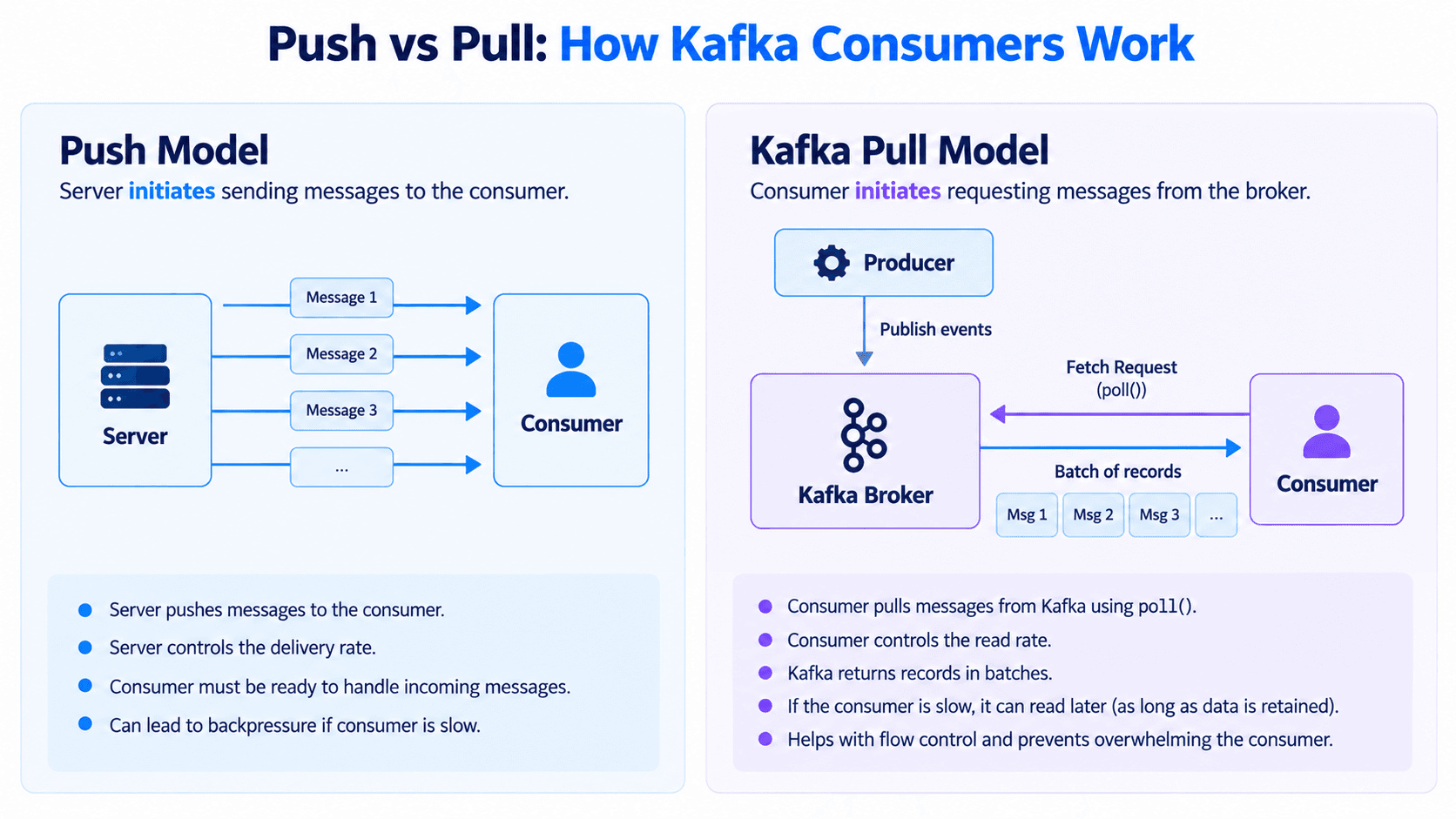
In a traditional push-based delivery system, the server initiates sending messages to consumers. This requires suitable flow control because the consumer may not be able to process messages as quickly as the server produces them.
Kafka uses a different approach for consumers: the pull model.
Instead of the broker continuously initiating message deliveries, the consumer requests records from the broker. In Java, this is commonly done through the Kafka consumer's poll() method.
while (true) { ConsumerRecords<String, String> records = consumer.poll(Duration.ofMillis(1000)); for (ConsumerRecord<String, String> record : records) { System.out.println(record.value()); } }
The consumer requests available records and processes them. This also allows Kafka to return records in batches, reducing the overhead of transferring one record at a time.
Imagine the Payment Service publishes 10,000 events per second, but our Analytics Service can process only 1,000 events per second. The consumer will fall behind, and its lag will grow.
The important advantage is that consumers can read at their own pace rather than requiring the broker to push every record into their application immediately. As long as the records remain available under Kafka's retention policy, the Analytics Service can catch up later.
Kafka therefore combines two different directions of communication: producers push records to brokers, while consumers pull records from brokers.
This doesn't automatically eliminate overload. We still need to monitor consumer lag, storage capacity, and processing throughput.
8. What Happens If Kafka Processes the Same Event Twice?
Now let's return to our banking application, because this is where understanding Kafka becomes especially important.
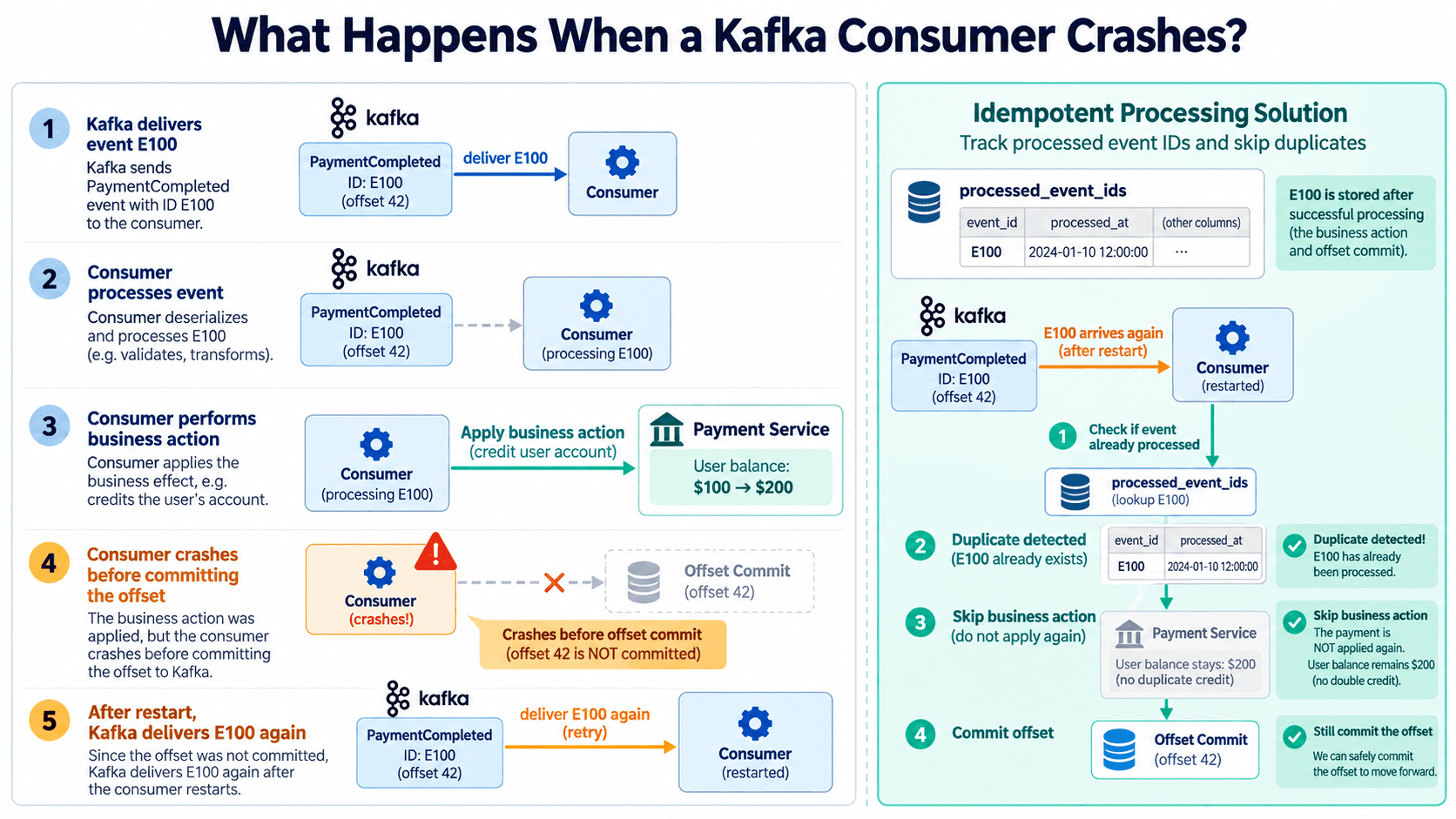
Imagine that our Notification Service reads a PaymentCompleted event and sends an email to the customer. Immediately afterward, the application crashes before committing its consumer offset.
When the application restarts, Kafka may deliver the same event again because the consumer's committed position was not updated.
The customer could receive the same email twice.
For notifications, this might be annoying. But imagine a consumer that performs a financial operation or changes an account balance. Processing the same business action twice could cause a serious problem.
This is why backend engineers must understand idempotency.
An idempotent operation can be repeated without applying the same business effect multiple times.
One common solution is to give every event a unique identifier and record processed identifiers in a database with a unique constraint. For a database update, the event identifier and the business changes should be recorded atomically in the same transaction.
If the same event arrives again, the system can recognize it and avoid repeating the operation.
There is another related problem. What if the Payment Service successfully commits the payment to PostgreSQL, but crashes before publishing the event to Kafka?
Our money transfer has completed, but the Notification Service never receives the event.
This is known as a dual-write consistency problem. One common solution is the Transactional Outbox Pattern, where the application writes its business changes and an outbox record in the same database transaction. A separate publisher then delivers the event to Kafka.
Kafka provides features such as idempotent producers and Kafka transactions, but these don't automatically make external database changes or bank transfers exactly-once.
9. When Should We Use Kafka?
After learning about Kafka, it might be tempting to introduce it into every backend project. But a good backend engineer should understand not only how a technology works, but also when it is worth using.
Kafka becomes especially useful when many independent applications need to react to the same events, when systems generate large streams of data, or when consumers need the ability to replay retained events.
For example, banking applications may use Kafka for transaction event distribution, fraud monitoring, audit pipelines, analytics, and notification processing. E-commerce platforms can use it to distribute order events, while logistics systems may use it to process shipment updates.
However, if we are building a simple application with one Spring Boot service and a PostgreSQL database, Kafka might introduce unnecessary infrastructure, operational complexity, and additional failure scenarios.
Sometimes a simple database transaction, an internal application event, or a direct REST call is enough.
The goal of backend engineering is not to use the most technologies. It is to solve the problem with the appropriate level of complexity.
10. Final Thoughts: Kafka Is More Than Messaging
When I first started learning Kafka, I thought of it mainly as a way for one service to send messages to another.
But once we look inside its architecture, we discover much more.
Producers publish events to topics, topics contain partitions, partitions maintain ordered logs, and brokers store those logs in segments. Consumers fetch records using offsets, consumer groups distribute processing, and retention policies allow events to remain available for later consumption.
Each concept solves a different problem, and understanding how they work together helps us make better architectural decisions.
The next time you click Pay in a banking application, remember that the payment itself may be only the beginning of a larger workflow. Behind a simple confirmation screen, multiple systems may be processing events, detecting unusual activity, updating reports, and notifying users.
Kafka is one tool that can help coordinate those activities reliably at scale, provided we design the surrounding business workflows correctly.
For me, the most interesting part of learning backend engineering is discovering what happens behind operations that appear simple to users.
And the more we understand those internal mechanisms, the better systems we can build.
Follow My Content
If you enjoy content about Java, backend engineering, concurrency, computer architecture, and system design, you can follow my work on:
- Instagram:@the.code.architect
- Medium:medium.com/@sarvar55mszde
- LinkedIn: Follow me here for technical discussions, software engineering lessons, and new articles from this series.
Comments (0)
Loading comments...