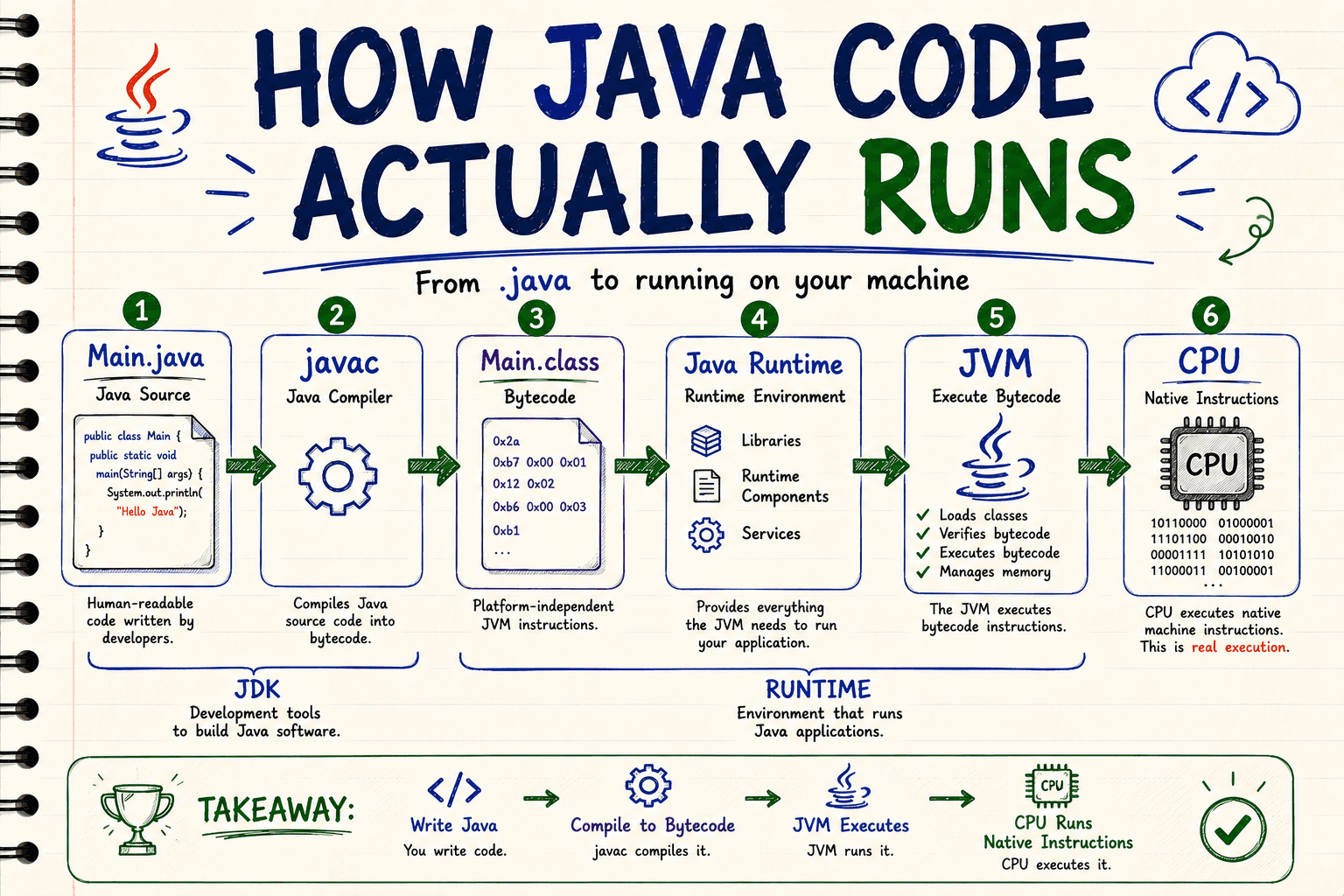
JDK vs JRE vs JVM: Understanding How Java Actually Runs
If you are learning Java, you have probably seen these three terms:
JDK, JRE, and JVM.
They are often explained with definitions like:
- JDK = JRE + development tools
- JRE = JVM + libraries
- JVM executes bytecode
These definitions are not necessarily wrong, but they don't explain why these things exist.
And then another unfamiliar word appears:
bytecode.
Then javac.
Then machine code.
Suddenly, something that should be simple becomes a collection of definitions to memorize.
Instead of memorizing them, let's start with a programming problem.
1. We Write Java, but the CPU Doesn't Understand Java
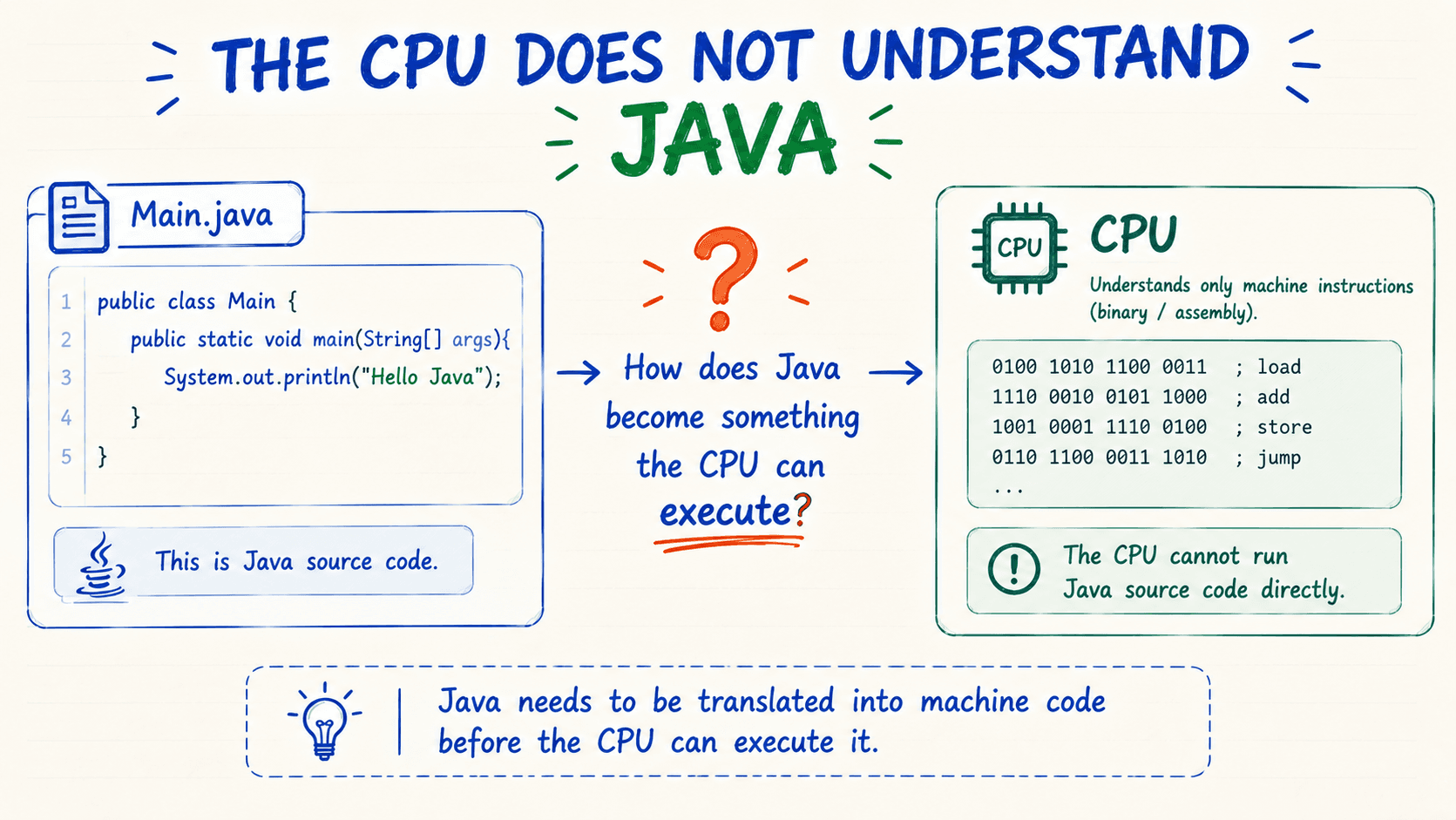
Suppose we create:
public class Main { public static void main(String[] args) { System.out.println("Hello Java"); }}We save it as:
Main.java
We understand what this code means.
The Java compiler understands Java syntax.
But your CPU does not execute Java source code directly.
A processor ultimately executes instructions from its own machine instruction set.
So we have our first problem:
How do we get from the Java code we write to instructions that can ultimately run on the CPU?
This question is the key to understanding JDK, javac, bytecode, JVM, and JRE.
2. We Need a Translation Step
We have:
Main.java
But we need to transform our source code into another representation.
Java provides a compiler called:
javac
When the JDK is installed, we can run:
javac Main.java
After running this command, we get:
Main.class
So javac is the first important piece of our story.
What Is javac?
javac is the Java compiler.
Its job is to compile Java source code into Java bytecode stored in .class files.
For now, don't think about the internal details of compilation.
Just remember:
javac takes the Java code we write and produces instructions designed for the JVM.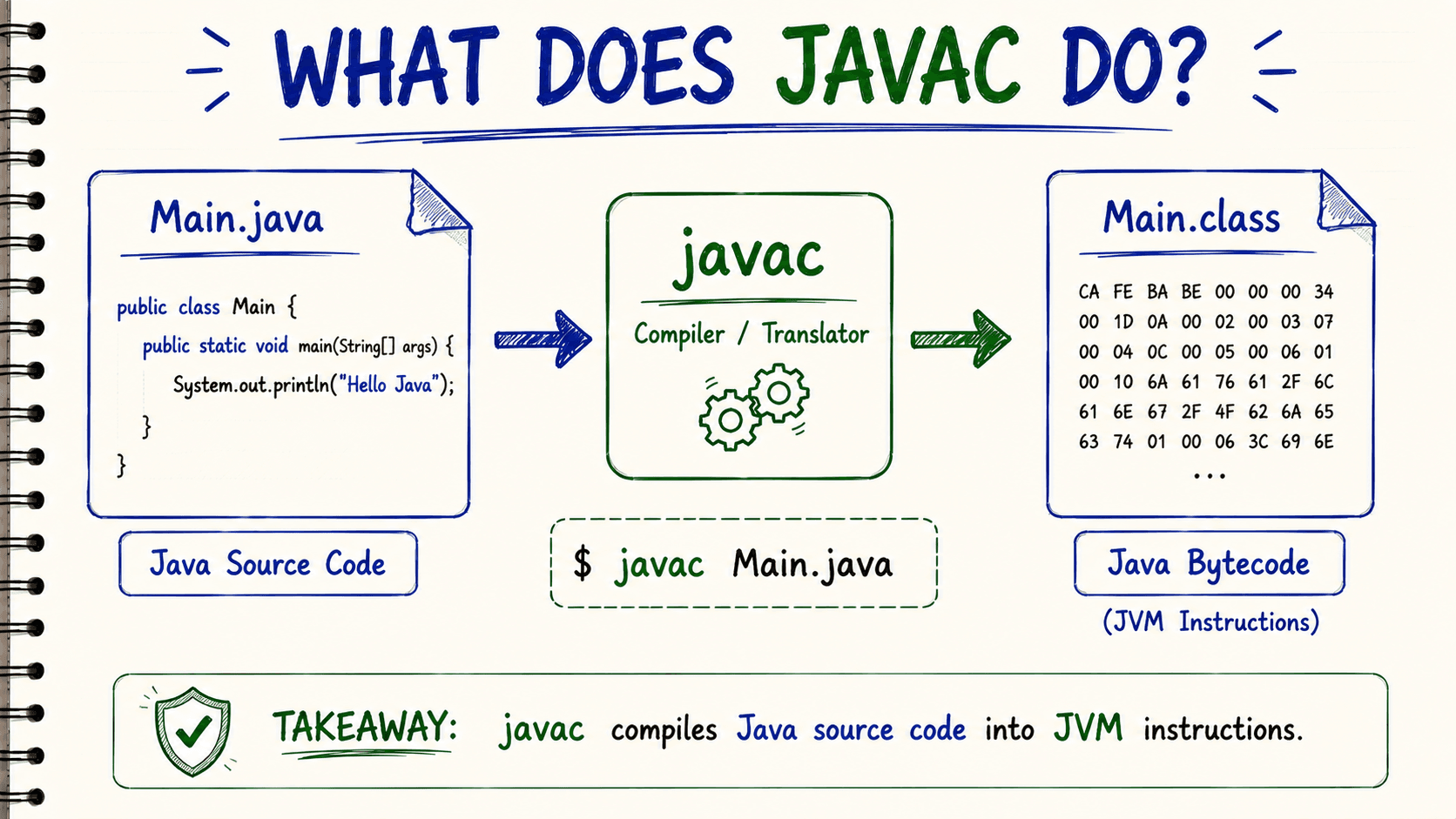
3. What Is Bytecode?
This is where many beginners get confused.
We started with:
Main.java
After compilation we have:
Main.class
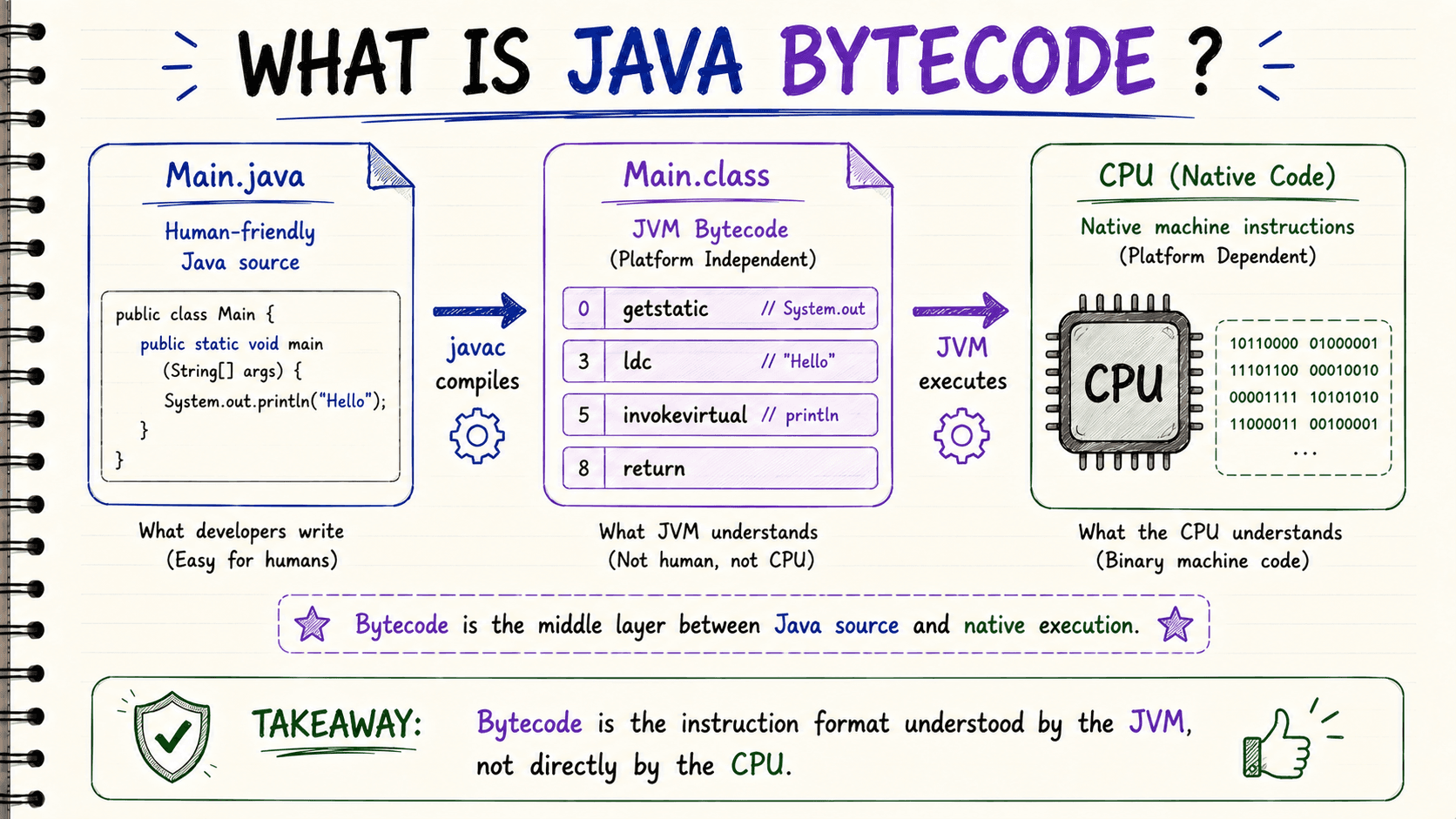
The .class file contains bytecode.
Bytecode is not the Java source code you wrote.
For example, you wrote something like:
System.out.println("Hello Java");
After compilation, the class file contains instructions defined by the JVM instruction set.
You may encounter instructions with names such as:
getstatic
ldc
invokevirtual
return
You do not need to memorize them.
The important idea is:
Bytecode is an intermediate instruction format designed to be executed by the JVM.
Why introduce an intermediate format?
Because Java wants something more portable than compiling your source directly into one platform's native machine instructions.
4. Why Doesn't javac Just Produce CPU Instructions?
This is where Java's design becomes interesting.
Imagine you compile your application directly into instructions for one specific platform and processor architecture.
The resulting native program would be tied to that target environment.
But Java introduces another layer.
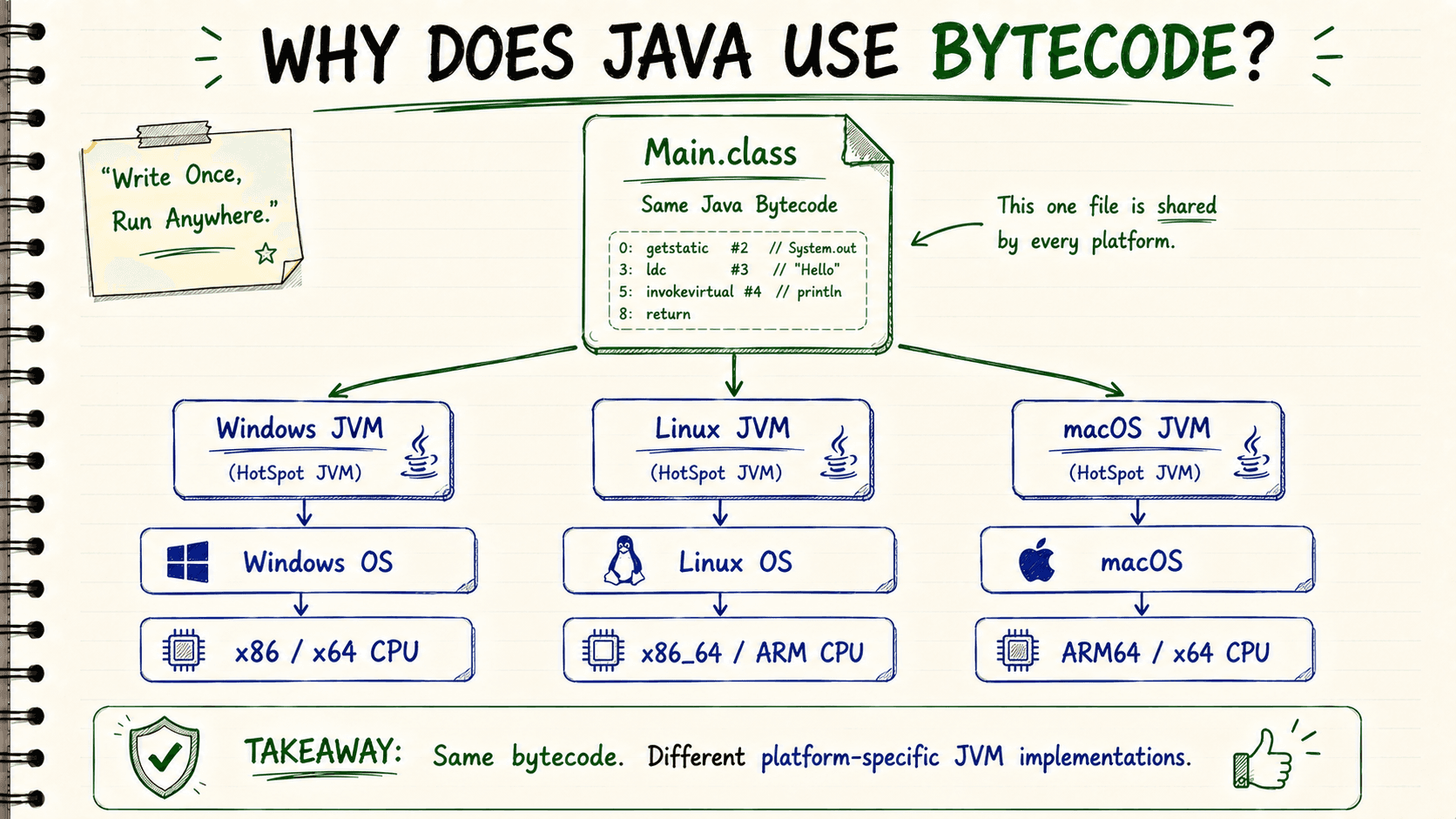
Instead of making javac target one particular CPU directly, it targets the JVM instruction set.
So the output can remain:
Main.class
while different systems provide JVM implementations capable of running that bytecode.
For example, you might have:
- a JVM build for Windows on x86-64
- a JVM build for Linux on x86-64
- a JVM build for macOS on ARM64
The JVM itself is implemented for the particular platform.
But the Java bytecode follows the same JVM specification.
This is the foundation behind Java's famous idea:
Write Once, Run Anywhere.
The portable part is primarily your compiled Java bytecode.
The JVM implementation provides the bridge to the actual machine.
5. Now We Need Something That Understands Bytecode
At this point we have solved one problem.
Our Java source has been compiled:
javac Main.java
and we have:
Main.class
But we still have another problem.
The CPU doesn't directly execute JVM bytecode.
We need something that understands the bytecode and knows how to execute the Java program on the current platform.
That is where the JVM enters the story.
JVM — Java Virtual Machine
A beginner-friendly definition is:
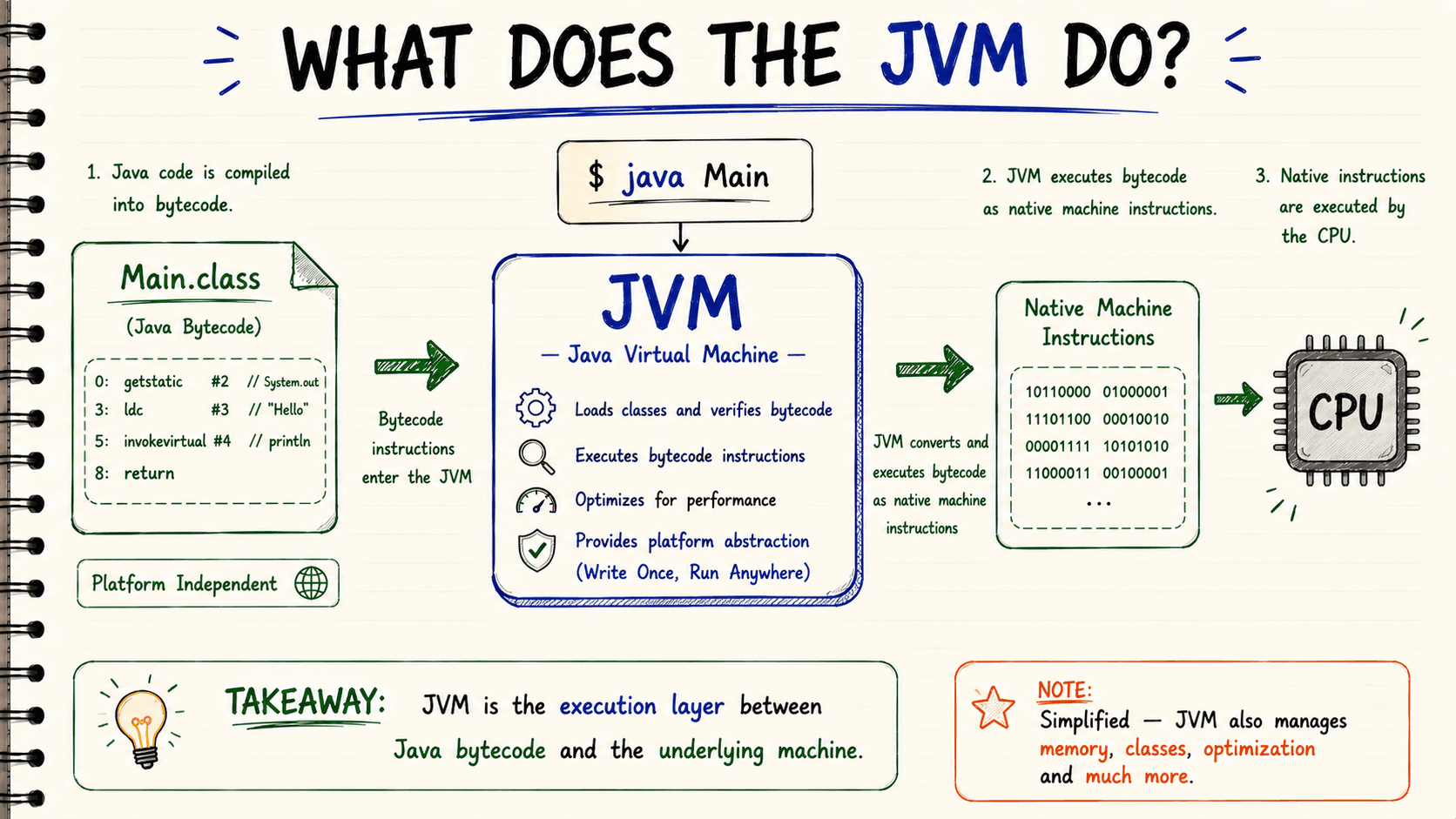
The JVM is the virtual machine responsible for loading and executing Java bytecode.
When you run:
java Main
the Java runtime starts the application, and the JVM becomes the execution environment for your bytecode.
At a very high level:
Java source is compiled into bytecode, and the JVM executes that bytecode on the current system.
You can initially think of the JVM as the bridge between:
Java bytecode and the underlying machine.
That mental model is enough for now.
Later, we can open the JVM and discover that it does much more than simple translation.
6. Is the JVM Just a Bytecode Decoder?
This is a useful mental model when you're starting:
Bytecode comes in → JVM understands it → program runs.
But technically, JVM is much more than a decoder.
A modern JVM is responsible for things such as:
- loading classes
- verifying bytecode
- managing runtime memory
- executing bytecode
- compiling frequently executed code into optimized native code
- garbage collection
- managing Java threads
- interacting with native code
So don't permanently memorize:
JVM = bytecode translator
A better definition is:
JVM is the runtime machine that provides the environment in which Java bytecode executes.
We'll explore its internal components separately.
7. So Where Does the JDK Come From?
We have already used this command:
javac Main.java
But where did javac come from?
It comes with the:
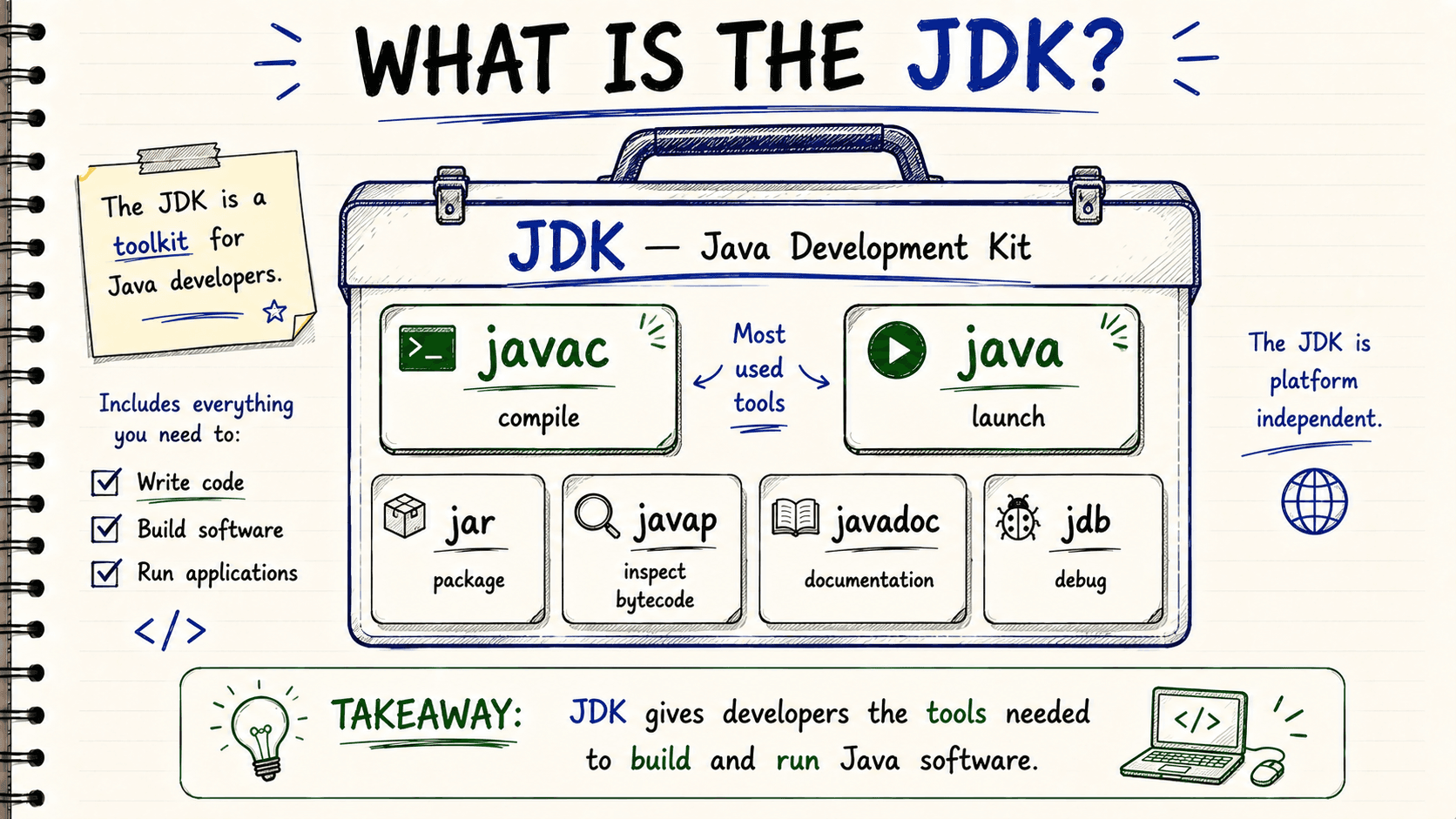
JDK — Java Development Kit
Think about what you need when you're developing a Java application.
You need to compile source code.
You may need to package applications.
You may want to inspect compiled classes.
You may need debugging and documentation tools.
The JDK provides these development capabilities.
For example, it includes tools such as:
javac
java
jar
javap
javadoc
jdb
You don't need to learn all of these at once.
For now, two are especially important.
javac
Used to compile:
.java → .class
For example:
javac Main.java
java
Used to launch Java applications.
For example:
java Main
So a simple definition is:
JDK is the toolkit you install when you want to develop Java applications.
8. A Practical JDK Example
Suppose you're building a Java backend application.
You create:
User.java
UserService.java
UserController.java
Application.java
These are source files.
During the build process, Java source must eventually be compiled into class files.
The JDK provides the compiler required for that work.
Whether you trigger compilation manually:
javac Main.java
or use a build tool such as Maven or Gradle, a Java compiler is still part of the compilation process.
That's why developers normally work with a JDK.
They aren't only running Java applications.
They're building them.
9. Then What Is the JRE?
Now imagine a different situation.
The application has already been compiled.
You aren't changing:
Main.java
You aren't compiling source code.
You simply want to run a Java application.
For running Java code, you need more than just the abstract idea of a JVM.
The application also relies on Java runtime classes and other runtime components.
Historically, Java packaged this runtime environment as:
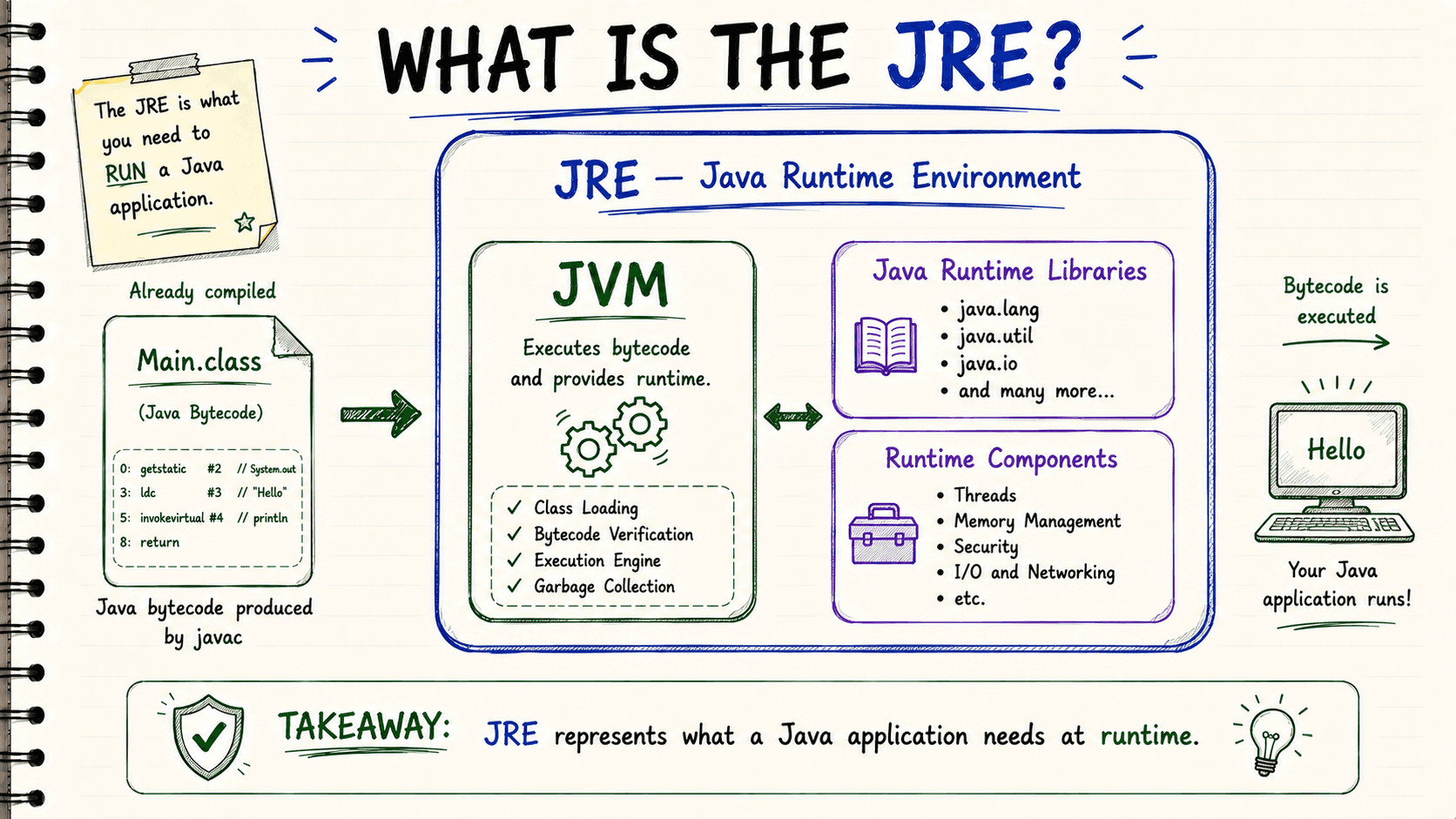
JRE — Java Runtime Environment
A beginner-friendly definition is:
JRE represents the environment required to run Java applications.
Conceptually, think of it as containing:
JVM + Java runtime libraries/components
The JVM is the execution engine at the center.
The surrounding runtime provides the Java environment the application needs.
10. JDK vs JRE Through a Programming Example
Let's compare two developers.
Developer A — Writing the Application
Developer A has:
Main.java
They want to compile it.
They need:
javac Main.java
Therefore they need the JDK, because they require development tools.
Environment B — Running the Application
The application is already compiled.
It has:
Main.class
or perhaps a packaged Java application such as:
application.jar
The environment doesn't need to edit the source code.
It only needs the Java runtime capabilities required to execute the application.
Conceptually, this is the JRE/runtime side of Java.
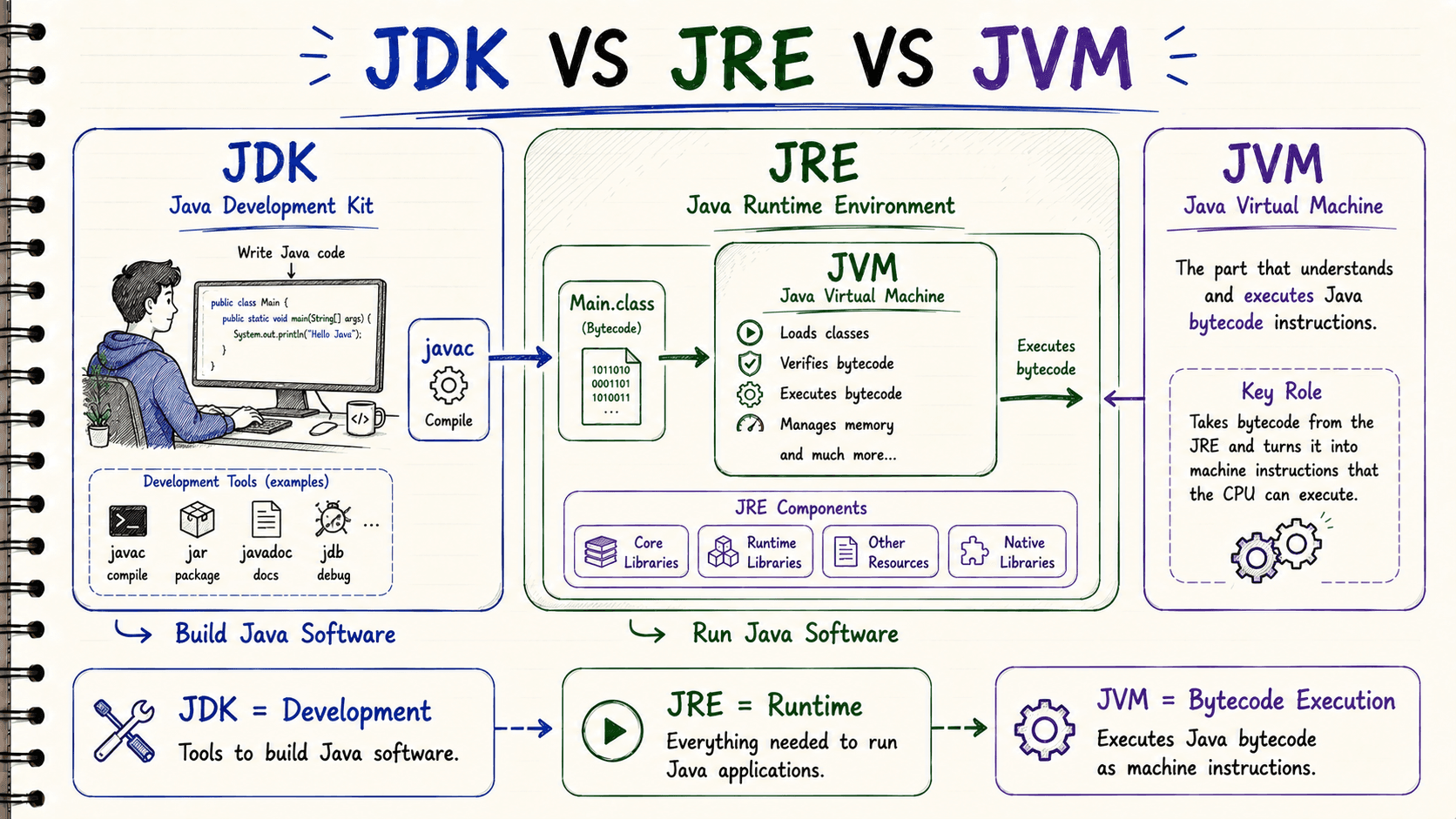
This gives us a much more useful distinction than memorizing formulas:
JDK → I want to develop Java software.
JRE → I need the Java runtime environment to run Java software.
JVM → I execute Java bytecode inside that runtime environment.
11. A Real Backend Example
Now let's connect this to something Java backend developers actually do.
Suppose we have a Spring Boot application:
@SpringBootApplicationpublic class Application { public static void main(String[] args) { SpringApplication.run(Application.class, args); }}During development, we use a JDK.
Our build eventually produces something such as:
application.jar
Then on a server we may run:
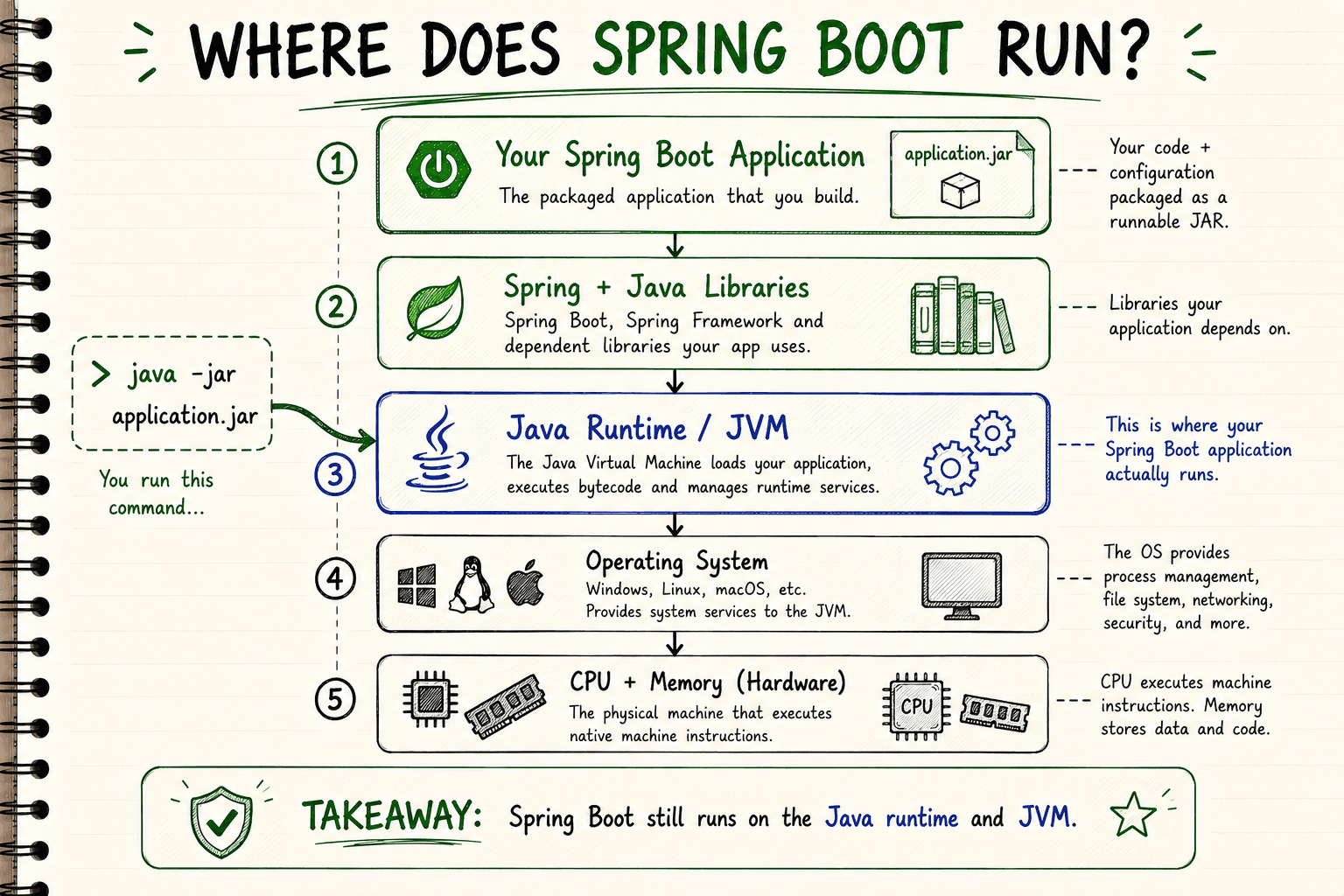
java -jar application.jar
Spring Boot doesn't replace Java.
Spring doesn't replace the JVM.
Your application still ultimately runs inside the Java runtime environment provided by the JVM/runtime implementation you're using.
This means a simplified backend execution stack looks like:
Your Java Application
Spring Boot and Libraries
Java Runtime / JVM
Operating System
Hardware
Understanding this separation becomes extremely useful later when debugging memory problems, garbage collection, JVM options, container memory limits, startup behavior and performance.
12. One Important Modern Java Detail
You will often see this classic formula:
JDK = JRE + Development Tools
and:
JRE = JVM + Runtime Libraries
This is useful for understanding the conceptual responsibilities.
However, don't assume every modern Java installation physically contains separate nested folders matching this formula.
Modern Java changed how runtime images and JDK distributions are structured.
Since Java 9 introduced the module system, tools such as jlink can even create customized runtime images containing only the modules an application needs.
So when learning modern Java, use JDK/JRE/JVM primarily to understand their roles:
JDK → development toolkit
JRE → runtime environment concept
JVM → virtual machine executing Java bytecode
That mental model is much more useful than memorizing folder structures.
13. The Complete Journey
Now let's return to our original program:
public class Main { public static void main(String[] args) { System.out.println("Hello Java"); }}We can finally understand what happens.
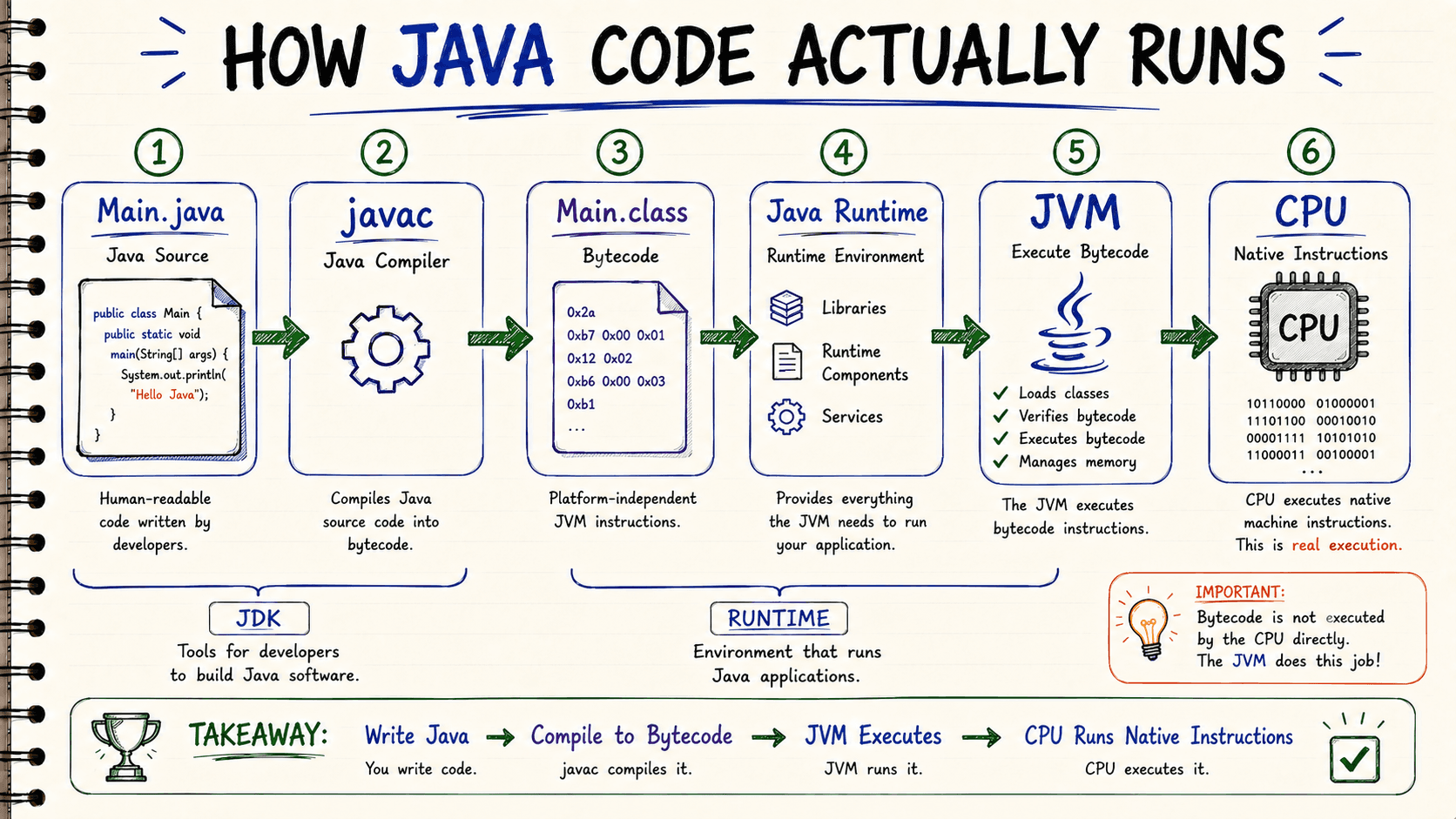
First, we write:
Main.java
Then the Java compiler from the JDK compiles it:
javac Main.java
That produces:
Main.class
The .class file contains Java bytecode.
Then we launch the application:
java Main
The Java runtime starts, the JVM loads the class and executes its bytecode.
Ultimately, the underlying CPU executes native machine instructions.
Final Mental Model
Don't start by memorizing:
JDK = JRE + JVM + something else.
Instead, remember the problem each component solves.
javac
Problem: We wrote Java source code, but the JVM needs its own instruction format.
Solution: javac compiles .java source into .class bytecode.
Bytecode
Problem: We want compiled Java code that isn't directly tied to one CPU instruction set.
Solution: Java uses JVM bytecode as an intermediate instruction format.
JVM
Problem: Something needs to load and execute that bytecode on the actual system.
Solution: The JVM provides the virtual machine where Java bytecode executes.
JRE
Problem: Running Java applications requires the JVM plus the surrounding Java runtime components.
Solution: The JRE is the traditional concept/package for the Java runtime environment.
JDK
Problem: Developers need more than runtime execution. We need compilers and other development tools.
Solution: The JDK provides the Java development toolkit.
Follow My Content
If you enjoy content about Java, backend engineering, concurrency, computer architecture, and system design, you can follow my work on:
- Instagram:@the.code.architect
- Medium:medium.com/@sarvar55mszde
- LinkedIn: Follow me here for technical discussions, software engineering lessons, and new articles from this series.
Comments (0)
Loading comments...