How Do Computers Really Store Files? Bits, Bytes, Binary, and UTF-8
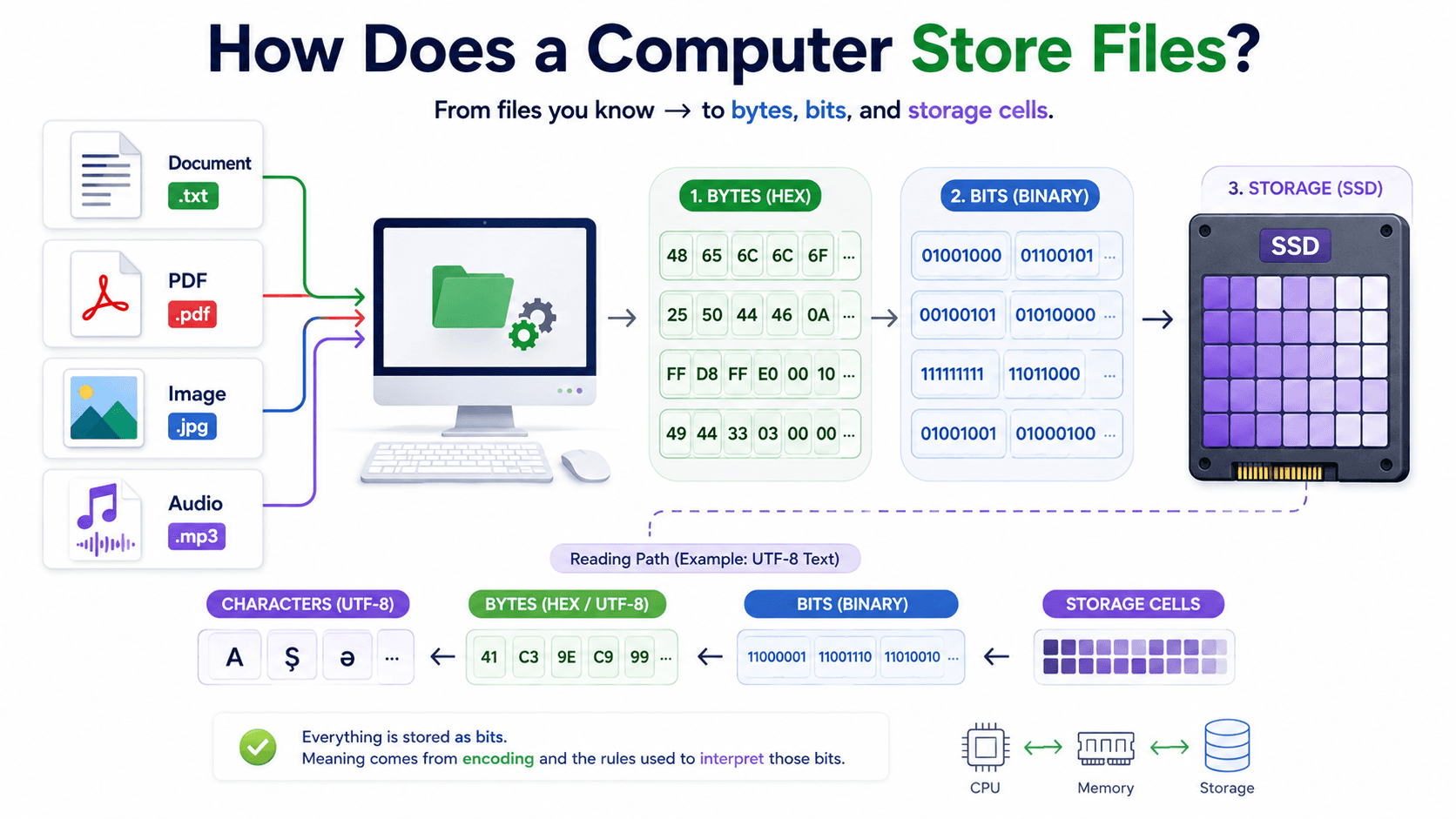
When we open a PDF, we see text, tables, and images. When we look at a photograph, we see colors. When we play an MP3 file, we hear sound. A computer, however, does not store any of these things in the form in which we experience them. From the computer’s point of view, a PDF, photograph, video, and text file are all ordered sequences of bytes.
This may sound like purely theoretical knowledge. In practice, it explains why Java uses byte[] for file data, why loading a large file can consume so much memory, why text becomes corrupted when the wrong encoding is used, and why a PDF cannot be read like an ordinary text file.
In this article, we will follow data from the characters entered by a user all the way to physical storage—and then back again. We will begin with bits and bytes, examine binary data, and clarify the relationship among characters, ASCII, Unicode, and UTF-8. Finally, we will connect everything with practical Java examples.
Everything starts with a file
Imagine that the following files exist on your computer:
notes.txtreport.pdfprofile.jpgmusic.mp3
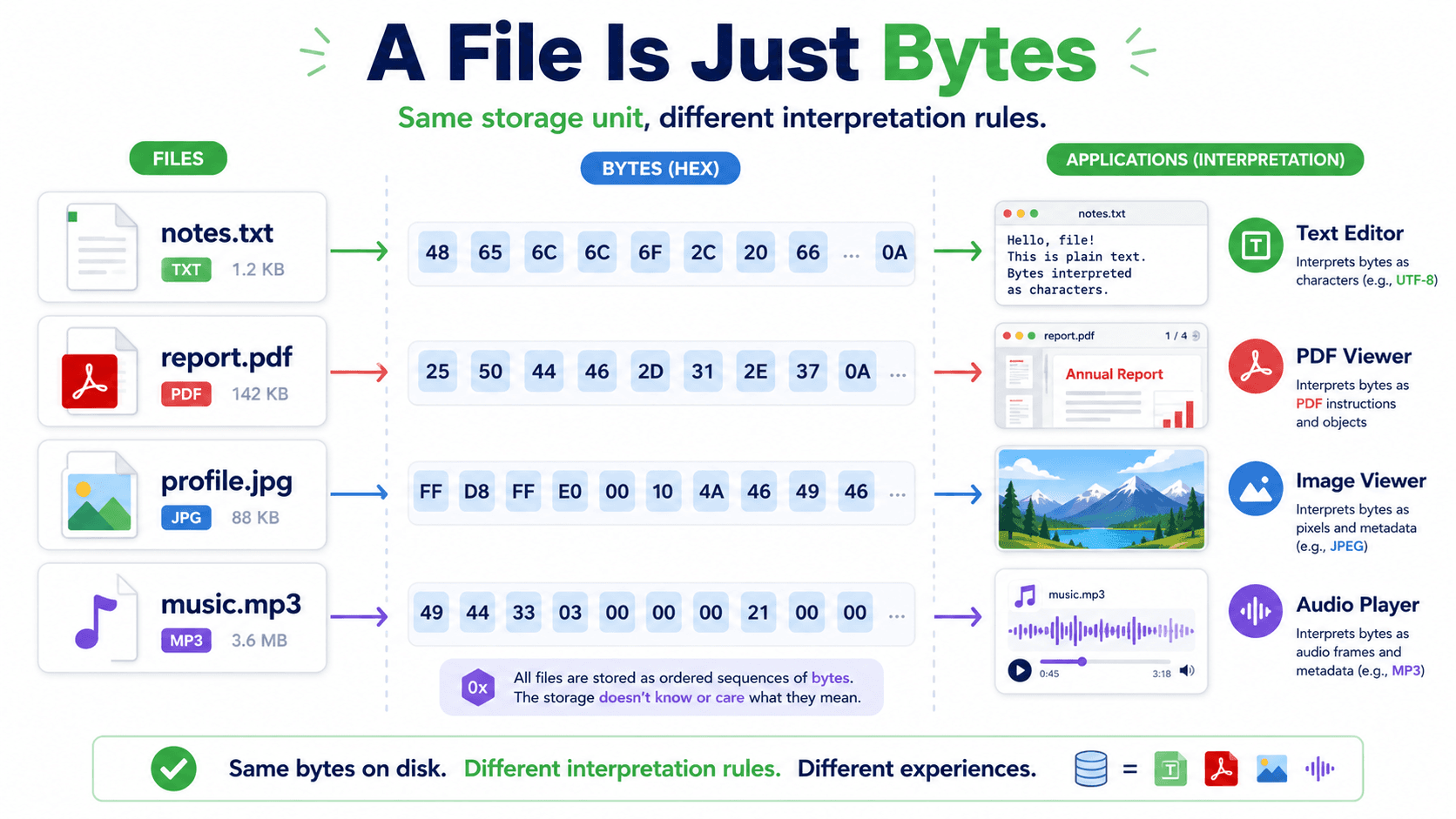
Their extensions and purposes are different, but they have one important property in common: they are all stored as sequences of bytes.
notes.txt → byte byte byte byte ... report.pdf → byte byte byte byte ... profile.jpg → byte byte byte byte ... music.mp3 → byte byte byte byte ...
The difference is not whether they contain bytes. The difference is how those bytes must be interpreted. A text editor decodes the bytes in a .txt file into characters using a character encoding. A PDF reader interprets bytes according to the PDF specification and constructs pages, fonts, and images. An image viewer interprets JPEG data and produces pixels.
We should therefore not confuse a file extension with the data itself. The .pdf extension is not a magical label that turns arbitrary data into a PDF. It is a strong hint telling applications which format rules should be used to interpret the file.
What is a bit?
A bit is the smallest unit of information in computing. It can hold one of two values:
0 or 1
The word bit comes from binary digit. Binary simply means that there are two possible states.
At the physical level, these states can be represented by low and high electrical voltage, opposite magnetic orientations, or an on/off state. As software developers, we usually do not work directly with those physical details. What matters to us is that computers represent information through two states.
One bit cannot describe much. It could represent a simple decision:
0 → no 1 → yes
When several bits are placed together, they can create more combinations:
1 bit → 2 possible values 2 bits → 4 possible values 3 bits → 8 possible values 8 bits → 256 possible values
The number of combinations is calculated with 2ⁿ, where n is the number of bits. Eight bits therefore produce 2⁸ = 256 combinations.
What is a byte?
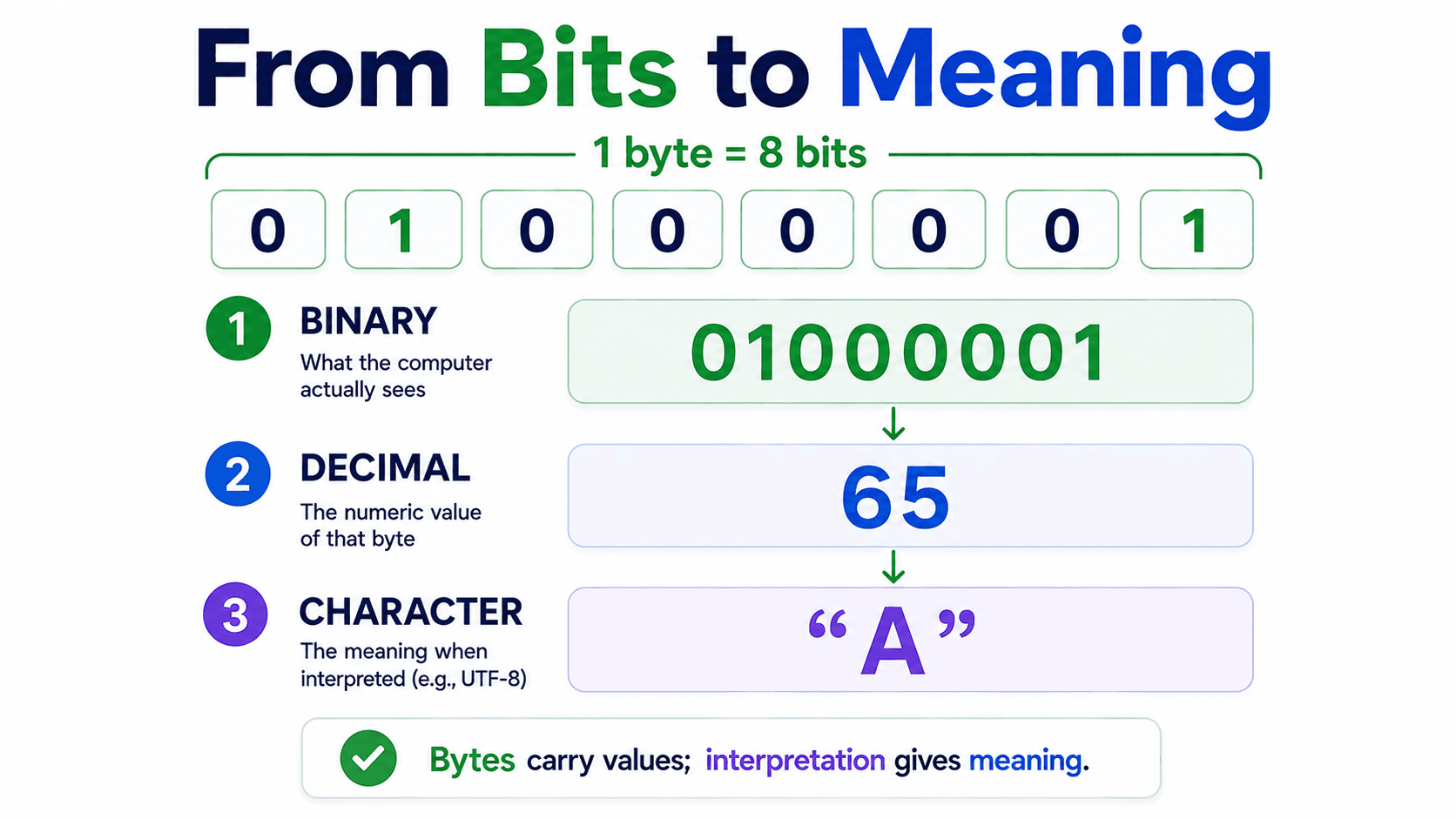
In modern systems, one byte consists of eight bits:
1 byte = 8 bits
Here is one possible byte:
01000001
Eight bits can form 256 patterns, from 00000000 to 11111111. When interpreted as an unsigned number, a byte can therefore represent a value from 0 to 255.
There is an important distinction here. The bits in a byte are not inherently “the number 65,” “the letter A,” or “the color red.” Their meaning depends on the rules used by the system reading them.
For example, this bit pattern:
01000001
represents decimal 65 when treated as a binary number. When interpreted as encoded text under ASCII or UTF-8, it represents the character A.
01000001 → 65 → "A"
This is one of the central ideas of the article: bytes carry values; formats and encodings give those values meaning.
What do KB, MB, and GB measure?
When we describe the size of a file, we are essentially describing how many bytes it contains.
In everyday use, we commonly use these decimal units:
1 KB = 1,000 bytes 1 MB = 1,000 KB 1 GB = 1,000 MB
Computing also has binary-based units:
1 KiB = 1,024 bytes 1 MiB = 1,024 KiB 1 GiB = 1,024 MiB
KB and KiB are not technically the same. Storage manufacturers usually advertise capacity with decimal units, while some operating-system displays use or historically used binary calculations. This is one reason a drive may appear slightly smaller in the operating system than its advertised capacity.
This distinction also matters in application memory. If a file is 500 MB and we load the whole file into a Java byte[], we need roughly 500 MB just for that data. If the application then copies the array, converts it to Base64, or processes several files concurrently, total memory use may become much larger.
How is a file stored on disk?
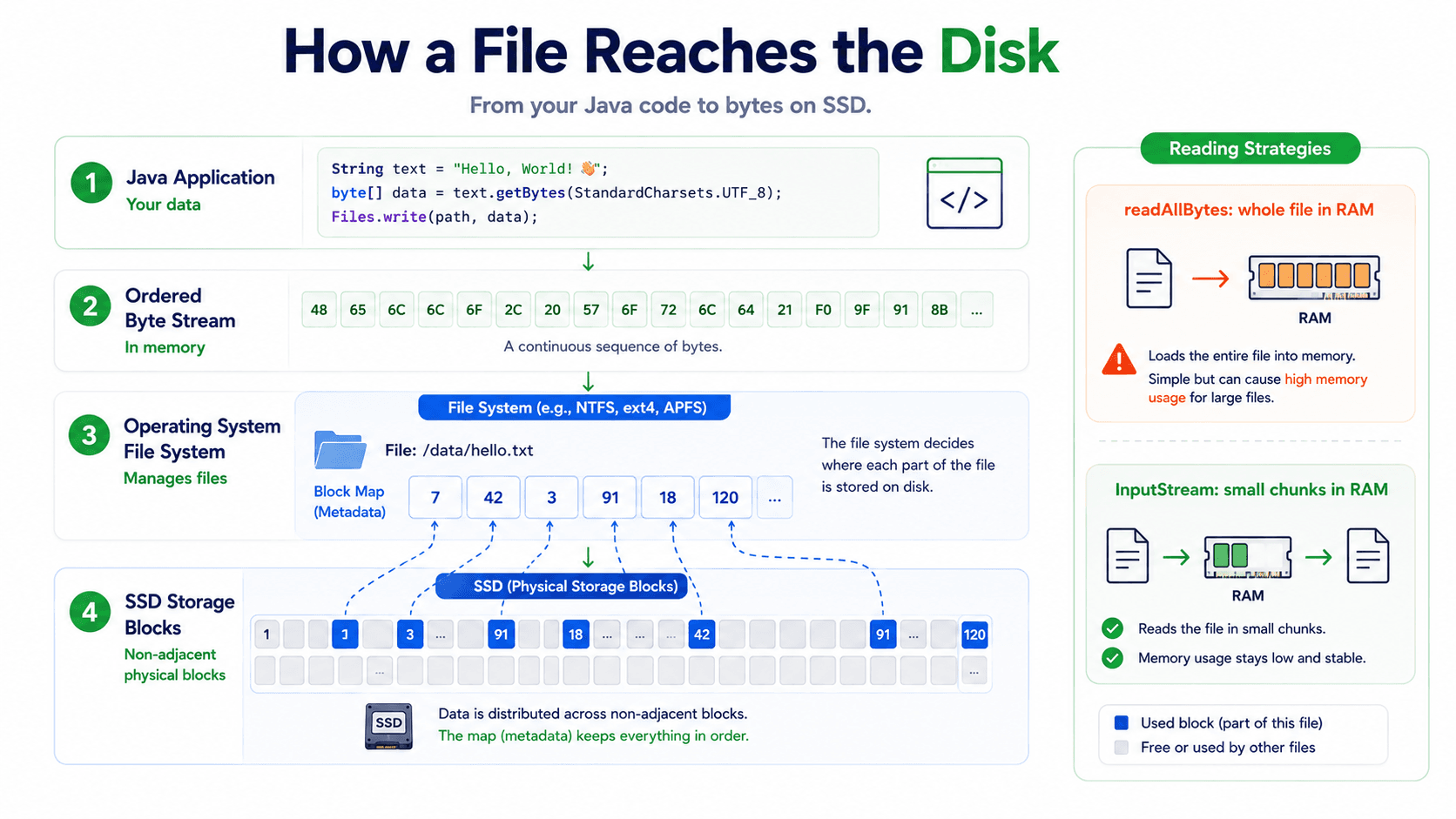
When an application saves a file, the operating system writes its bytes to a storage device. The file system manages metadata such as the name, size, location, permissions, and timestamps.
A simplified path looks like this:
Data inside the application ↓ Sequence of bytes ↓ Operating system and file system ↓ Physical storage on an SSD or HDD
The bytes do not always have to occupy one continuous area of physical storage. A file system can track pieces stored in different blocks. When the application reads the file, the operating system hides those details and presents an ordered stream of bytes.
In Java, we can read an entire small file like this:
Path path = Path.of("report.pdf"); byte[] content = Files.readAllBytes(path); System.out.println("File size: " + content.length + " bytes");
Files.readAllBytes() loads the entire file into a byte[] on the heap. It is convenient for small files, but it can be dangerous for files hundreds of megabytes or several gigabytes in size. For large data, streaming is usually safer because we do not need to hold the whole file in memory at once.
try (InputStream input = Files.newInputStream(path)) { byte[] buffer = new byte[8 * 1024]; int bytesRead; while ((bytesRead = input.read(buffer)) != -1) { // Process only the valid portion of this chunk. process(buffer, bytesRead); } }
This example reads the file piece by piece using an 8 KiB buffer. Notice that the last read may fill only part of the buffer, which is why bytesRead must be passed to the processing code.
Are text files and binary files really different?
The terms “text file” and “binary file” can create the wrong impression, because text files are also stored in binary form—as bytes. The real difference is how those bytes are interpreted.
The bytes in a text file represent characters according to an encoding such as UTF-8. A text editor knows that encoding and can turn the bytes into readable text.
The bytes in PDF, JPEG, or ZIP files follow the structural rules of their respective formats. Such a file may contain some readable text, but it does not consist only of encoded characters. It can include headers, compressed data, object references, fonts, pixels, and many other structures.
We could attempt to read a PDF like this:
String incorrect = Files.readString( Path.of("report.pdf"), StandardCharsets.UTF_8 );
This is not a correct approach. The code tries to decode PDF bytes as though the entire file were UTF-8 text. The result may contain replacement symbols and meaningless characters. To understand a PDF, we need a library that understands the PDF format, such as Apache PDFBox.
try (PDDocument document = Loader.loadPDF( Files.readAllBytes(Path.of("report.pdf")))) { PDFTextStripper stripper = new PDFTextStripper(); String text = stripper.getText(document); }
In short, we do not call a file “binary” merely because it contains zeros and ones; all files do. In everyday software terminology, a binary file is one whose complete contents cannot be meaningfully decoded with a character encoding alone.
What is a character?
A character is a logical element of text. A, 7, ?, Ş, and ə are examples. A character is not the same thing as the bytes used to store it.
Character → A logical text element Byte → A unit of stored numerical data Encoding → Rules for converting between characters and bytes
The world contains far more than English letters. We need to represent Azerbaijani, Turkish, Arabic, Chinese, Japanese, emoji, mathematical notation, and thousands of other symbols consistently. ASCII alone cannot do that.
What is ASCII, and why was it not enough?
ASCII is an early and important standard that maps characters to numbers. Basic ASCII defines 128 entries, including English letters, digits, punctuation, and control characters.
Character Decimal Binary A 65 01000001 B 66 01000010 a 97 01100001 0 48 00110000
ASCII works well for basic English, but it has no entries for characters such as Ş, ə, and ğ, Arabic letters, Chinese characters, or emoji. Different systems began using various extended character tables. The same byte value could then produce different characters under different encodings, creating incompatibility.
Software needed one shared, universal character repertoire. That need led to Unicode.
What is Unicode?
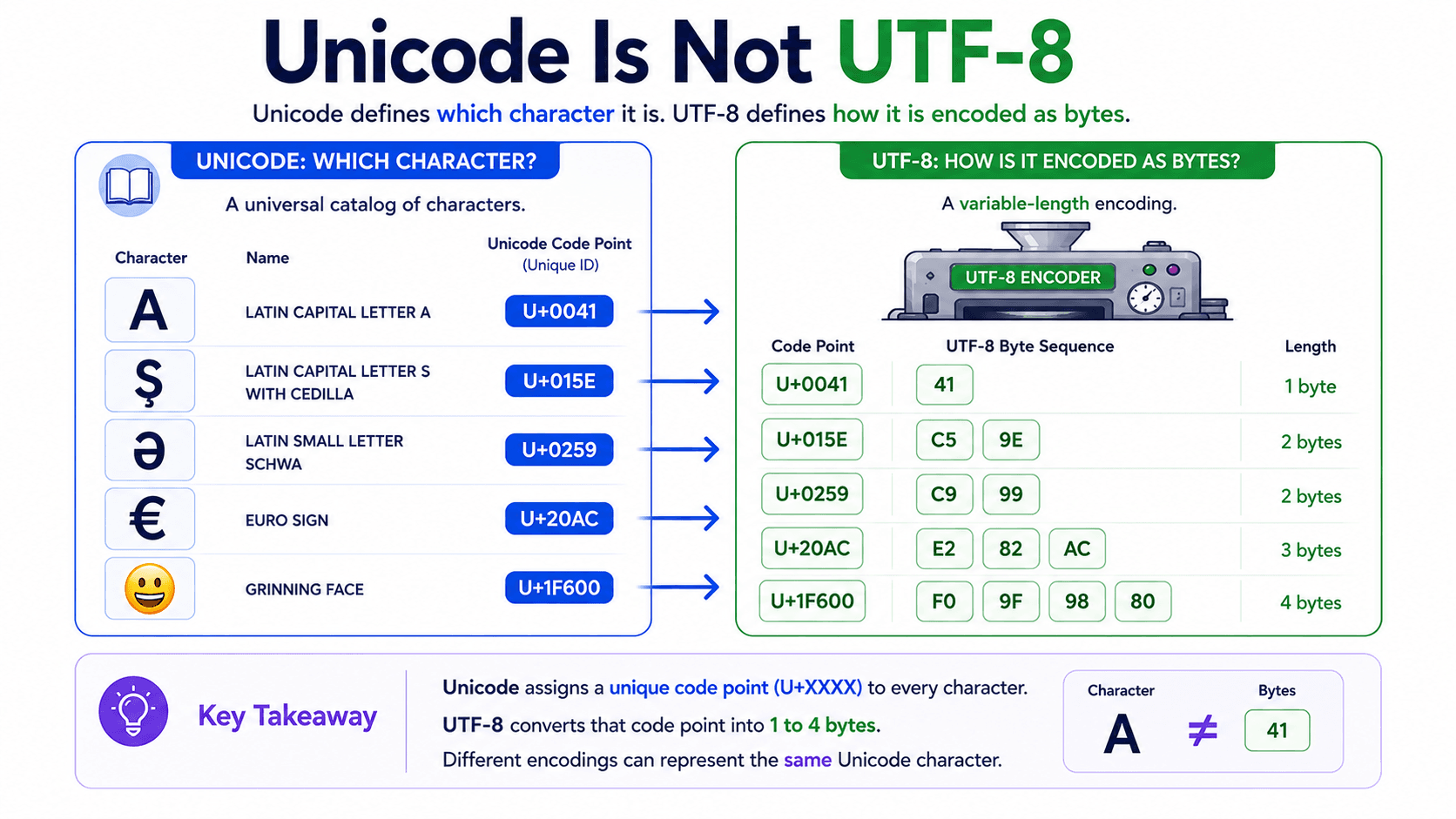
Unicode is a universal standard that assigns characters unique numerical identifiers. Such an identifier is called a code point and is usually written in hexadecimal with a U+ prefix.
A → U+0041 Ş → U+015E ə → U+0259 € → U+20AC
Unicode does not simply say, “store this character using these exact bytes.” It first identifies the character. Encodings such as UTF-8, UTF-16, and UTF-32 define how that code point is represented as code units and ultimately as bytes.
You can think of Unicode as a universal catalog of characters and UTF-8 as one method for writing the catalog numbers into bytes.
What does UTF-8 do?
UTF-8 is a variable-length character encoding for Unicode. It represents one Unicode code point with one to four bytes.
- ASCII characters use one byte.
- Many additional Latin-script characters use two bytes.
- Many characters from other writing systems use three bytes.
- Some symbols and emoji code points use four bytes.
For example:
Character Unicode UTF-8 bytes A U+0041 1 Ş U+015E 2 ə U+0259 2 € U+20AC 3
That is why the number of characters and the number of bytes are not necessarily equal.
String text = "AŞə€"; byte[] utf8Bytes = text.getBytes(StandardCharsets.UTF_8); System.out.println(text.length()); System.out.println(utf8Bytes.length);
There is another Java detail hiding here. String.length() returns the number of UTF-16 code units, not necessarily the number of visible characters. Many common characters use one code unit, but a supplementary character such as many emoji uses two Java char values.
String emoji = "😀"; System.out.println(emoji.length()); // 2 UTF-16 code units System.out.println(emoji.codePointCount(0, emoji.length())); // 1 Unicode code point System.out.println(emoji.getBytes(StandardCharsets.UTF_8).length); // 4 UTF-8 bytes
Even “character count” can therefore mean different things: Java char count, Unicode code-point count, user-perceived symbol count, or encoded byte count. These values often coincide for simple English text, but we should not assume that they always do.
What happens when we use the wrong encoding?
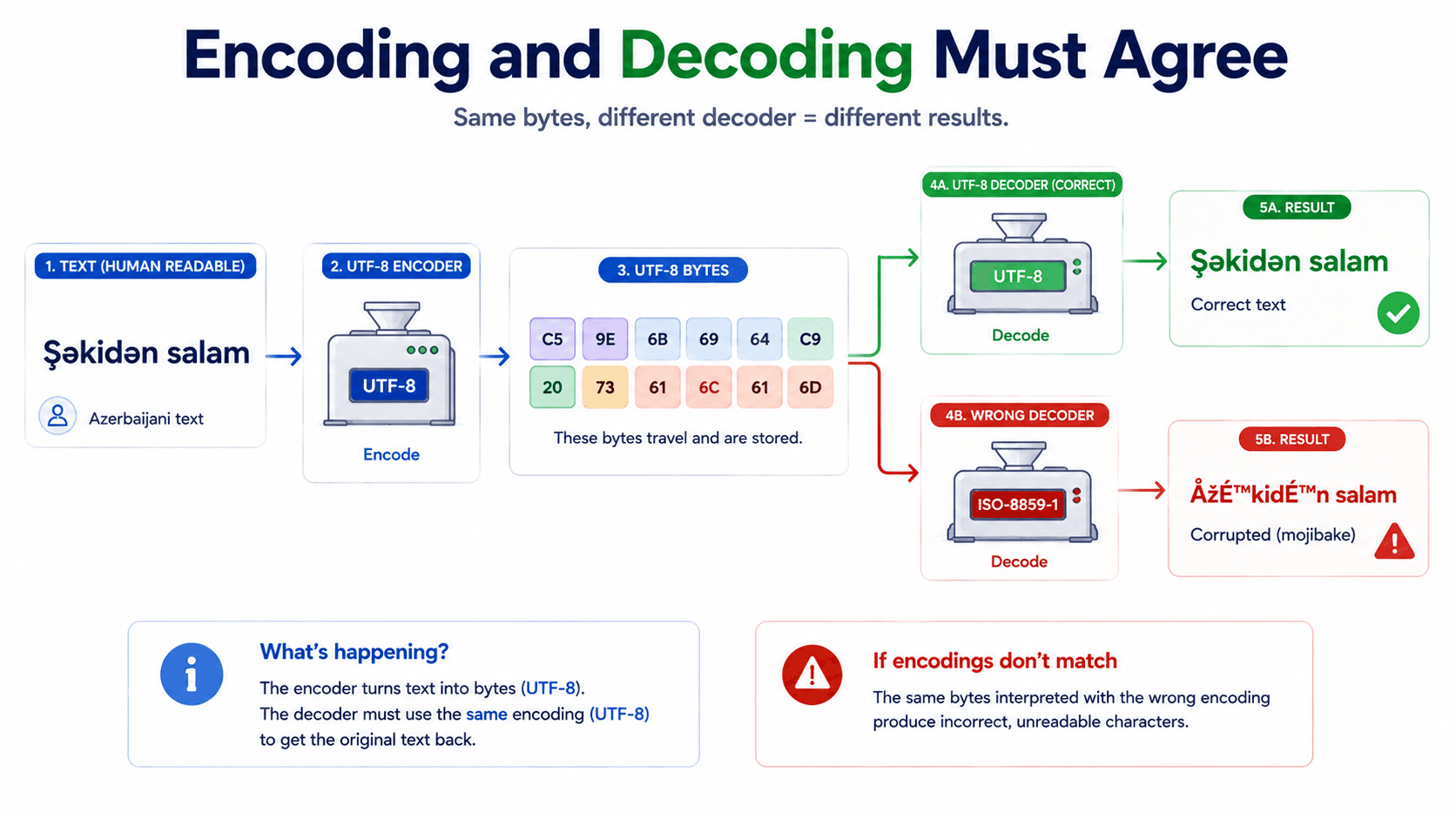
If text is encoded into bytes using UTF-8, those bytes should be decoded using UTF-8 as well.
String original = "Salam, Bakıdan gəlmişəm"; byte[] bytes = original.getBytes(StandardCharsets.UTF_8); String restored = new String(bytes, StandardCharsets.UTF_8); System.out.println(restored);
The process is:
String ↓ UTF-8 encode byte[] ↓ UTF-8 decode String
If the encoder and decoder use incompatible rules, the result may become mojibake—garbled text produced when bytes are decoded with the wrong character encoding. This is a common reason characters such as Ş, ə, or ğ appear as strange symbols on a web page.
It is safer to specify the encoding explicitly than to depend on a platform default:
text.getBytes(StandardCharsets.UTF_8); new String(bytes, StandardCharsets.UTF_8);
Java byte and byte[] are not the same thing
In Java, byte is a primitive type that stores one signed eight-bit value. Its numeric range is -128 to 127.
byte value = 65;
A byte[] is an array object holding multiple byte values in order.
byte[] values = {65, 66, 67};
When decoded as ASCII-compatible UTF-8 text, this array produces ABC:
String result = new String(values, StandardCharsets.UTF_8); System.out.println(result); // ABC
Although Java's byte type is signed, none of the underlying eight bits disappear. Only the way Java interprets the bits as a number changes. To obtain the equivalent value in the 0–255 range, we can write:
int unsignedValue = Byte.toUnsignedInt(values[0]);
A byte[] is mutable, meaning its elements can change after creation:
byte[] data = {65, 66, 67}; data[0] = 90; System.out.println(new String(data, StandardCharsets.UTF_8)); // ZBC
Mutability matters in security-sensitive and domain-model code. If an object stores a caller's array directly, outside code can later modify that same array and silently change the object's internal state. Defensive copying can prevent that.
public final class FileContent { private final byte[] data; public FileContent(byte[] data) { this.data = data.clone(); } public byte[] getData() { return data.clone(); } }
Every copy has a memory cost, however. Copying a 500 MB array creates roughly another 500 MB of payload data. Defensive copying may be appropriate for small immutable value objects, while large-file systems often need streaming, temporary storage, bounded buffers, and clearly controlled ownership instead.
File extension, file format, and MIME type
These concepts are related, but they are not identical.
A file extension is the suffix at the end of a filename:
report.pdf → .pdf photo.jpg → .jpg
A file format defines how bytes are organized. The PDF specification, for example, defines how pages, fonts, images, references, and other objects can be represented in a PDF file.
A MIME type is a standardized label used to describe the media type when data moves between systems:
text/plain application/pdf image/jpeg application/json
application/pdf tells the receiver that the content should be interpreted as PDF data. It does not prove that the bytes are actually a valid PDF. A user can rename malware.exe to report.pdf, and a client can send an incorrect Content-Type header. Secure upload systems should validate content and known file signatures rather than trusting only the extension or client-provided MIME type.
Bringing the entire journey together
Suppose a user wants to save this text:
Salam, Bakı!
The process is roughly as follows:
- The user enters logical text characters.
- Java represents the text in a
String. - A UTF-8 encoder converts Unicode code points into bytes.
- The operating system sends the bytes to the file system.
- The file system records the data in storage blocks.
- When the file is opened again, its bytes are read.
- A UTF-8 decoder reconstructs text from those bytes.
Path file = Path.of("message.txt"); String original = "Salam, Bakı!"; Files.writeString(file, original, StandardCharsets.UTF_8); byte[] storedBytes = Files.readAllBytes(file); System.out.println(Arrays.toString(storedBytes)); String restored = new String(storedBytes, StandardCharsets.UTF_8); System.out.println(restored);
Follow My Content
If you enjoy content about Java, backend engineering, concurrency, computer architecture, and system design, you can follow my work on:
- Instagram:@the.code.architect
- Medium:medium.com/@sarvar55mszde
- LinkedIn: Follow me here for technical discussions, software engineering lessons, and new articles from this series.
Comments (0)
Loading comments...