From Chatbots to AI Agents: How AI Learned to Use Tools and Take Action
From Chatbots to AI Agents: How AI Learned to Use Tools and Take Action
LLMs, RAG, tool calling, agents, and agentic AI — explained through one trip from Baku to Istanbul
A while ago I was planning a weekend in Istanbul, and like most people these days, I opened a chatbot and typed: "I want to visit Istanbul next weekend. Can you help me plan my trip?"
The answer was honestly pretty good. Hagia Sophia, the Grand Bazaar, a few restaurants, a rough plan for each day. Then I started asking the questions that actually matter when you're about to spend money. How much is a flight right now? Which hotels still have rooms? Can you book it for me? Can you fit the whole thing into $700?
That's where it fell apart. The chatbot could tell me what I should do, but it couldn't check a single real price or touch a booking system.
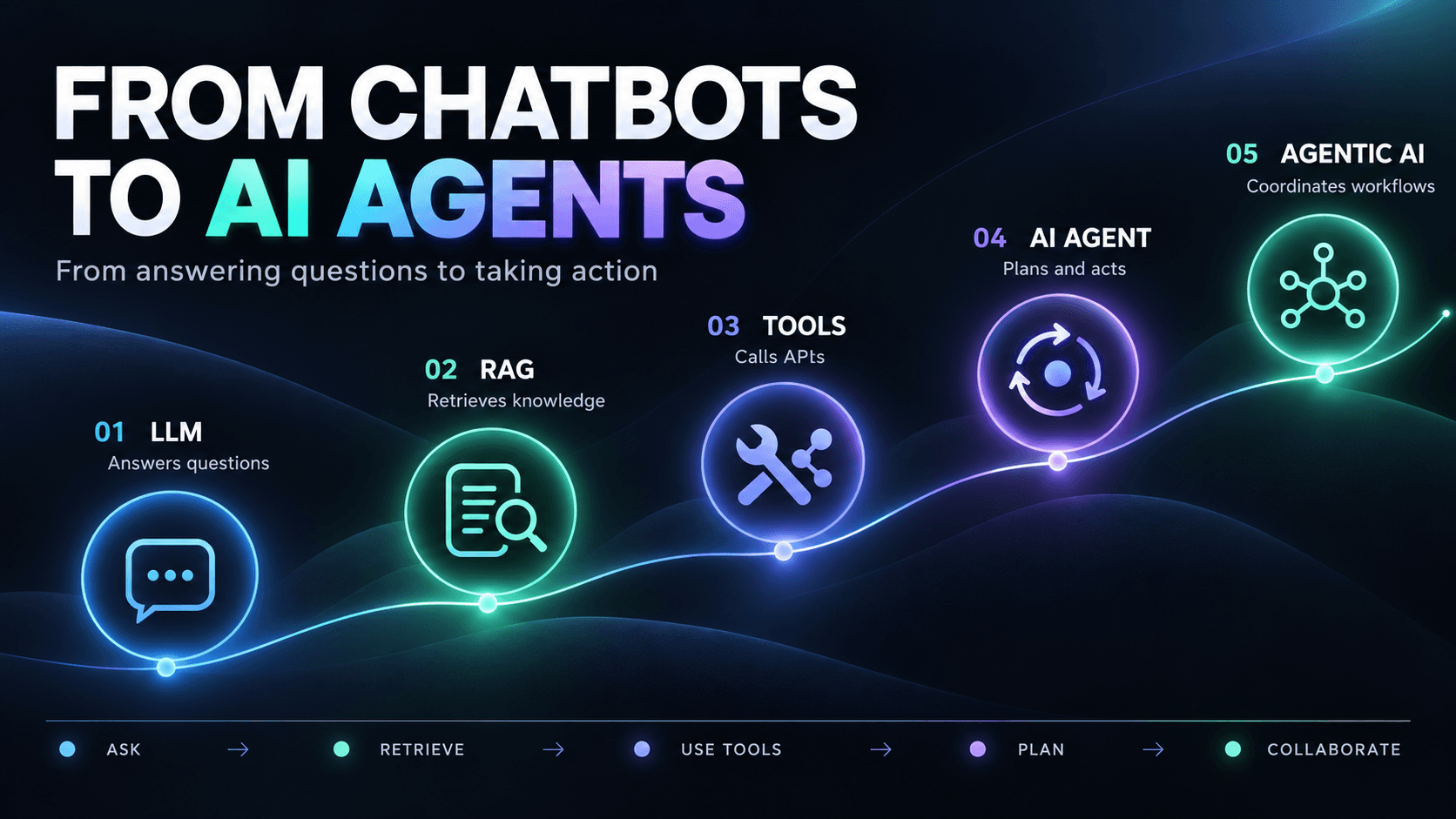
As a backend developer, that gap made me curious. What exactly has to be added to a language model before it can go from "here are some ideas" to "I found a flight for $145, want me to hold it?" It turns out the answer is a stack of six ideas, and each one builds on the previous. So let's build a travel assistant together, one layer at a time.
1. The LLM: a well-read friend with no phone
Picture a friend — let's call him Alex — who has read thousands of books on history, geography, programming, and travel. You can ask him almost anything. The catch: Alex has no phone, no internet, and no idea who you are.
Ask him what to see in Istanbul and he'll happily list Hagia Sophia, the Blue Mosque, and the Grand Bazaar. That's roughly what a plain Large Language Model (LLM) is.
Under the hood, an LLM is a model trained on huge amounts of text that learns to predict the next token — a word, part of a word, or some other chunk of text. Give it "The capital of France is…" and it predicts "Paris." Scale that up enough and you get something that can explain concepts, write code, and summarize documents surprisingly well.
But it only knows what was in its training data. Ask it for the cheapest flight from Baku to Istanbul tomorrow and you might get "probably between $100 and $300." That sounds reasonable, but nobody checked anything. It's an educated guess dressed up as an answer.
🧪 Try it yourself Ask a chatbot two things: "What are five popular places to visit in Istanbul?" and then "What is the exact cheapest available flight from Baku to Istanbul tomorrow? Show the booking source." If your chatbot has web search, turn it off first. Notice how confident the first answer is — and how vague (or invented) the second one gets.
What we have so far: an assistant that knows a lot, but is completely cut off from the outside world.
2. LLM + RAG: handing Alex your notes
Now imagine you give Alex a folder before asking him anything. Inside:
- Total budget: $700
- Flying from Baku to Istanbul
- Hotel near Sultanahmet, around $80 a night
- Interests: history, local food, museums
He reads it first, and suddenly his suggestions fit you instead of an average tourist. That's the core idea behind Retrieval-Augmented Generation (RAG).
The flow is simple:
- You ask a question.
- The application searches for relevant information.
- Whatever it finds gets added to the model's prompt.
- The model answers using that extra context.
Without RAG, asking "What kind of hotel do I like?" gets you "I don't know your preferences." With RAG, the app pulls up your saved notes and the model answers: "Something near Sultanahmet, around $80 a night."
One thing people often miss: the model didn't learn your preferences. It was just shown them for this one request.
The information can come from almost anywhere — PDFs, internal wikis, product docs, websites, SQL databases, search indexes. A popular approach is to split documents into chunks, turn them into embeddings (numeric vectors), and store them in a vector database so you can find similar text later. But you don't need a vector database. Plain keyword search or a good SQL query works too, and sometimes works better.
🤔 Quick check If you close the chat and start a new one, does the model still remember your hotel budget? (Answer at the end of the article.)
What we have so far: an assistant that knows a lot and knows about you. But it still can't book anything.
3. LLM + RAG + Tools: giving Alex a smartphone
This is the step where things get interesting. Give Alex a phone with a flight app and a hotel app, and he stops being just an advisor.
In AI terms, a tool is any operation the application lets the model use: a function, an API call, a database query, a file read, a booking service. Our travel app might expose something like this:
searchFlights(origin, destination, date)
searchHotels(city, checkIn, checkOut)
getWeather(city)
calculateBudget(flights, hotel, expenses)
Now you say, "Find flights from Baku to Istanbul for next Saturday." The model realizes it doesn't have that data, so instead of guessing, it produces a structured request:
{
"tool": "searchFlights",
"arguments": {
"origin": "Baku",
"destination": "Istanbul",
"date": "2026-10-31"
}
}
The application runs the function and gets back (fictional) results:
{
"flights": [
{ "airline": "Airline A", "price": 145 },
{ "airline": "Airline B", "price": 190 }
]
}
Those results go back to the model, which can now say: "I found two options — Airline A is cheaper at $145." This time the number came from a real system, not from a guess.
Here's the part I'd underline twice as a backend developer: the model never runs your code. It only asks for a tool call. Your application decides whether that request is valid, executes it, and passes the result back. That boundary is where all your validation, permissions, and safety checks live.
And RAG still has a job here. When you say "find me a suitable hotel," RAG pulls up your preferences (Sultanahmet, max $80), the model uses them to fill in the search parameters, the hotel tool returns what's available, and the model compares the results against what you actually want. RAG brings the knowledge, tools bring the access, and the LLM ties it together.
🧪 Try it yourself With web search turned on, ask: "Search for the current weather in Istanbul and suggest three activities that fit it." Watch whether the app actually runs a search, then compare it with the answer you get with search turned off.
What we have so far: an assistant that understands you, reads your preferences, and can fetch live data. But you still have to tell it every step.
4. AI Agents: from instructions to goals
Let's be honest — nobody wants to ask for flights, then hotels, then weather, then restaurants, one by one. What you really want to say is:
"Organize a three-day trip to Istanbul within $700. Find affordable flights and hotels and put together an itinerary."
That's not a question anymore. It's a goal. And reaching it takes several decisions, where each one depends on what you learned from the last.
An AI agent is a system that uses a model to pursue a goal by choosing an action, looking at the result, and deciding what to do next. Here's how our travel agent might handle that request:
It figures out the constraints. Istanbul, three days, $700 max, needs flights, a hotel, and a plan.
It gathers data. Cheapest flight: $145. Hotels: Hotel A at $65/night, Hotel B at $95/night.
It does the math.
Flight: $145
Hotel: 3 × $65
Food: $100
Activities: $80
----------------------
Estimated total: $520
That leaves $180. (I'm simplifying here — no return flight, airport transfers, or taxes. A real assistant would have to include those before calling the trip "affordable.")
It notices what's missing. A good agent would realize the return flight isn't in the budget yet and go search for it, instead of announcing "Done!" This is the key difference: the next step depends on what the agent just found.
It reports back. An itinerary, a cost breakdown, links to options — and if it can book things, it asks for your approval before spending any money.
Most agents follow some version of this loop:
Observe → Decide → Act → Evaluate → Repeat
Not everything with an LLM and tools is an agent
This confused me at first, so here's the distinction that helped:
A fixed workflow — a developer hard-codes the steps: search flights, search hotels, calculate budget, write answer. Same order every time.
An agent — the model looks at what it has and picks the next move. Flights too expensive? Try another date. No hotels in Sultanahmet? Try another neighborhood. Over budget? Go back and rethink.
Both are valid. The agent is more flexible, but it also needs more guardrails: cost limits, permission checks, and monitoring. Flexibility isn't free.
✍️ Your turn Think of a task you do every week at work. Write down its steps. Are they always the same (→ a fixed workflow is enough), or do they change depending on what you find along the way (→ an agent might actually help)?
5. Agents outside of travel
Travel is just a convenient example. Here are a few places where the same pattern shows up:
Fixing failing tests. You say, "My tests are failing, find out why." The agent runs the test suite, reads the errors, finds the failing methods, opens the related files, proposes a fix — and with your permission, applies it and reruns the tests. It's investigating your project, not explaining testing in general.
Customer support. "Where's my order? It should've arrived yesterday." The agent looks up the order, checks the shipment status, compares the expected and actual dates, explains the delay, and offers whatever next step the business rules allow.
Interview prep. "Help me get ready for a backend interview next month." The agent reviews your past exercises, spots weak topics, builds a weekly plan, generates quizzes, and adjusts the plan as your scores change. This works best when the app has some kind of persistent memory or progress tracker.
Market research. "Compare five competitors and write a report." The agent finds their sites, collects public info, compares features, and produces a structured report with sources. Lots of small steps, which is exactly where agents shine.
6. Agentic AI: when the work gets bigger
Now imagine you're not one traveler but a travel agency handling thousands of requests a day. One person wants a cheap weekend trip, another a luxury honeymoon, a third needs an accessible hotel and transport. One agent could probably handle a lot of this, but it often makes sense to split the work among specialists:
- Flight agent — searches and compares routes
- Hotel agent — finds accommodation that fits preferences
- Budget agent — tracks costs and spending limits
- Itinerary agent — plans the days
- Coordinator agent — owns the overall goal and combines everyone's results
Ask this system for "an affordable five-day vacation in Italy," and the coordinator splits the job, the specialists do their parts, and the coordinator assembles the final plan. If it comes out over budget, it can send everyone back for another round.
Agentic AI is the broad name for systems built around goals, planning, tool use, and feedback. Multi-agent setups are one form of it, but not a requirement — a single well-designed agent can be just as "agentic."
One misconception I see a lot: that agentic systems learn on their own. Usually they don't, at least not in the sense of the model changing. An agent can remember past interactions or use earlier results to make better decisions, but that's memory and feedback, not retraining. Fine-tuning and reinforcement learning are separate processes. An agent can change its behavior without changing the model's weights.
Don't read this as a ladder you have to climb. You can build an agent without RAG, use RAG without an agent, give a simple chatbot a single tool, or build an agentic system with exactly one agent. The right architecture depends on the problem.
8. Build "TravelMate" yourself — no code needed
If you want to feel the difference instead of just reading about it, try these four experiments in any AI chat app.
Experiment 1 — Model only. "You are TravelMate, a travel assistant. Recommend a three-day Istanbul itinerary using only your existing knowledge. Don't browse the web or use any tools." You should get general ideas, with no claims about live prices.
Experiment 2 — Add context. "My total budget is $700. I love museums, historical places, and local food. I prefer affordable hotels near Sultanahmet. Prepare an itinerary that fits." Compare it with the first answer. (Small honesty note: pasting info into a prompt shows the effect of extra context, but it's not real RAG. Real RAG retrieves the right information automatically.)
Experiment 3 — Add tools. With web search on: "Search for current travel information about Istanbul and update my itinerary using verified sources."
Experiment 4 — Give it a goal. "Prepare a realistic three-day plan within $700. Identify missing information, research options, compare alternatives, and explain your choices. Ask for approval before booking anything." See how far it gets. Keep in mind that a clever prompt doesn't turn a chatbot into an agent — the app has to actually have the tools and the loop behind it.
Mini quiz: test yourself
- Does an LLM run the tool code itself when it makes a tool call?
- Do you need a vector database to build RAG?
- Your app always runs: search flights → search hotels → calculate → answer. Is that an agent?
- Does an agent that remembers your past trips mean its model was retrained?
- Is a multi-agent setup required for something to count as "agentic AI"?
Answers:
- No. The model only produces a structured request; your application validates and executes it.
- No. Vector search is common, but keyword search, SQL, or hybrid search all work.
- Not really. It's a fixed workflow. An agent would choose its next step based on results.
- No. That's memory, not retraining. The model's weights stay the same.
- No. A single well-designed agent can be agentic too.
(And the quick check from section 2: no — unless the app saves your preferences and retrieves them again, a new chat starts from zero.)
Final thoughts
Looking back, the story is pretty clear. Early chatbots mostly generated text. RAG let them ground answers in real information. Tool calling connected them to APIs and databases. Agents made the workflow flexible, so the system could react to what it found. Agentic architectures scaled that up to bigger, multi-step processes.
But if there's one thing I'd like you to take away, it's this: not every app needs to be an autonomous agent. Pick the simplest architecture that solves the problem reliably. Sometimes a plain LLM is enough. Sometimes RAG is. Sometimes two well-designed API calls beat an agent every time. And sometimes an agent really is the right tool — usually when you can't know the path to the answer in advance.
I'm still exploring this space myself, coming at it from the Java backend side. If you've built something with agents — or decided not to — I'd love to hear how it went.
Follow My Content
If you enjoy content about Java, backend engineering, concurrency, computer architecture, and system design, you can follow my work on:
- Instagram:@the.code.architect
- Medium:medium.com/@sarvar55mszde
- LinkedIn: Follow me here for technical discussions, software engineering lessons, and new articles from this series.
Comments (0)
Loading comments...