Concurrency vs Parallelism: They Are Not the Same Thing
Before learning locks, synchronization, thread pools, or asynchronous programming, we need to understand the difference between concurrency and parallelism. These concepts are related, but they describe different ways of organizing and executing work.
Introduction
In the previous parts of this series, we built the foundation required to understand concurrency.
We learned how a CPU executes instructions.
We explored CPU cores, registers, caches, memory, store buffers, and the role of the operating system.
Then we moved one level higher and learned about:
- Programs
- Processes
- Threads
- Process memory
- Thread stacks
- Shared Heap memory
- Operating system scheduling
Now we can finally ask the main question:
What is concurrency?
This question sounds simple.
However, many developers confuse concurrency with parallelism.
You may hear statements such as:
"My application uses multiple threads, so it runs in parallel."
That statement is not always correct.
An application can be concurrent without performing work in parallel.
It can also use multiple threads while only one thread executes at a particular moment.
Concurrency and parallelism are connected, but they solve different problems.
The simplest distinction is this:
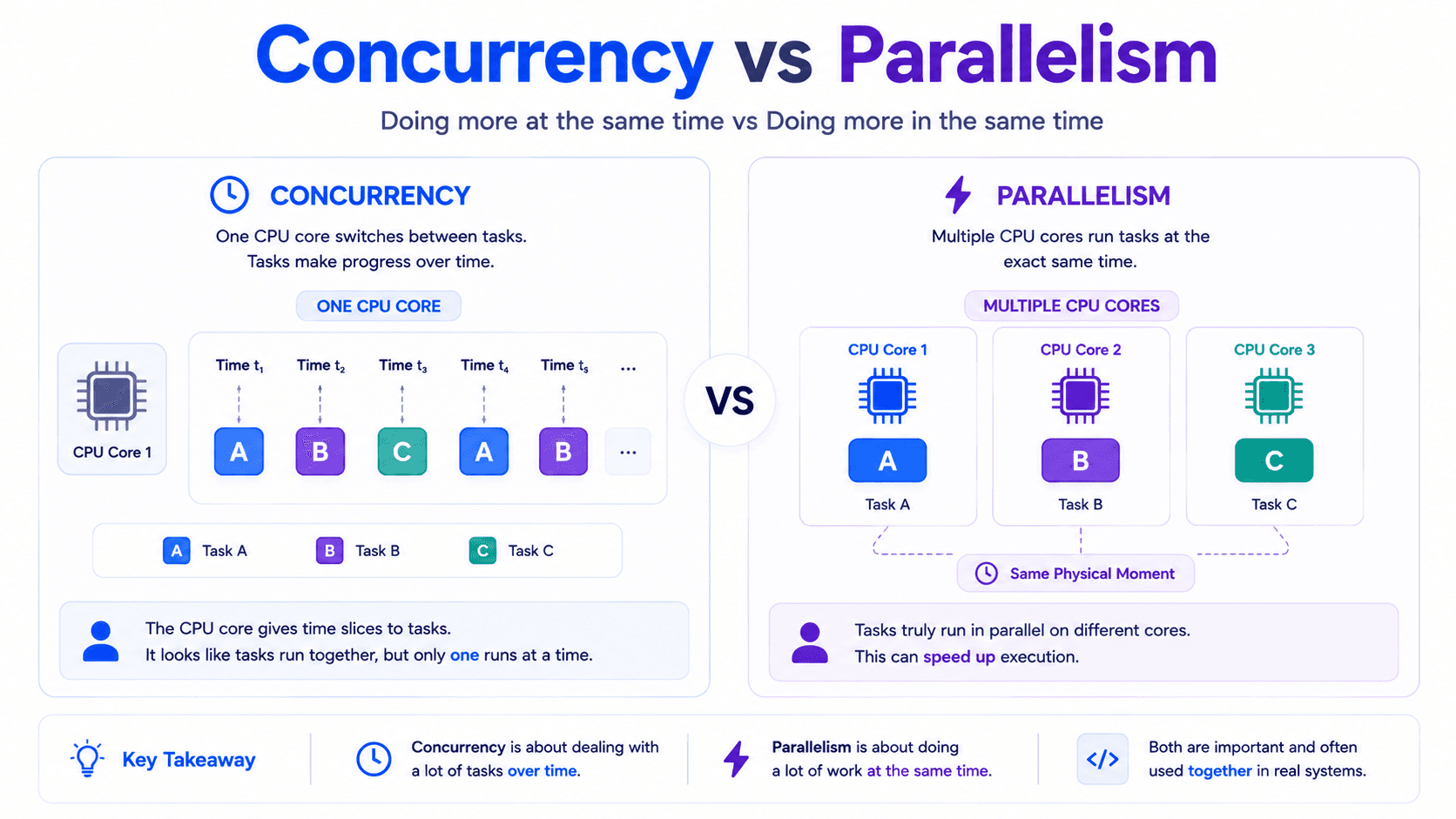
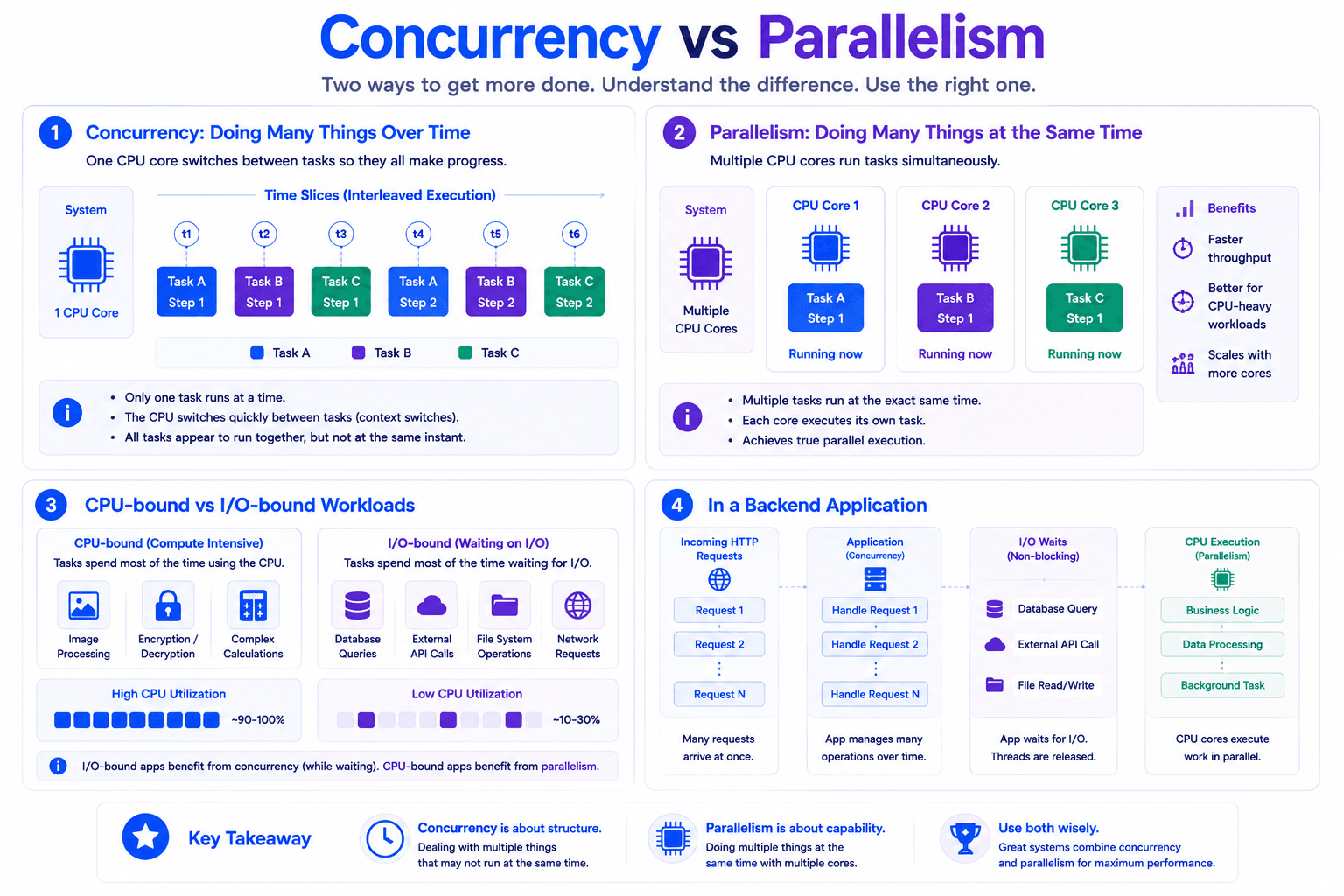
Concurrency is about managing multiple tasks during the same period.
Parallelism is about executing multiple tasks at the same physical moment.
To understand this properly, we need to look at how tasks use CPU cores.
What Is Concurrency?
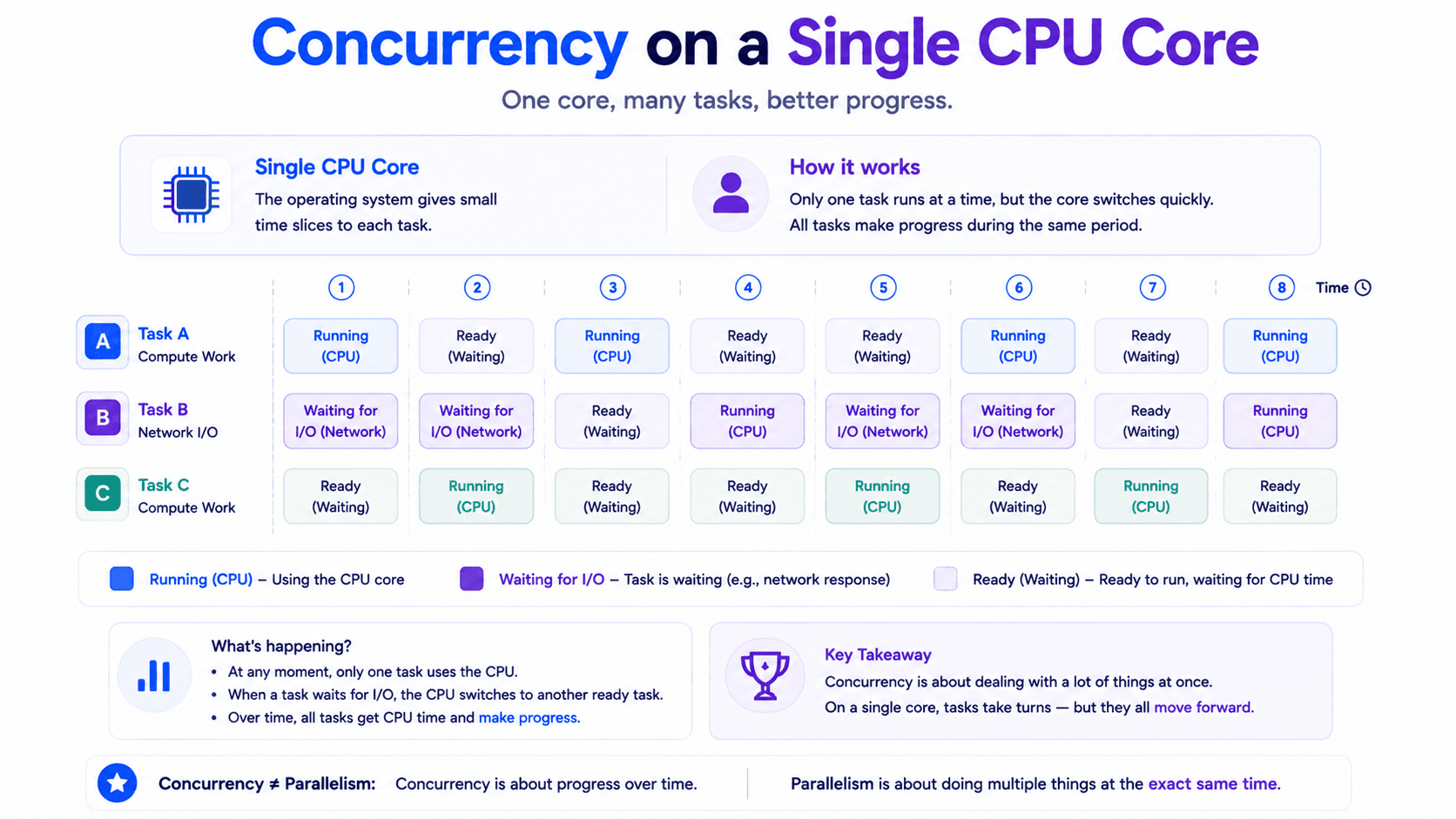
Concurrency means that multiple tasks can make progress during the same period.
The tasks do not necessarily execute at exactly the same physical moment.
Instead, their execution may overlap.
Imagine one CPU core handling three tasks:
- Task A
- Task B
- Task C
The CPU core cannot physically execute all three instruction streams at the same instant.
It may instead perform a small amount of Task A, pause it, execute part of Task B, pause it, and then execute part of Task C.
After that, it returns to Task A.
A simplified schedule may look like this:
- Task A runs for a short period.
- Task A is paused.
- Task B runs.
- Task B waits for a network response.
- Task C runs.
- Task C is paused.
- Task A continues.
- Task B resumes after its response arrives.
All three tasks make progress during the same overall period.
That is concurrency.
The CPU is not necessarily performing all of them simultaneously.
It is coordinating them.
Concurrency Is About Structure
Concurrency is mainly about how a system is designed.
A concurrent system can deal with several tasks whose lifetimes overlap.
For example, a web server may manage:
- A user login request
- A database query
- A file upload
- An email notification
- A scheduled cleanup task
These operations may all be active during the same period.
Some are using the CPU.
Some are waiting for a database.
Some are waiting for the network.
Some are sleeping until a scheduled time.
The system keeps track of all of them and allows available work to continue.
This is the main goal of concurrency.
A Real-World Analogy
Imagine one chef preparing three meals.
The chef begins Meal A and places it in the oven.
While Meal A is baking, the chef starts cutting vegetables for Meal B.
Then Meal B begins cooking, so the chef prepares the sauce for Meal C.
Only one chef is working.
The chef cannot physically perform two actions at the exact same moment.
However, all three meals make progress during the same period.
This is concurrency.
The chef uses waiting time efficiently instead of doing nothing.
What Is Parallelism?
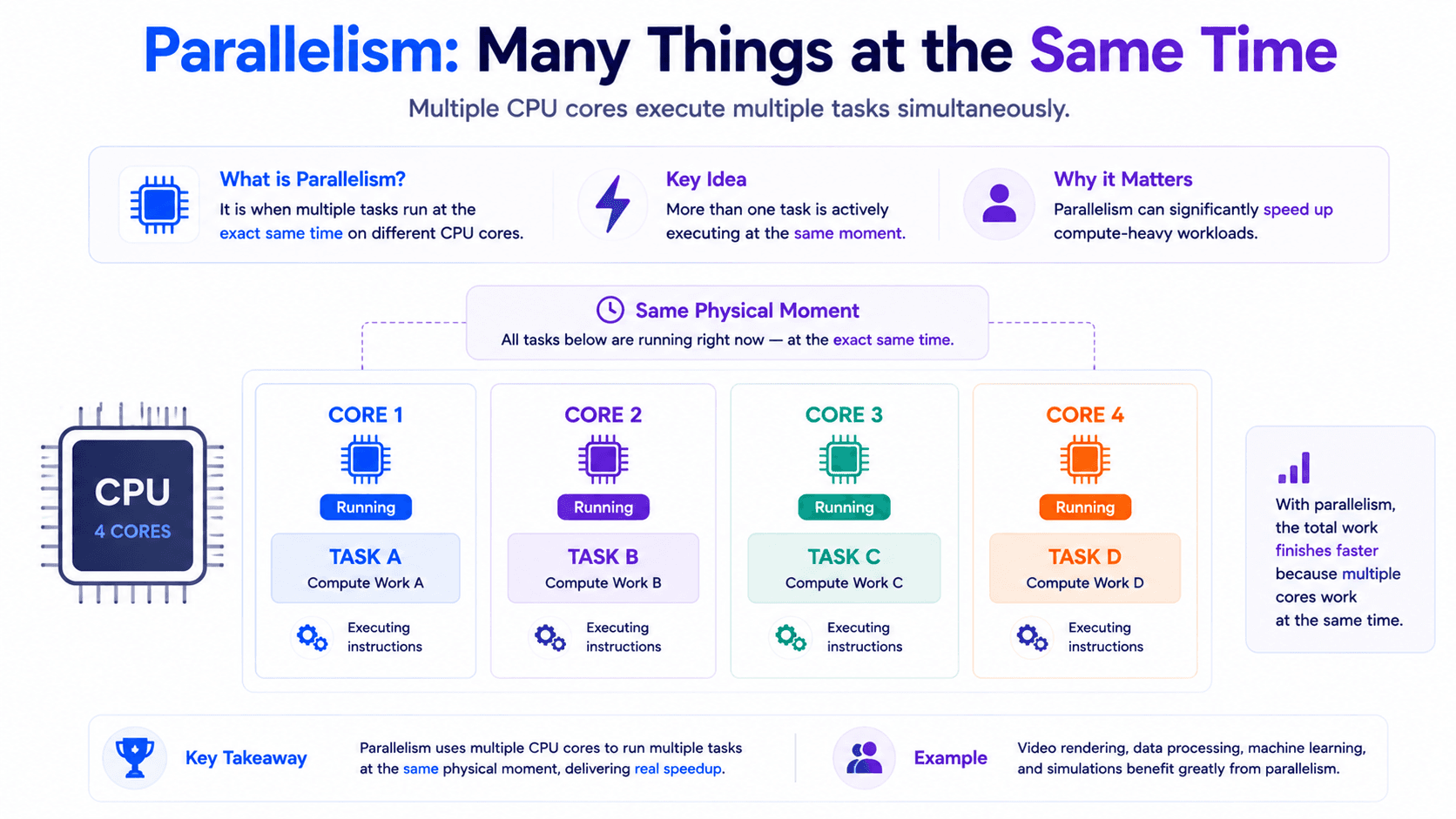
Parallelism means that multiple tasks execute at the same physical moment.
This requires multiple execution resources.
For example, imagine a CPU with four cores.
The operating system may schedule different tasks like this:
- Core 1 executes Task A.
- Core 2 executes Task B.
- Core 3 executes Task C.
- Core 4 executes Task D.
These tasks are not merely taking turns.
They are physically executing at the same time on different CPU cores.
That is parallelism.
Parallelism Is About Execution
Concurrency describes how multiple tasks are managed.
Parallelism describes how multiple tasks are physically executed.
A parallel program divides work into smaller parts that can run simultaneously.
For example, suppose you need to process one million images.
The work could be divided between four CPU cores.
- Core 1 processes the first group.
- Core 2 processes the second group.
- Core 3 processes the third group.
- Core 4 processes the final group.
If the work is balanced correctly, the total processing time may decrease significantly.
This is a common use case for parallelism.
A Real-World Analogy
Imagine four chefs preparing four meals.
Each chef works on a different meal at the same time.
Unlike the concurrency example, the work is physically simultaneous.
This is parallelism.
The important difference is the number of workers.
- One chef switching between tasks represents concurrency.
- Multiple chefs working at the same moment represent parallelism.
Concurrency vs Parallelism
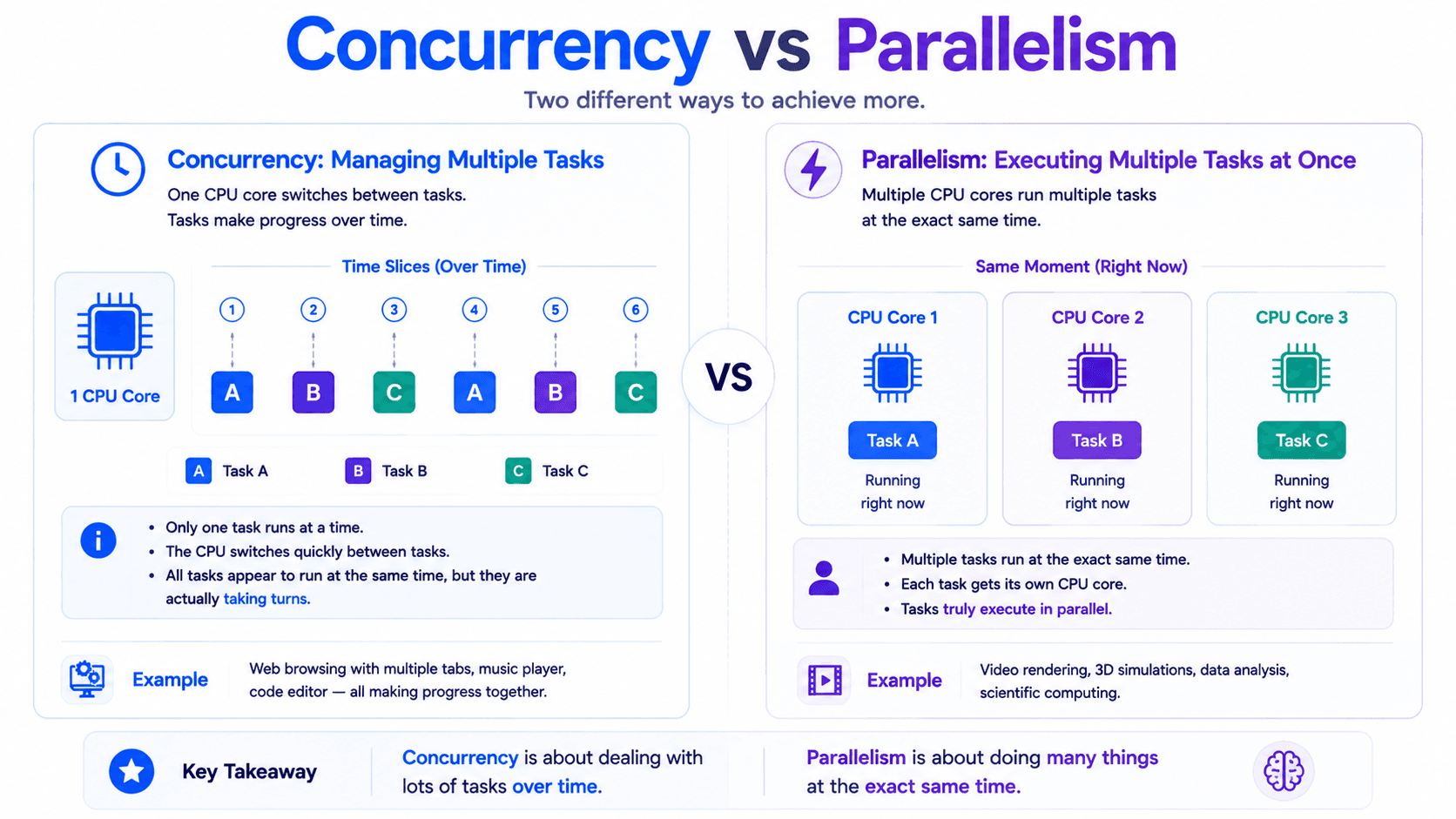
The main difference can be summarized as follows:
Concurrency
Parallelism
Manages multiple tasks during the same period
Executes multiple tasks at the same physical moment
Can work with one CPU core
Requires multiple execution resources for true simultaneous execution
Focuses on task coordination
Focuses on execution speed
Useful when tasks frequently wait
Useful when tasks require significant computation
Tasks may take turns
Tasks execute simultaneously
Improves responsiveness and resource usage
Can improve computational throughput
Concurrency and parallelism are not opposites.
A system can use both.
Concurrent but Not Parallel
A single-core processor can run a concurrent application.
Suppose three threads exist:
- Thread A
- Thread B
- Thread C
The operating system scheduler rapidly switches between them.
Only one thread executes at a particular instant.
However, all three threads make progress over time.
This system is concurrent, but it is not executing the threads in parallel.
This is an important point:
Multiple threads do not automatically mean parallel execution.
The number of threads can be much larger than the number of CPU cores.
Your application may create 100 threads on a machine with four CPU cores.
At most, only a limited number can physically execute at the same moment.
The others may be:
- Waiting for CPU time
- Waiting for network responses
- Waiting for database results
- Sleeping
- Blocked by locks
Parallel and Concurrent
A multi-core application can be both concurrent and parallel.
Imagine a server with four CPU cores and hundreds of active requests.
The application is concurrent because it manages many overlapping requests.
It is also parallel because several threads can physically execute on different cores at the same moment.
For example:
- One core validates a login request.
- Another core serializes a JSON response.
- Another core performs a calculation.
- Another core runs a background task.
At the same time, many other requests may be waiting for:
- A database
- An external API
- A file operation
- A message broker
This application uses both concurrency and parallelism.
Can a Program Be Parallel but Not Concurrent?
In normal software discussions, parallel systems usually involve concurrent task structures because multiple tasks exist at the same time.
However, the concepts focus on different questions.
Concurrency asks:
How do we organize and manage multiple active tasks?
Parallelism asks:
How many tasks are physically executing at this instant?
A parallel computation may divide one large operation into several independent pieces, execute them together, and combine the results.
The focus is the simultaneous execution rather than long-lived task coordination.
Why Concurrency Exists
Concurrency is not only about making applications faster.
In many cases, its main purpose is to keep applications responsive and use resources efficiently.
Consider a backend service.
A request may need to:
- Validate input.
- Query a database.
- Call another service.
- Wait for a response.
- Build the final result.
The CPU may be active only during some of these stages.
When the request waits for the database or network, the CPU does not need to remain idle.
It can work on another request.
Concurrency allows the application to make progress on other tasks while one task is waiting.
This is especially important for I/O-heavy applications.
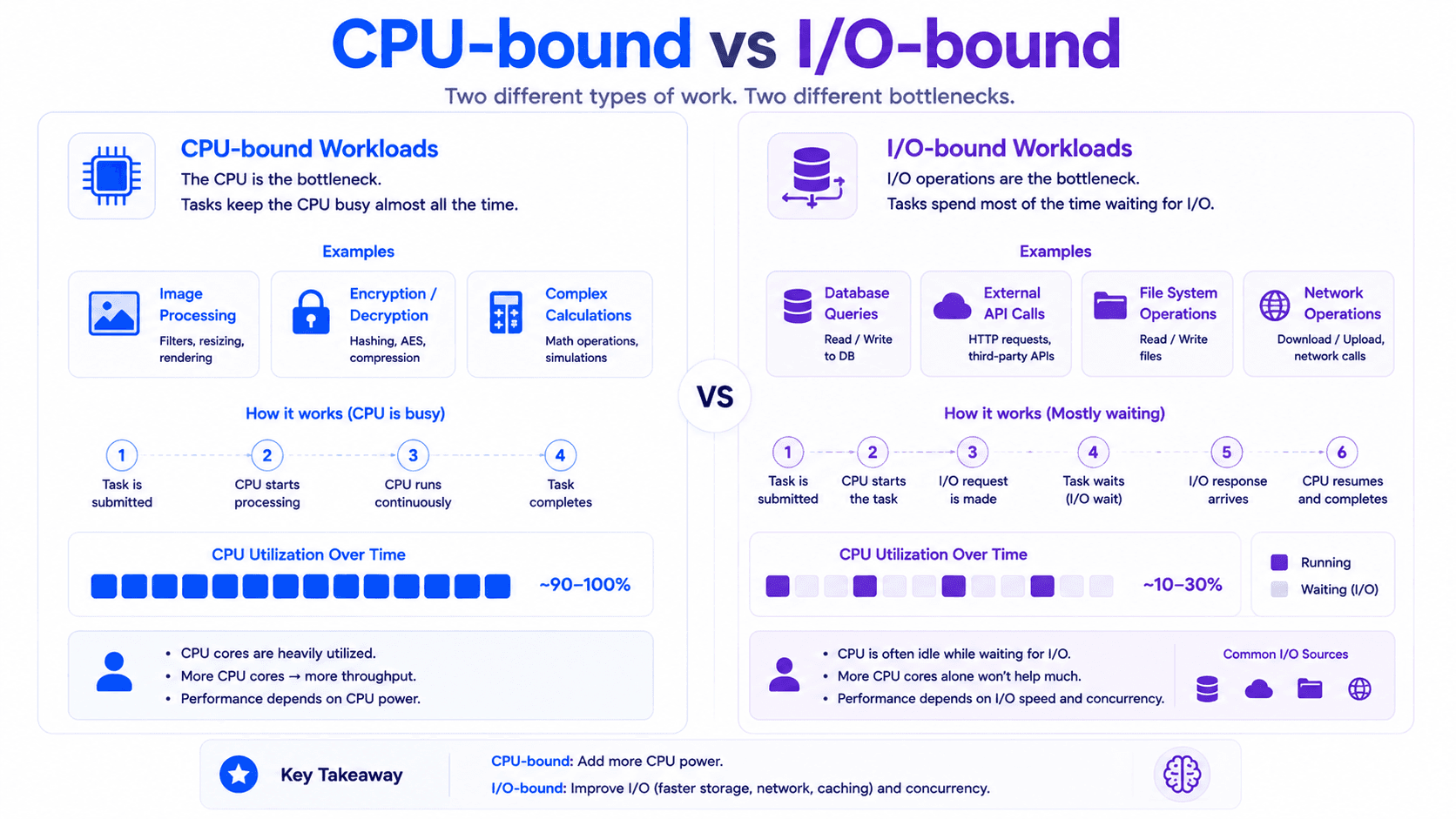
CPU-Bound Work
A task is CPU-bound when its performance mainly depends on processor speed.
Examples include:
- Image processing
- Video encoding
- Encryption
- Compression
- Large calculations
- Machine learning computations
- Complex data transformations
These tasks spend most of their time performing calculations.
They do not wait frequently for the network or storage.
Parallelism can help CPU-bound tasks because the work may be divided between several CPU cores.
For example, a large collection of images could be divided between four worker threads.
Each thread processes a separate group.
However, creating more threads than available cores does not necessarily make the work faster.
It may introduce:
- More context switching
- More scheduler overhead
- More memory usage
- More contention
For CPU-bound work, the number of active worker threads is often related to the number of available CPU cores.
I/O-Bound Work
A task is I/O-bound when it spends much of its time waiting for external resources.
Examples include:
- Database queries
- HTTP requests
- File operations
- Network communication
- Message broker operations
- Cloud storage calls
During these waits, the CPU is often free to perform other work.
Concurrency is especially valuable here.
A server can manage many requests even if only a small number are actively using the CPU at any moment.
This is why backend systems commonly use:
- Thread pools
- Asynchronous APIs
- Event loops
- Reactive programming
- Virtual threads
These models help applications handle waiting efficiently.
Threads Do Not Create More CPU Power
A common beginner mistake is believing that creating more threads creates more processing power.
It does not.
Suppose your machine has four CPU cores.
Creating 1,000 platform threads does not create 1,000 CPU cores.
Only a limited number of CPU-bound threads can physically execute at the same time.
The remaining threads must wait.
More threads may help when tasks frequently wait for I/O.
But for CPU-heavy work, too many threads can reduce performance.
This happens because the operating system must constantly switch between threads.
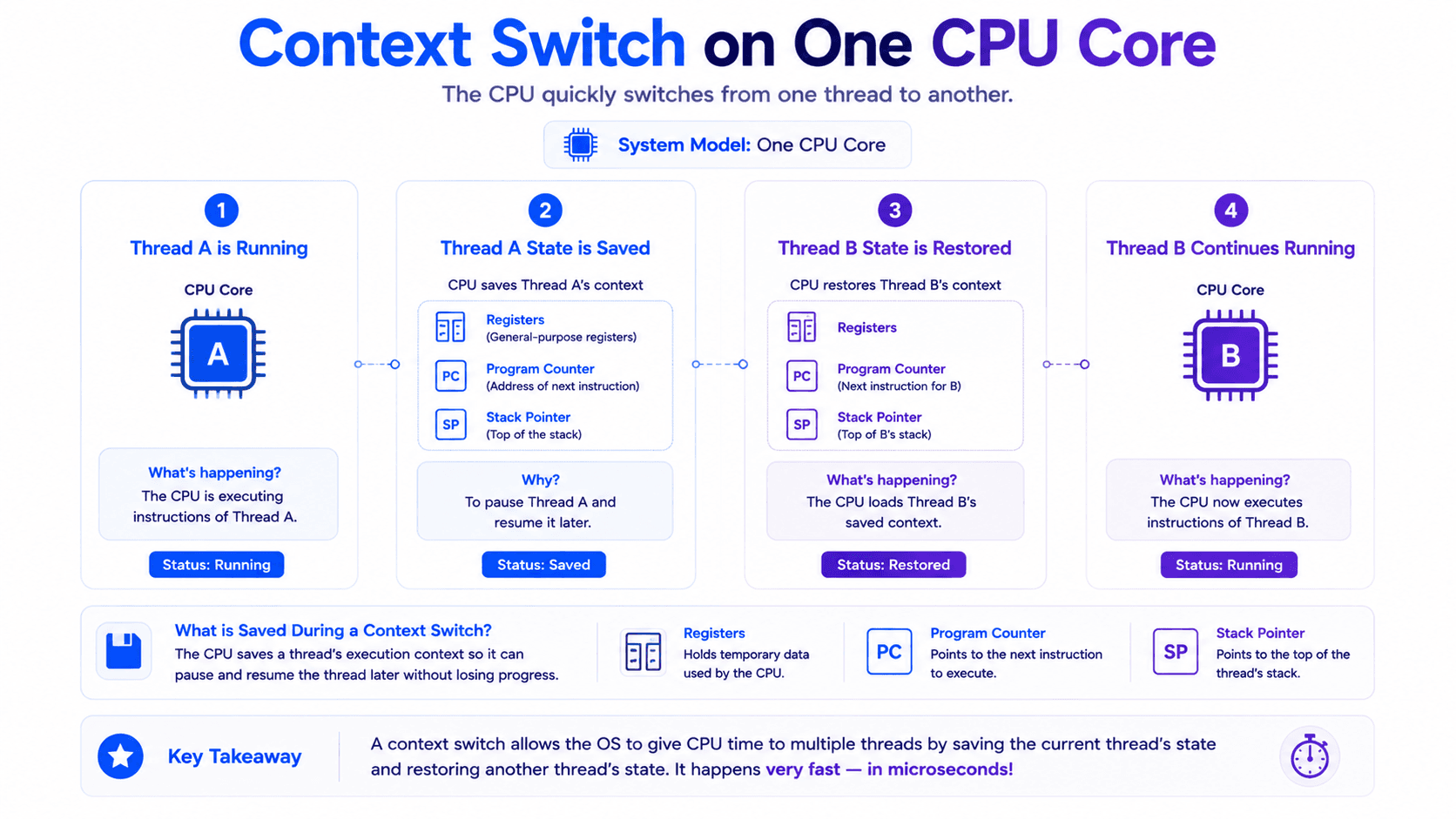
What Is a Context Switch?
A context switch happens when the CPU stops executing one thread and starts executing another.
The operating system must preserve enough information to resume the paused thread later.
This may include:
- Register values
- Program Counter
- Stack pointer
- Execution state
- Scheduling information
Then the state of the next thread must be restored.
Context switching is necessary for concurrency.
However, it is not free.
Frequent switching introduces overhead.
If an application creates too many active threads, the operating system may spend significant time managing threads instead of performing useful work.
This is one reason thread pools exist.
A thread pool limits the number of worker threads and reuses them for many tasks.
Concurrency Does Not Guarantee Speed
Concurrency may improve responsiveness and resource usage.
But it does not automatically make an application faster.
A concurrent design may become slower because of:
- Thread creation overhead
- Context switching
- Lock contention
- Shared-memory coordination
- Cache invalidation
- Poor task division
- Excessive synchronization
For example, dividing a tiny calculation between ten threads may take longer than performing it on one thread.
The cost of creating, scheduling, and coordinating the threads may be greater than the computation itself.
Concurrency is not a performance button.
It is a design technique.
It should be used when the problem benefits from overlapping work.
Parallelism Does Not Guarantee Linear Speedup
Suppose one task takes ten seconds on one CPU core.
Using two cores does not guarantee that it will finish in five seconds.
Using four cores does not guarantee that it will finish in 2.5 seconds.
Some parts of the work may not be parallelizable.
Threads may need to communicate.
They may compete for shared memory.
The system may spend time combining results.
Other applications are also using the CPU.
Parallelism can improve performance, but the improvement is rarely perfectly linear.
Shared State Changes Everything
When tasks run concurrently, they may access shared data.
Consider two threads updating the same counter:
counter++;
This line looks like one operation.
Conceptually, it may include:
- Read the current value.
- Add one.
- Write the result.
Two threads can interleave these steps and produce the wrong result.
This is called a race condition.
Concurrency introduces questions such as:
- Which thread accesses the data first?
- Can two threads modify it simultaneously?
- Will one thread see another thread's latest update?
- Can operations be observed in a different order?
- Should a lock protect the critical section?
These problems do not exist because concurrency is poorly designed.
They exist because shared mutable state must be coordinated.
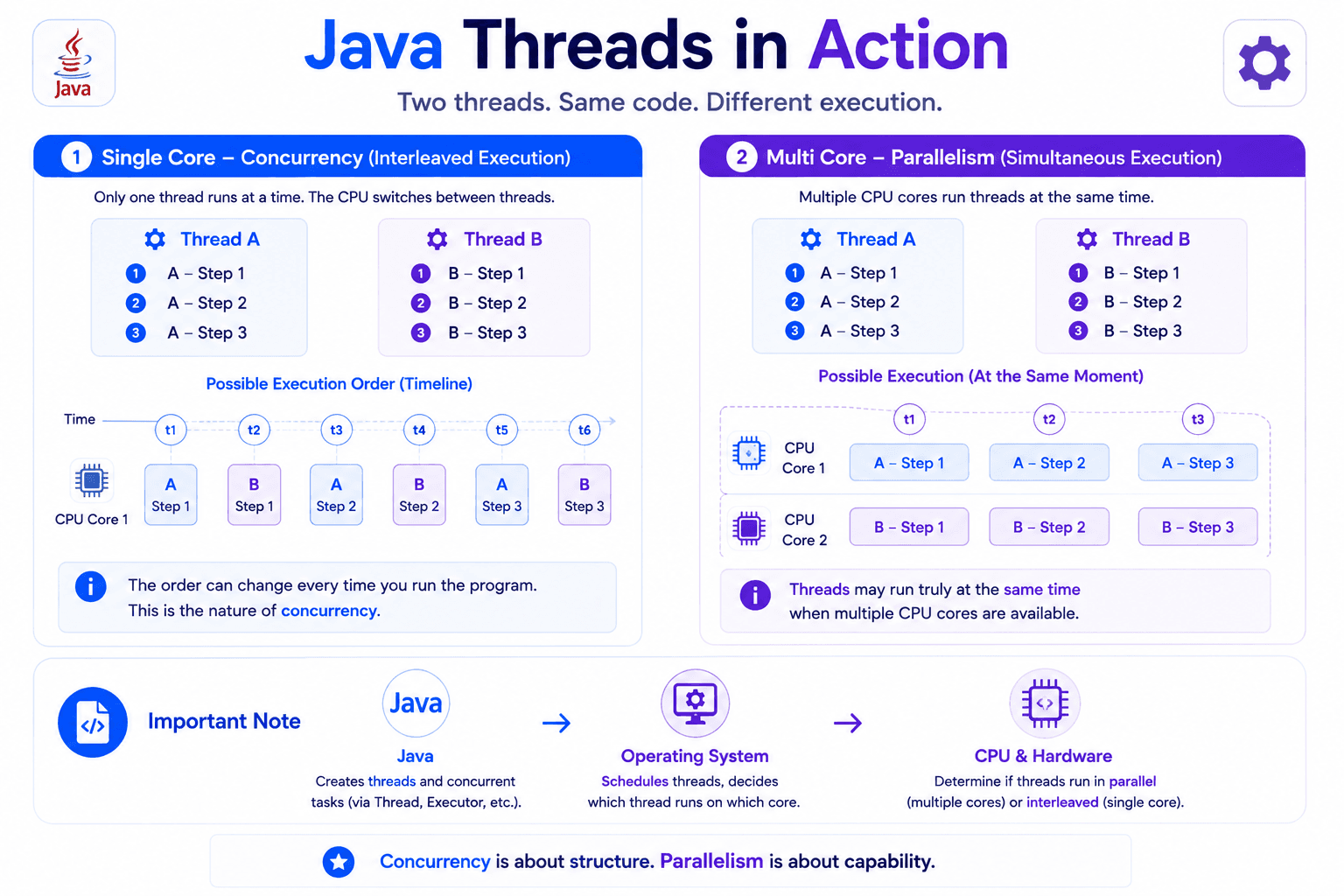
Simple Java Example
Consider two tasks:
public class ConcurrencyExample {

    public static void main(String[] args)
            throws InterruptedException {

        Thread first = new Thread(() -> performTask("Task A"));
        Thread second = new Thread(() -> performTask("Task B"));

        first.start();
        second.start();

        first.join();
        second.join();

        System.out.println("All tasks completed");
    }

    private static void performTask(String name) {
        for (int step = 1; step <= 3; step++) {
            System.out.println(
                    name + " completed step " + step +
                    " on " + Thread.currentThread().getName()
            );
        }
    }
}
The output order is not guaranteed.
You might see:
Task A completed step 1
Task B completed step 1
Task A completed step 2
Task B completed step 2
Task B completed step 3
Task A completed step 3
All tasks completed
Another execution may produce a different order.
The tasks are concurrent because both thread lifetimes overlap.
Whether they execute in parallel depends on:
- The number of CPU cores
- Operating system scheduling
- Other system activity
- Whether the tasks are runnable at the same time
The Java code creates the possibility of parallel execution.
It does not guarantee it.
Concurrency in Backend Applications
Backend applications are naturally concurrent.
Imagine a Spring Boot application receiving many requests.
At the same time:
- One user logs in.
- Another user creates an order.
- Another user downloads a report.
- A scheduled task removes expired records.
- A background worker sends notifications.
These operations overlap.
The system must manage them safely.
Some operations are using the CPU.
Others are waiting for:
- PostgreSQL
- Redis
- Kafka
- External HTTP services
- File storage
Concurrency allows the application to remain responsive.
Parallelism allows multiple runnable tasks to use different CPU cores when available.
Most production systems use both.
When Should You Think About Concurrency?
Concurrency is useful when:
- Several tasks can overlap.
- Tasks spend time waiting.
- The application must remain responsive.
- Multiple users need to be served.
- Background work must continue independently.
- Resources need to be used efficiently.
Parallelism is useful when:
- A large computation can be divided.
- Tasks are independent.
- Multiple CPU cores are available.
- The cost of coordination is smaller than the performance benefit.
The correct approach depends on the workload.
Common Misconceptions
Misconception 1: Concurrency Means Parallelism
Concurrency can exist on one CPU core.
Parallelism requires simultaneous execution resources.
Misconception 2: More Threads Always Improve Performance
Too many threads can increase context switching, memory usage, and contention.
Misconception 3: One Thread Always Runs on One Core
The operating system may pause a thread and later resume it on another core.
A thread is not permanently attached to one CPU core.
Misconception 4: Thread Execution Order Follows Source Code
After multiple threads start, their relative execution order is generally controlled by scheduling.
It should not be assumed unless explicit coordination exists.
Misconception 5: Concurrency Is Only About Threads
Concurrency can be implemented using several models:
- Threads
- Processes
- Event loops
- Asynchronous tasks
- Coroutines
- Actors
- Reactive streams
- Virtual threads
Threads are only one way to build concurrent systems.
Key Takeaways
- Concurrency and parallelism are related but different concepts.
- Concurrency is about managing multiple active tasks during the same period.
- Parallelism is about executing multiple tasks at the same physical moment.
- A concurrent application can run on one CPU core.
- True parallel execution requires multiple execution resources.
- Multiple threads do not guarantee parallelism.
- CPU-bound workloads may benefit from parallelism.
- I/O-bound workloads often benefit from concurrency.
- More threads do not create more CPU power.
- Context switching has a cost.
- Concurrency does not automatically make applications faster.
- Parallel speedup is rarely perfectly linear.
- Shared mutable state introduces race conditions and synchronization problems.
- Backend applications commonly use concurrency and parallelism together.
Follow My Content
If you enjoy content about Java, backend engineering, concurrency, computer architecture, and system design, you can follow my work on:
- Instagram:@the.code.architect
- Medium:medium.com/@sarvar55mszde
- LinkedIn: Follow me here for technical discussions, software engineering lessons, and new articles from this series.
In the next article, we will explore:
How Operating Systems Schedule Threads: From Runnable Queues to CPU Time
What was the most confusing part of concurrency and parallelism when you first started learning them?
Comments (0)
Loading comments...