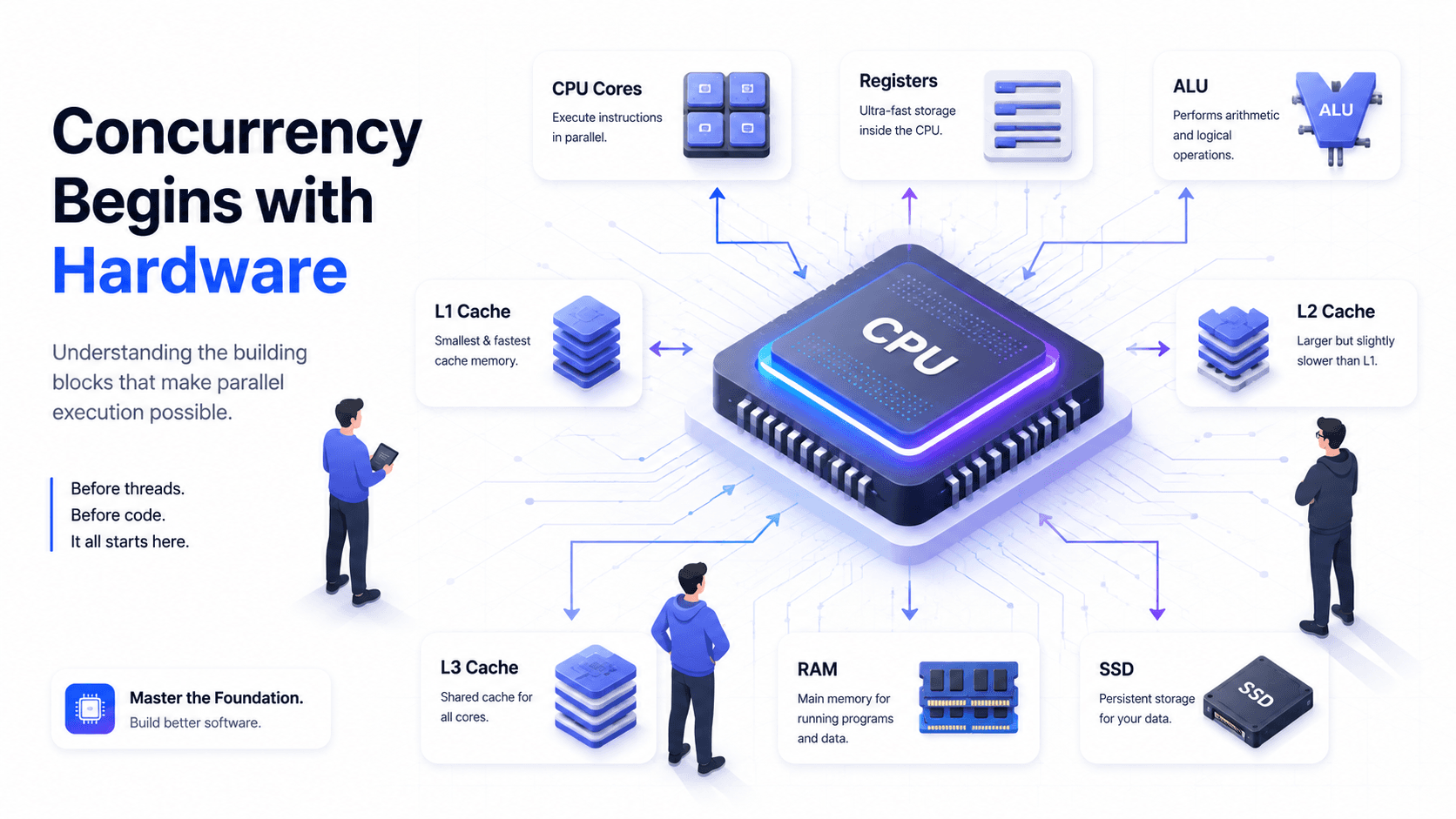
Concurrency Starts with Hardware: Understanding CPUs Before Threads
Concurrency is usually introduced with threads, locks, and synchronization.
That is often too early.
Before understanding concurrency, we first need to understand the machine that runs our code.
Why does a thread sometimes wait?
Why can two threads produce the wrong result?
Why does memory visibility become a problem?
Why do programming languages provide tools such as locks, atomic variables, and memory barriers?
The answers begin with hardware.
In this article, we will build the foundation step by step.
We will explore:
- What a CPU is
- What a CPU core is
- What registers do
- How the ALU works
- Why CPU caches exist
- The difference between L1, L2, and L3 cache
- What a store buffer is
- How the CPU communicates with RAM
- Why hardware knowledge matters for concurrency
We will not discuss Java-specific features yet.
The goal is to understand the machine first.
1. What Is a CPU?
CPU stands for Central Processing Unit.
It is the component that executes the instructions of a program.
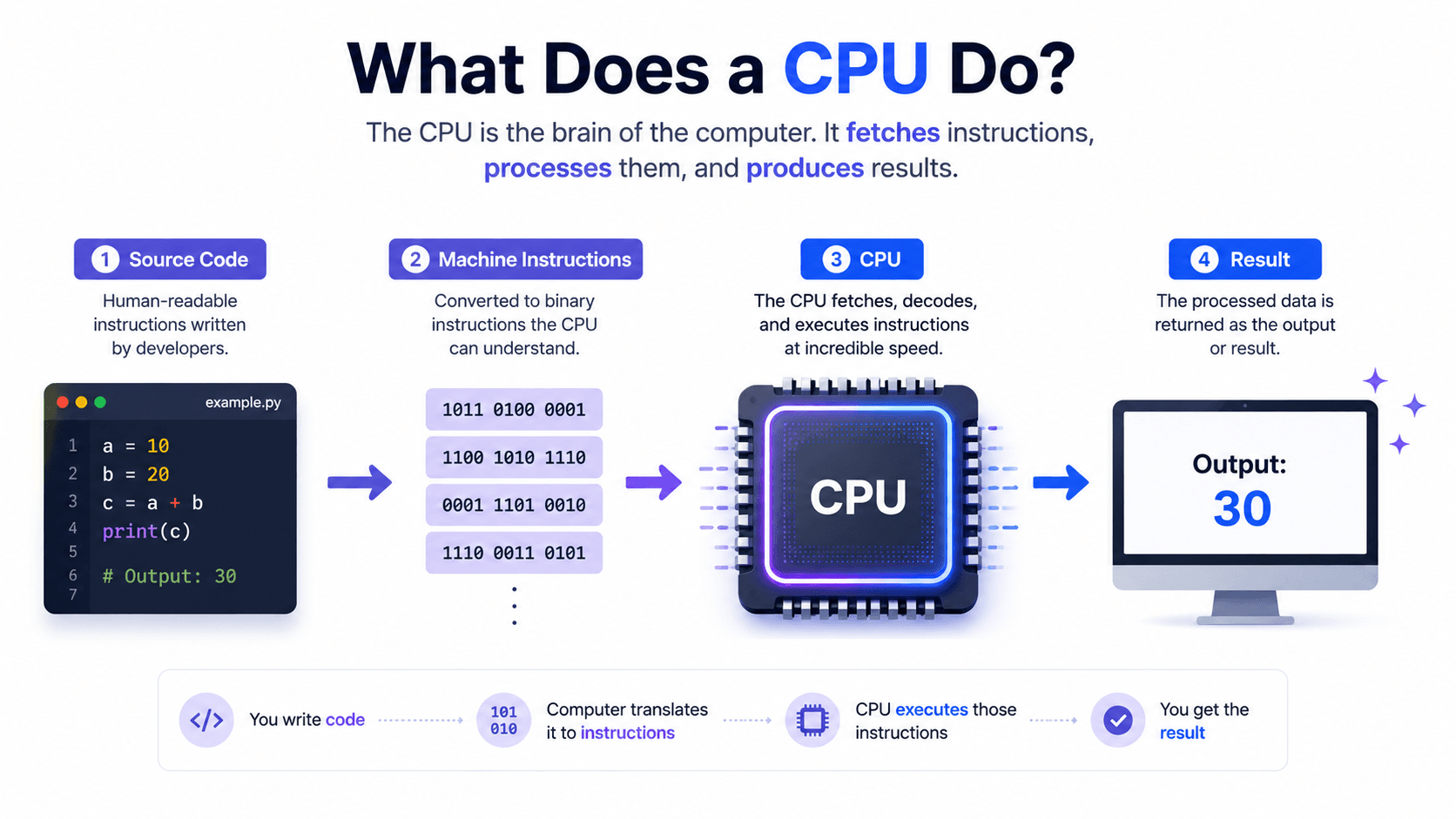
When you write code like this:
int result = 5 + 3;
the CPU does not understand Java source code directly.
Your code must first be transformed into instructions that the machine can execute.
The general flow looks like this:
- Source Code
- Compiler or Interpreter
- Machine Instructions
- CPU Execution
- Program Result
The CPU continuously performs operations such as:
- Loading data
- Performing calculations
- Comparing values
- Moving data
- Jumping between instructions
- Reading from memory
- Writing to memory
You can think of the CPU as the execution engine of the computer.
The program contains instructions.
The CPU performs those instructions.
2. A CPU Does Not Execute an Entire Program at Once
A program may contain thousands or millions of instructions.
The CPU does not execute the entire program in one step.
It executes instructions one by one.
For example, imagine this code:
int a = 5; int b = 3; int result = a + b;
Conceptually, the processor may perform operations similar to these:
Load 5 Store it as a Load 3 Store it as b Load a Load b Add them Store the result
Real CPU instructions are more complex, and compilers may optimize the code, but the basic idea remains the same.
The CPU works with small instructions.
A complicated application is ultimately reduced to a large sequence of simple operations.
3. The Main Components of a CPU
A modern CPU contains many components.
For our concurrency foundation, the most important ones are:
- CPU cores
- Registers
- Arithmetic Logic Unit
- Control Unit
- L1 cache
- L2 cache
- L3 cache
- Store buffers
- Execution pipelines
These components work together to execute instructions as efficiently as possible.
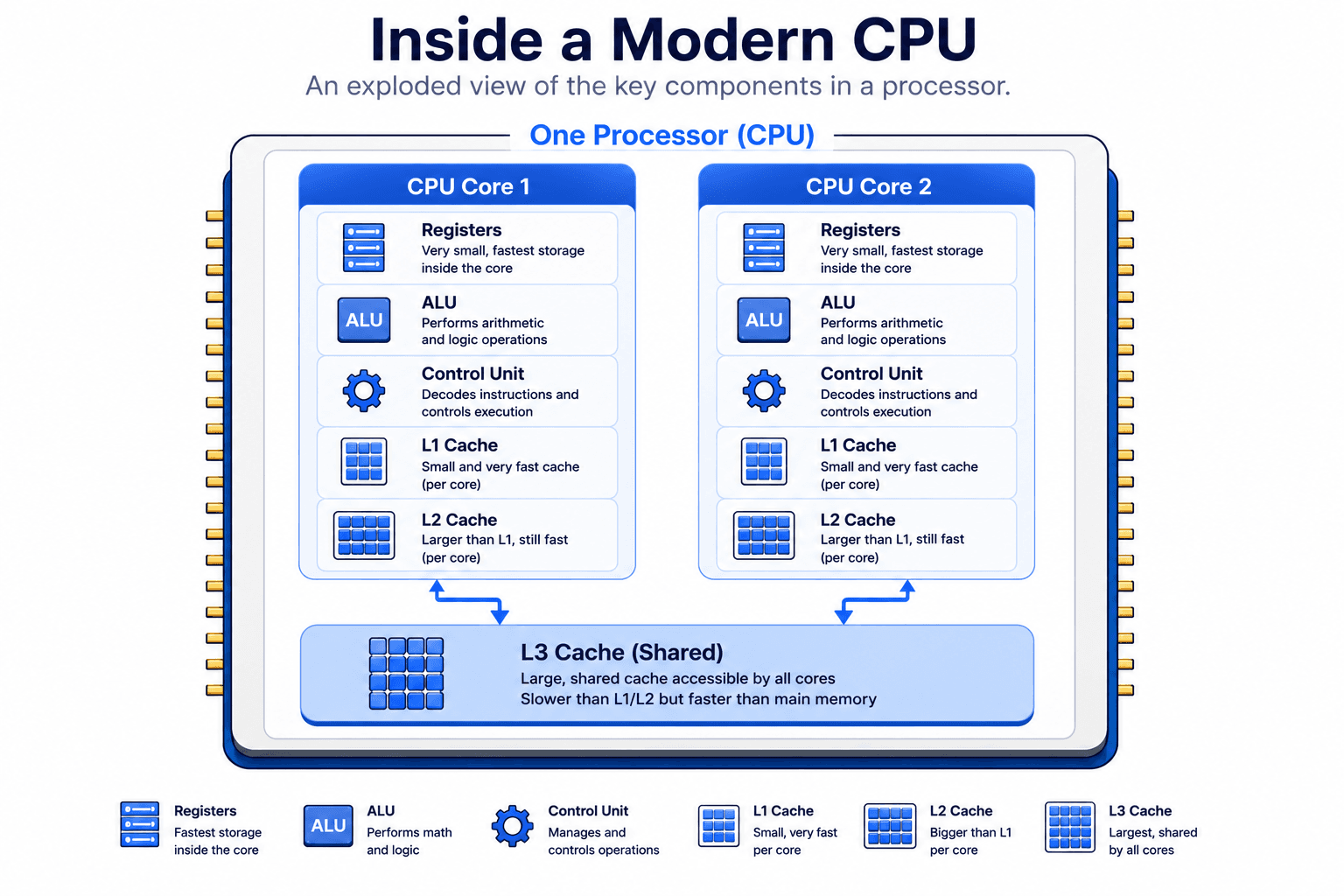
A simplified CPU can be viewed as containing the following components:
CPU
Core 1
- Registers
- Arithmetic Logic Unit (ALU)
- Control Unit
- L1 Cache
- L2 Cache
Core 2
- Registers
- Arithmetic Logic Unit (ALU)
- Control Unit
- L1 Cache
- L2 Cache
Shared Components
- L3 Cache (shared by all CPU cores)
This is intentionally a simplified model.
Modern processors contain many additional components, such as instruction pipelines, branch predictors, execution units, store buffers, load buffers, reorder buffers, and cache coherence logic. However, understanding the components shown above is enough to build a solid foundation for learning concurrency. We will gradually introduce the more advanced hardware structures later in this series.
4. What Is a CPU Core?
A CPU core is an independent execution unit inside the processor.
A processor can contain:
- One core
- Two cores
- Four cores
- Eight cores
- Sixteen cores
- Or many more
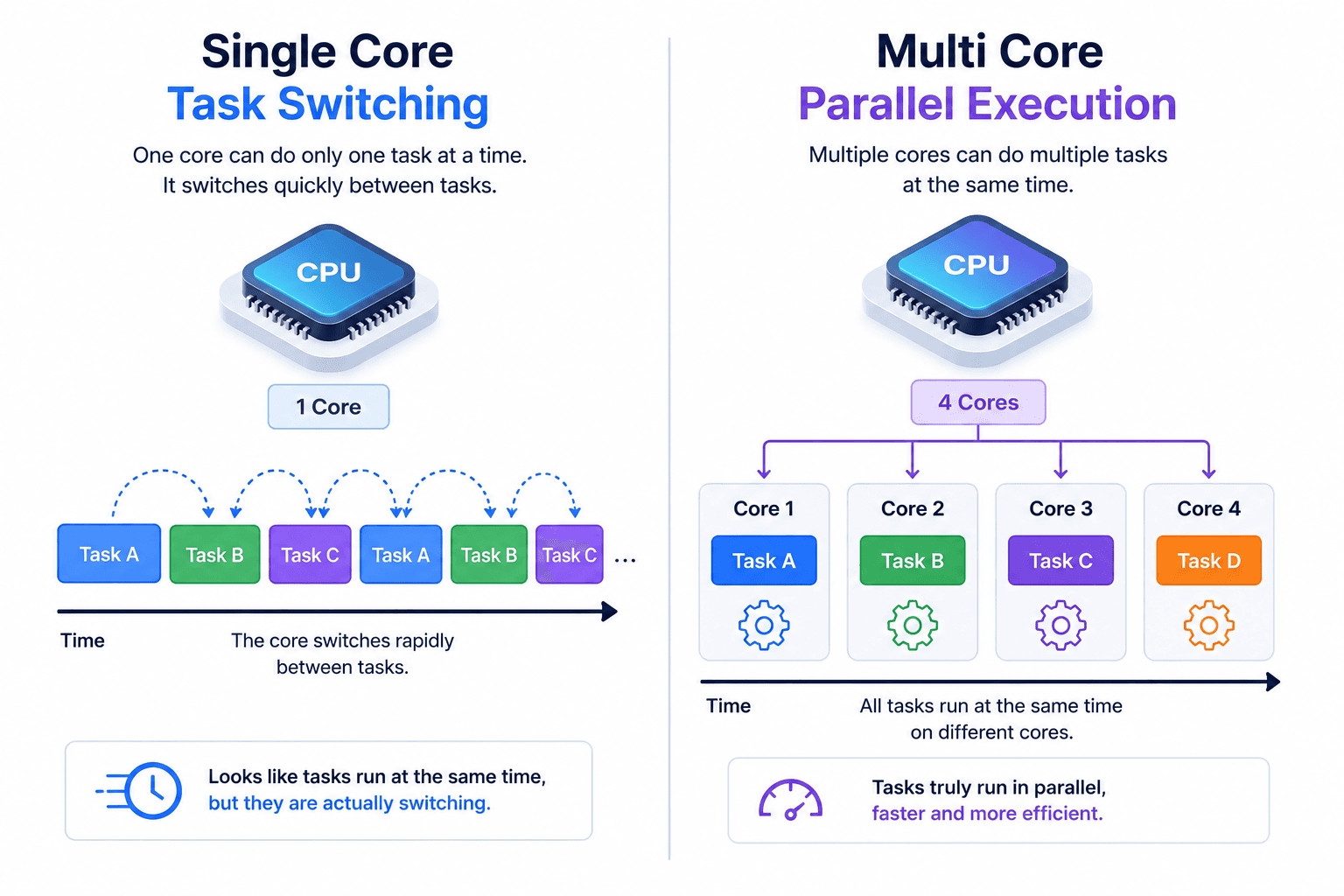
A single-core processor has one execution core, meaning it can execute only one instruction stream at a time (while rapidly switching between tasks when necessary).
A multi-core processor contains multiple independent execution cores.
For example, a 4-core CPU consists of:
- Core 1
- Core 2
- Core 3
- Core 4
Each core is capable of fetching, decoding, and executing its own stream of instructions independently.
This is one of the fundamental ideas behind concurrency.
Imagine your computer has four CPU cores. The operating system can schedule different tasks on different cores at the same time.
For example:
- Core 1 executes your web browser.
- Core 2 plays music from your media application.
- Core 3 processes a request for your backend server.
- Core 4 handles operating system services and background tasks.
Because each core can work independently, multiple applications—and even multiple parts of the same application—can make progress simultaneously. This ability to execute work in parallel is one of the key reasons modern computers feel fast and responsive.
Multiple cores make true parallel execution possible.
Two different operations can physically run at the same time on two different cores.
However, multiple cores also create a new problem:
What happens when two cores access the same data?
This question is one of the foundations of concurrency.
We will return to it later.
Single-Core and Multi-Core Execution
On a single-core CPU, only one instruction stream can make progress on the core at a particular instant.
The operating system can rapidly switch between tasks:
Task A Task B Task A Task C Task B
This can create the appearance that many tasks are running simultaneously.
This is concurrency.
On a multi-core CPU, tasks may truly execute at the same time:
Core 1 → Task A Core 2 → Task B Core 3 → Task C Core 4 → Task D
This is parallelism.
We will explain the exact difference between concurrency and parallelism in a later article.
For now, remember this:
Concurrency: Multiple tasks make progress during the same period. Parallelism: Multiple tasks execute at the same physical moment.
5. What Are CPU Registers?
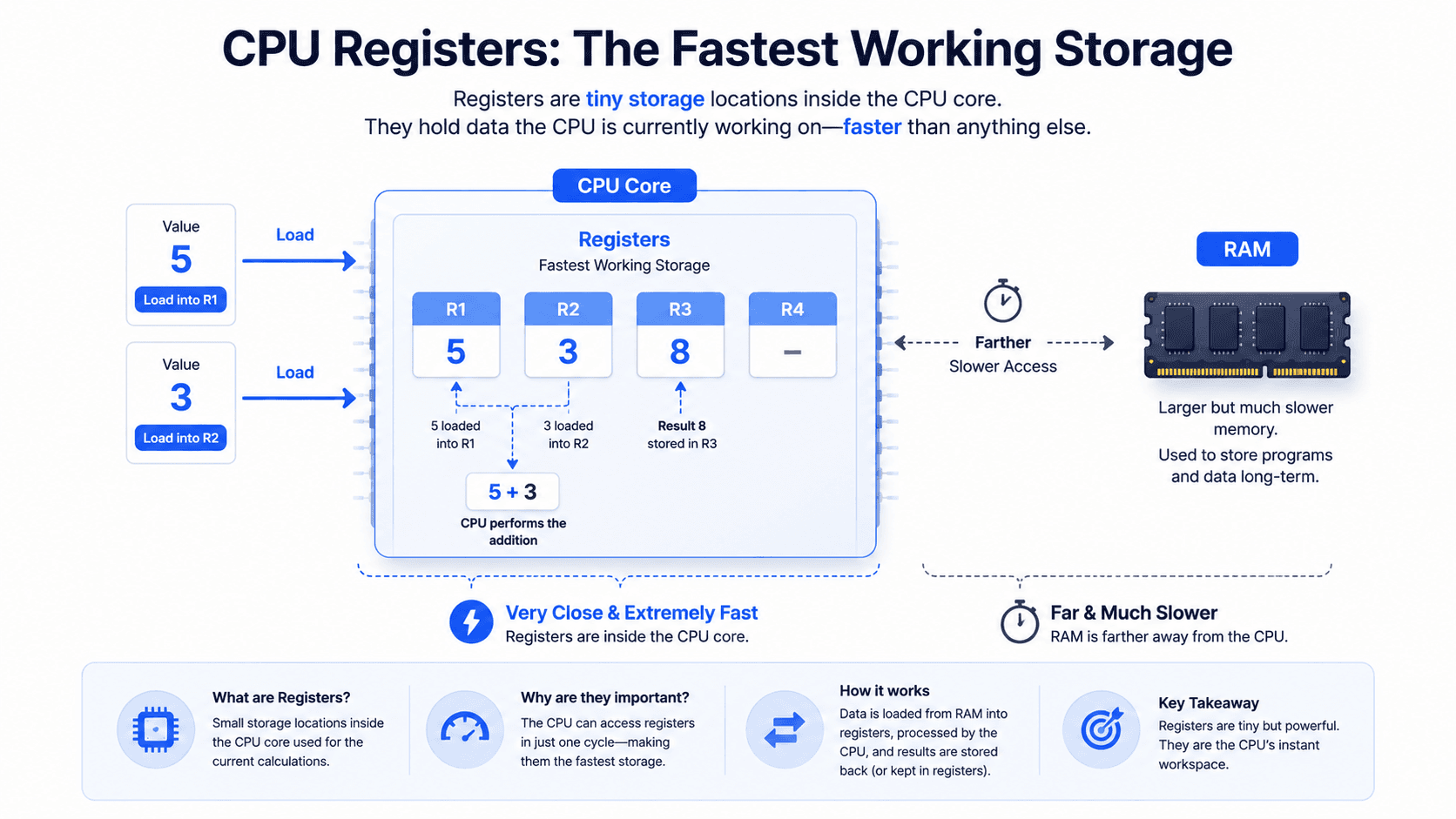
Registers are extremely small and extremely fast storage locations inside a CPU core.
The CPU uses registers to hold values that it needs immediately.
For example, while calculating:
5 + 3
the processor may load both numbers into registers.
Register A = 5 Register B = 3
Then the ALU performs the operation:
Register A + Register B = 8
The result may then be placed in another register.
Register C = 8
Registers are much faster than RAM because they are located directly inside the CPU core.
They are also very limited in size.
A CPU cannot store an entire application inside registers.
Instead, registers are used for the values required during the current operations.
Common register responsibilities include:
- Holding numbers
- Holding memory addresses
- Holding intermediate results
- Tracking the current instruction
- Tracking the stack
- Storing status information
Different CPU architectures provide different registers.
Examples include:
- General-purpose registers
- Instruction pointer
- Stack pointer
- Status registers
- Floating-point registers
- Vector registers
You do not need to memorize them yet.
The important idea is:
Registers are the CPU's fastest working storage.
Registers Are Usually Core-Local
Each CPU core has its own registers.
For example:
Core 1 ├── Register A ├── Register B └── Register C Core 2 ├── Register A ├── Register B └── Register C
Core 1 does not normally perform its current work using Core 2's registers.
This means two cores may temporarily hold different values related to the same logical data.
That matters when we later discuss:
- Shared memory
- Visibility
- Atomicity
- Synchronization
6. What Is the ALU?
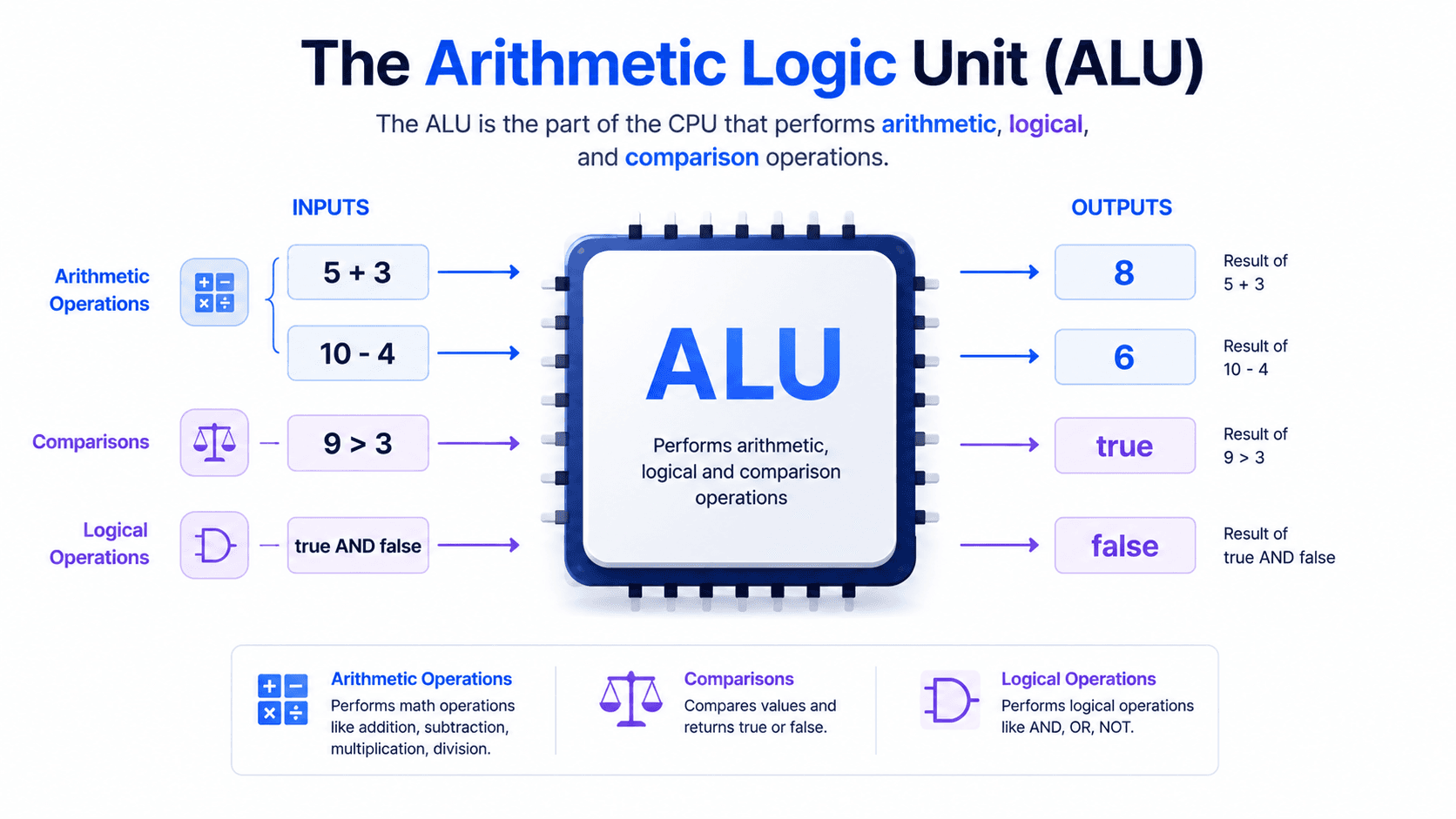
ALU stands for Arithmetic Logic Unit.
It is the part of the CPU that performs arithmetic and logical operations.
Arithmetic operations include:
Addition Subtraction Multiplication Division
Logical operations include:
AND OR XOR NOT
The ALU can also compare values:
5 > 3 10 == 10 7 < 2
Consider this expression:
boolean allowed = age >= 18;
At a simplified level, the CPU loads the value of age, compares it with 18, and produces a result.
age = 20 20 >= 18 Result = true
The ALU is not responsible for storing an entire application.
It performs operations using values supplied by registers and other processor components.
A simplified flow looks like this:
Registers ↓ ALU ↓ Result ↓ Register
7. What Is the Control Unit?
The Control Unit coordinates instruction execution.
It helps the CPU decide:
- Which instruction should be executed
- Which data should be loaded
- Which operation the ALU should perform
- Where the result should be stored
- Which instruction comes next
You can think of the Control Unit as a coordinator.
Imagine a small factory:
- Registers hold temporary materials
- The ALU performs the operation
- The Control Unit tells each component what to do
- Cache supplies frequently needed data
- RAM stores much larger amounts of data
The Control Unit does not usually perform calculations itself.
Instead, it directs the other components.
8. The Fetch–Decode–Execute Cycle
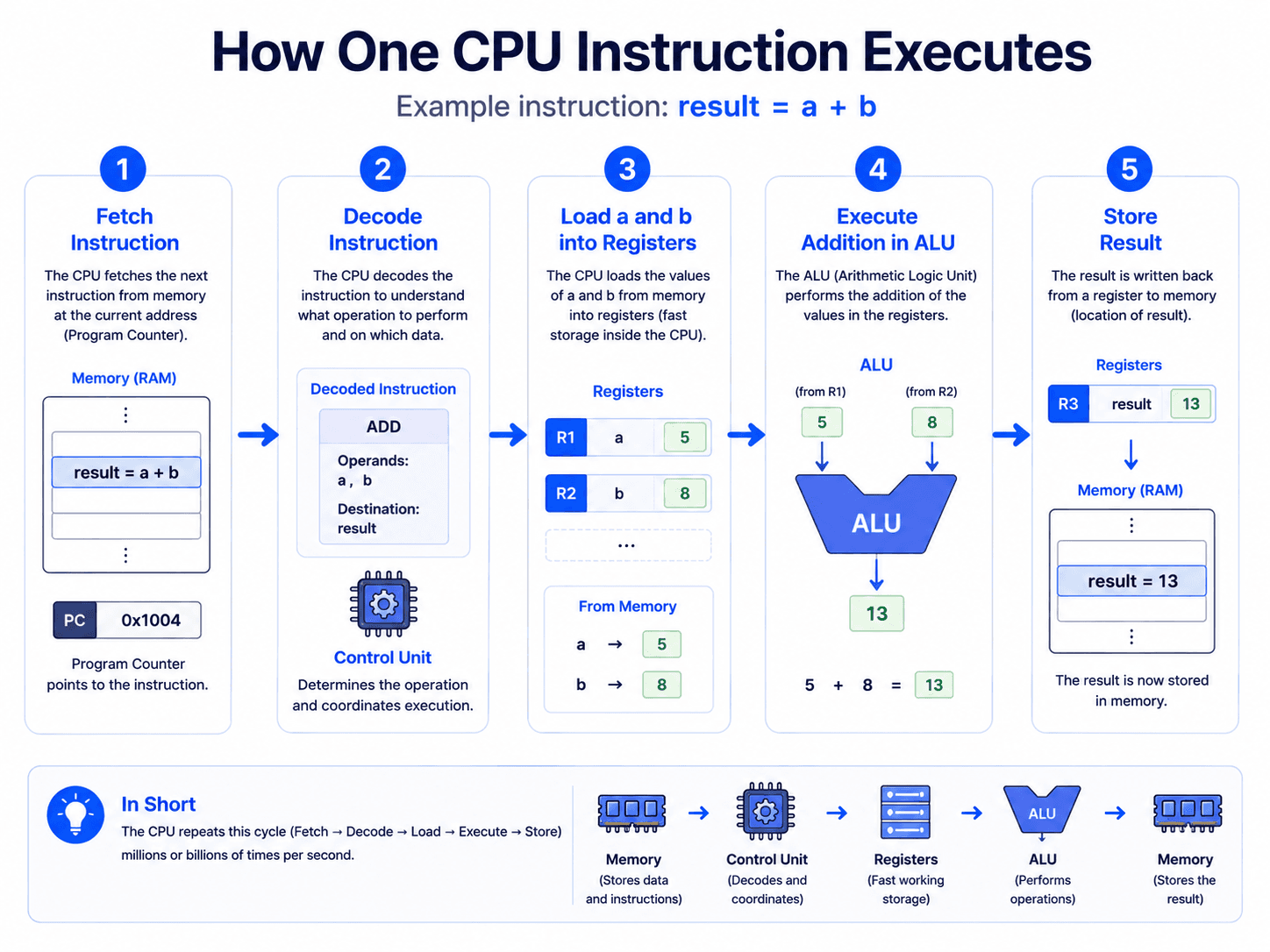
The CPU repeatedly performs a cycle:
Fetch Decode Execute Store
Fetch
The CPU retrieves the next instruction.
Decode
The CPU determines what the instruction means.
Execute
The necessary operation is performed.
Store
The result is written to a register, cache, or memory.
Consider this statement:
int result = a + b;
A simplified flow may be:
1. Fetch the addition instruction 2. Decode the instruction 3. Load a into a register 4. Load b into a register 5. Send the values to the ALU 6. Add the values 7. Store the result
Again, real CPUs are more advanced.
They use techniques such as:
- Pipelining
- Out-of-order execution
- Speculation
- Branch prediction
- Multiple execution units
But the simple fetch–decode–execute model is still a good starting point.
9. Why Does the CPU Need Cache?
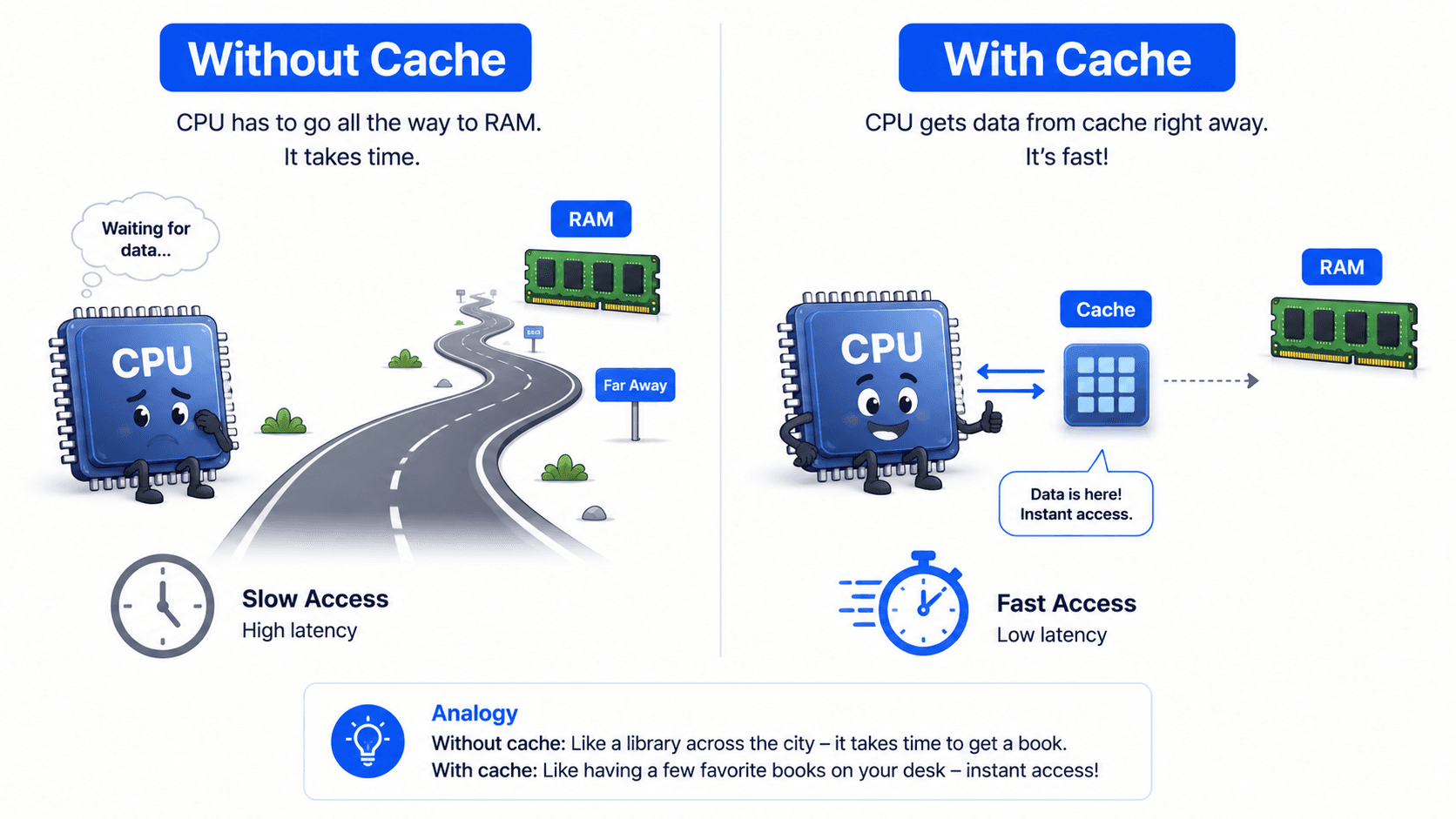
Modern CPUs are extremely fast.
RAM is much slower in comparison.
If the CPU had to wait for RAM every time it needed data, much of its time would be wasted.
Imagine a worker who can complete a task in one second but must wait several minutes for every tool.
The worker's speed becomes useless because the tools arrive too slowly.
The same type of problem exists between the CPU and RAM.
CPU → Very fast RAM → Much slower
To reduce this waiting time, CPUs use cache memory.
Cache is smaller than RAM but much faster.
It stores data that the CPU is likely to need soon.
The general idea is:
CPU needs data ↓ Check cache ↓ If found, use it quickly ↓ If not found, request it from RAM
When data is found in the cache, it is called a cache hit.
When data is not found, it is called a cache miss.
Cache Hit
CPU requests value X L1 Cache contains X CPU receives X quickly
Cache Miss
CPU requests value X L1 does not contain X L2 does not contain X L3 does not contain X The CPU requests X from RAM
A cache miss is more expensive because the processor must wait longer.
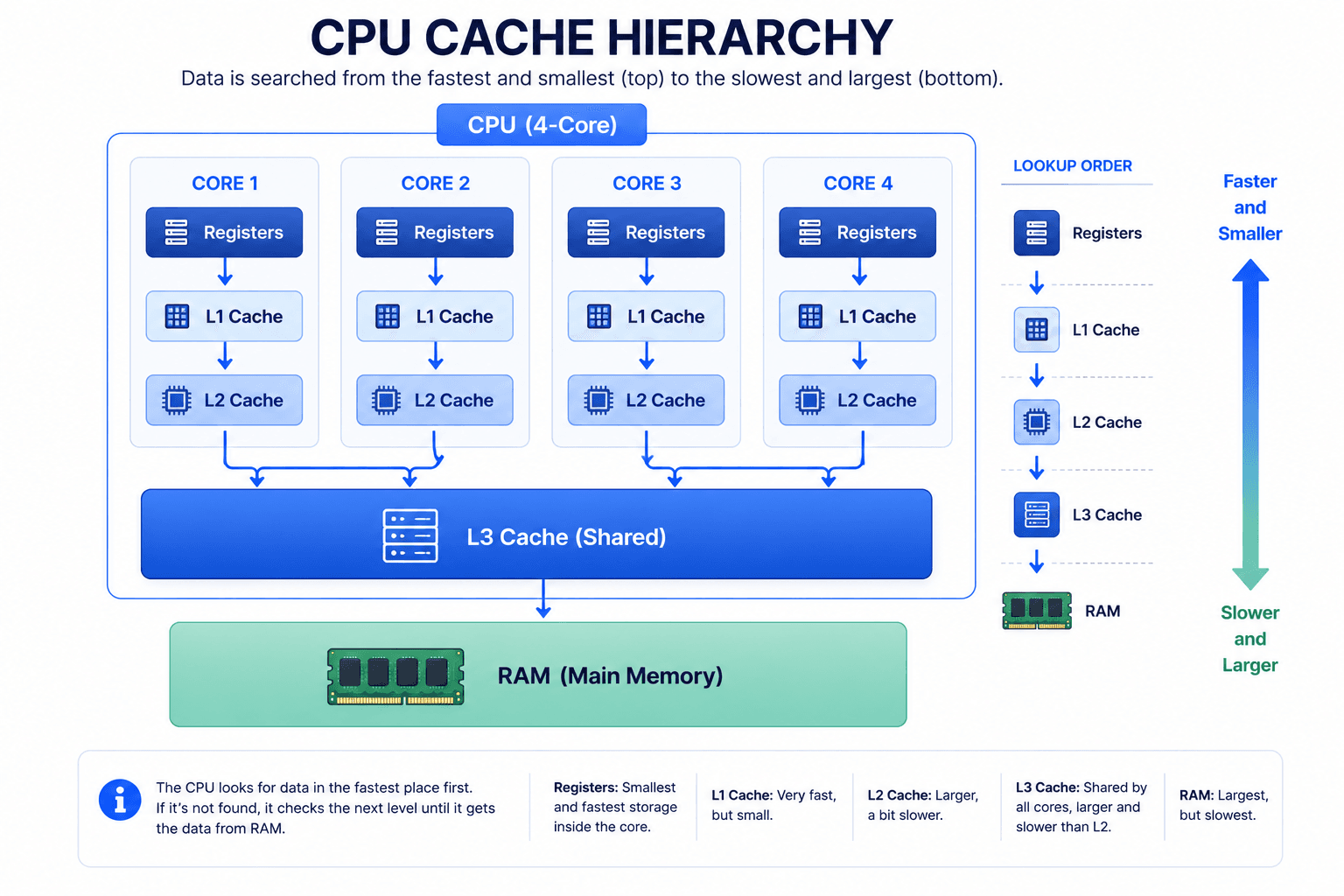
10. L1, L2, and L3 Cache
Modern CPUs commonly contain several cache levels.
L1 Cache L2 Cache L3 Cache
These caches differ in:
- Speed
- Size
- Distance from the core
- Sharing model
The general pattern is:
L1 → Smallest and fastest L2 → Larger but slower L3 → Largest cache but slower than L1 and L2
However, even L3 cache is usually much faster than RAM.
L1 Cache
L1 is the closest cache to the CPU core.
It is very small and very fast.
Each core normally has its own L1 cache.
A core may have separate L1 caches for:
- Instructions
- Data
Conceptually:
Core 1 ├── L1 Instruction Cache └── L1 Data Cache
The instruction cache stores instructions.
The data cache stores values used by those instructions.
L2 Cache
L2 is usually larger than L1.
It is slower than L1 but still very fast.
A CPU core commonly has its own L2 cache.
Core 1 ├── L1 Cache └── L2 Cache
If data is missing from L1, the CPU may check L2 next.
L3 Cache
L3 is usually shared between multiple cores.
For example:
Core 1 ─┐ Core 2 ─┼── Shared L3 Cache Core 3 ─┤ Core 4 ─┘
L3 is larger than L1 and L2.
It is also slower than them.
However, it is still important because it can reduce the need to access RAM.
Simplified Cache Lookup
When a core needs data, the process may look like this:
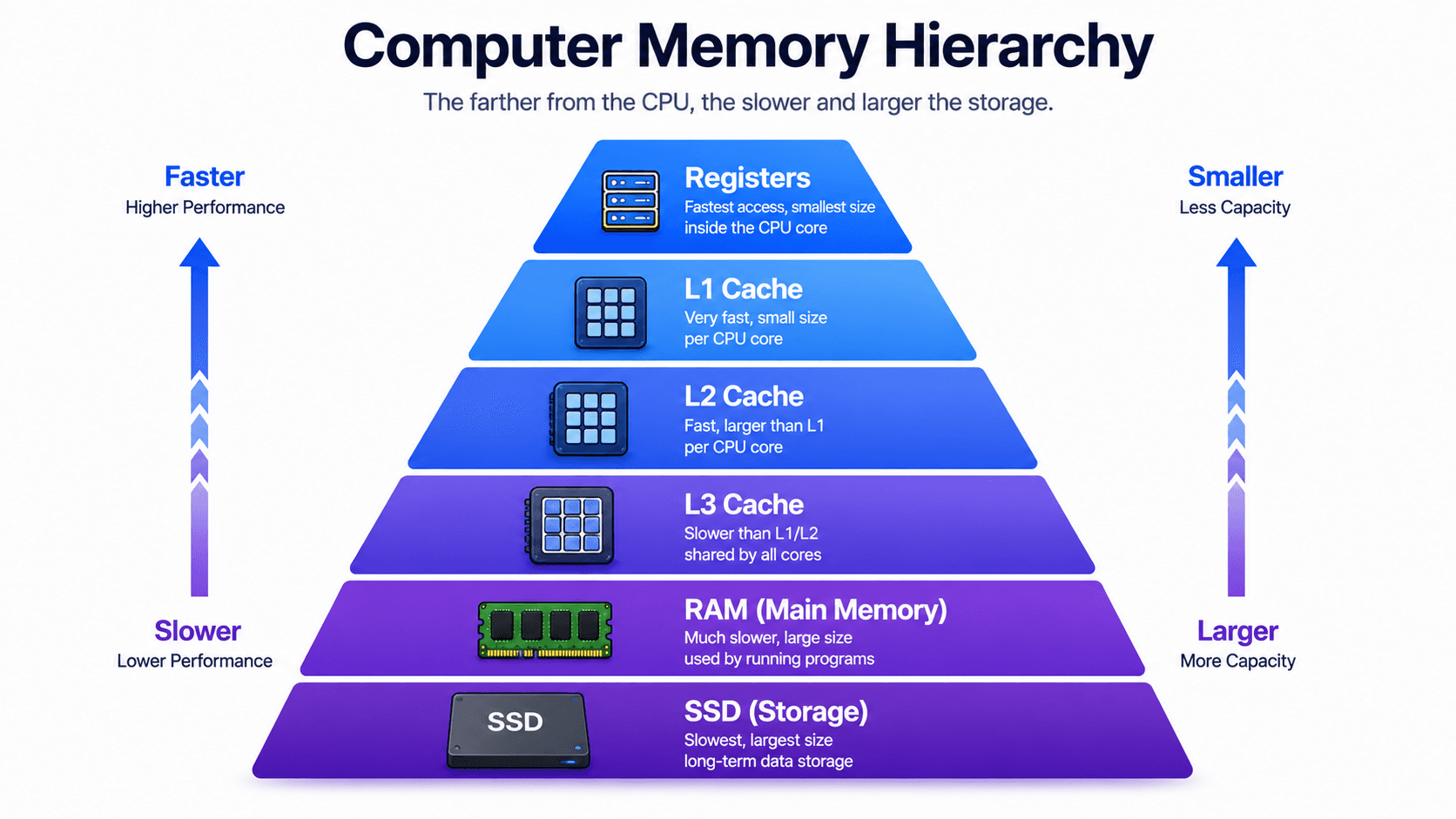
1. Check registers 2. Check L1 cache 3. Check L2 cache 4. Check L3 cache 5. Check RAM 6. Check storage if necessary
The farther the processor must go, the slower the access becomes.
12. How Does Data Move from RAM to the CPU?
Suppose a program needs a value stored in RAM.
For example:
int price = product.price;
At a simplified level:
1. The CPU requests the memory address 2. The data is fetched from RAM 3. A block of data is copied into cache 4. The required value is loaded into a register 5. The CPU performs the operation
Notice that the CPU may not copy only one variable.
Memory is commonly transferred in blocks called cache lines.
A cache line often contains multiple nearby values.
This helps because programs frequently access nearby memory locations.
This behavior is related to spatial locality.
Temporal and Spatial Locality
Caches work well because programs often follow two patterns.
Temporal locality
If data was used recently, it may be used again soon.
Example:
for (int i = 0; i < 1000; i++) { total += price; }
The value of price may be reused many times.
Spatial locality
If one memory location is used, nearby locations may also be used soon.
Example:
int[] numbers = {1, 2, 3, 4, 5};
When the program reads one array element, it will probably read the next element soon.
The cache can load a group of nearby values together.
13. What Is a Store Buffer?
The CPU does not always immediately write every value directly to cache or RAM.
Writes can be expensive.
If the processor waited for every write to complete before continuing, performance would suffer.
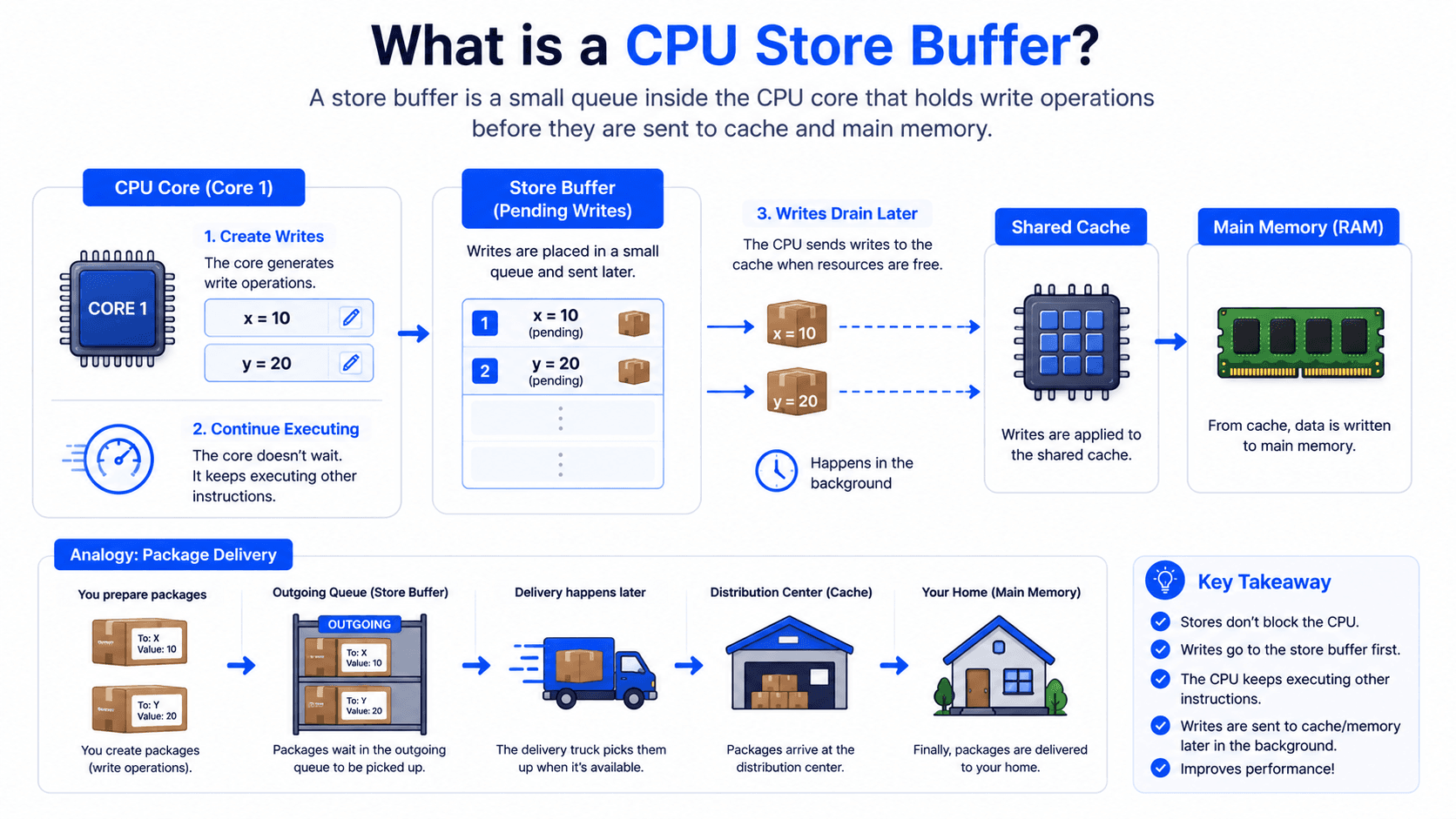
To reduce this delay, CPU cores may use a structure called a store buffer.
A store buffer temporarily holds pending writes.
A simplified process looks like this:
Core produces a new value ↓ Value enters the Store Buffer ↓ Core continues executing ↓ Write becomes visible later
Think of it as a small outgoing queue.
The core says:
I want this value to be written, but I do not want to wait here until the complete memory system finishes the operation.
The store buffer allows the core to continue working.
Store Buffer Example
Imagine that Core 1 performs:
x = 10
The new value may first enter Core 1's store buffer.
Core 1 └── Store Buffer └── x = 10
The write may not immediately be visible everywhere in the system.
This introduces a critical concurrency question:
Could another core temporarily observe an older value?
In some situations, yes.
This is one reason memory visibility is not as simple as:
One core writes Another core immediately sees it
Modern memory systems are designed for performance.
That performance introduces complexity.
17. What Does Atomic Mean at the Hardware Level?
An operation is atomic when it behaves as one indivisible action from the perspective of other observers.
Consider:
counter++;
This looks like one operation in source code.
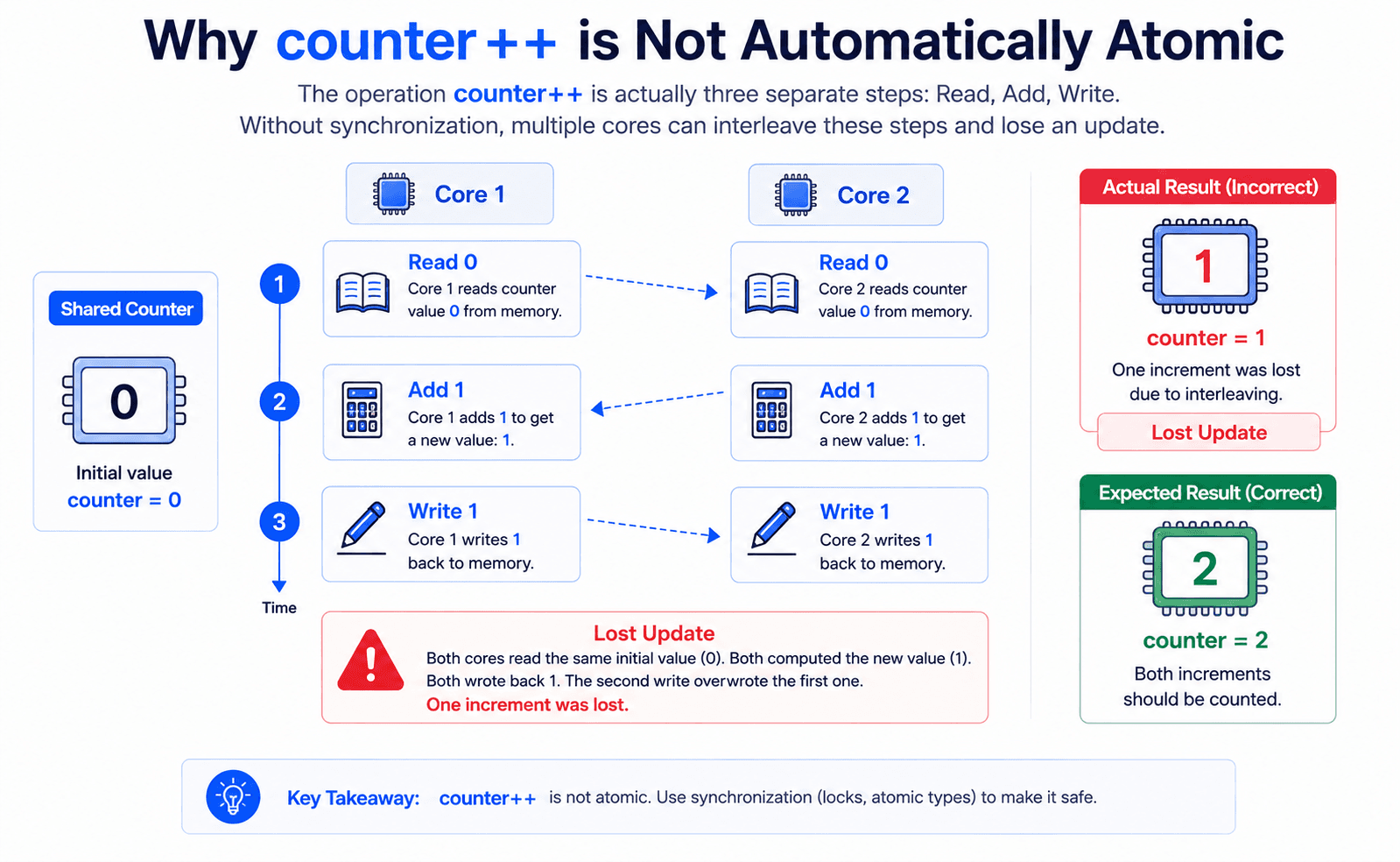
But conceptually, it may involve multiple steps:
1. Read counter 2. Add 1 3. Write counter
Suppose:
counter = 0
Two cores execute counter++.
Core 1 reads 0 Core 2 reads 0 Core 1 calculates 1 Core 2 calculates 1 Core 1 writes 1 Core 2 writes 1
The expected result was:
2
The actual result may be:
1
This is called a lost update.
The problem exists because the complete read-modify-write sequence was not atomic.
Hardware provides special atomic instructions that programming languages can use.
Examples include operations conceptually similar to:
- Compare and swap
- Atomic exchange
- Fetch and add
These instructions form the foundation of many higher-level concurrency tools.
19. A Complete Simplified Picture
Now let's combine everything we have learned.
When your program performs a calculation, the execution process can be simplified into these steps:
- Your program generates an instruction that needs to be executed.
- The operating system schedules that work on an available CPU core.
- The CPU core fetches the next instruction from memory.
- The instruction is decoded so the processor understands what operation to perform.
- The CPU searches for the required data, checking the memory hierarchy in this order:
- Registers
- L1 Cache
- L2 Cache
- L3 Cache
- RAM
- Once the data is available, the required values are loaded into CPU registers.
- The ALU performs the requested calculation or comparison.
- The result is temporarily stored in a register.
- If the result must be written to memory, it may first enter the store buffer.
- Finally, the value is propagated through the cache hierarchy and eventually reaches main memory (RAM).
When multiple CPU cores execute code simultaneously, each core has its own private hardware resources.
Core 1
- Registers
- L1 Cache
- L2 Cache
- Store Buffer
Core 2
- Registers
- L1 Cache
- L2 Cache
- Store Buffer
Although these resources are private to each core, both cores can read from and write to the same shared memory. This shared access is exactly where concurrency challenges begin. From this point onward, we must start thinking about synchronization, memory visibility, and how different cores observe changes made by one another.
That interaction creates the foundation for concurrency problems.
20. Why This Matters for Concurrency
Concurrency is not difficult only because multiple lines of code run together.
It is difficult because modern hardware is highly optimized.
The CPU uses:
- Multiple cores
- Local registers
- Multiple cache levels
- Store buffers
- Instruction pipelines
- Out-of-order execution
- Speculative execution
- Shared memory
These features make computers fast.
But they also mean that the following assumptions can be dangerous:
Every line runs immediately. Every write goes directly to RAM. Every core sees the same value at the same time. Source code order always equals execution order. One line of code always means one atomic CPU operation.
These assumptions are often false.
Concurrency tools exist because the hardware needs explicit coordination.
Follow My Content
If you enjoy content about backend engineering, Java, concurrency, computer architecture, and system design, you can follow me on:
- Instagram:@the.code.architect
- Medium:medium.com/@sarvar55mszde
- LinkedIn: Follow me here for technical discussions, project lessons, and software engineering notes.
The next article in this series will explain:
Programs, Processes, and Threads: How Software Runs on the CPU
Comments (0)
Loading comments...