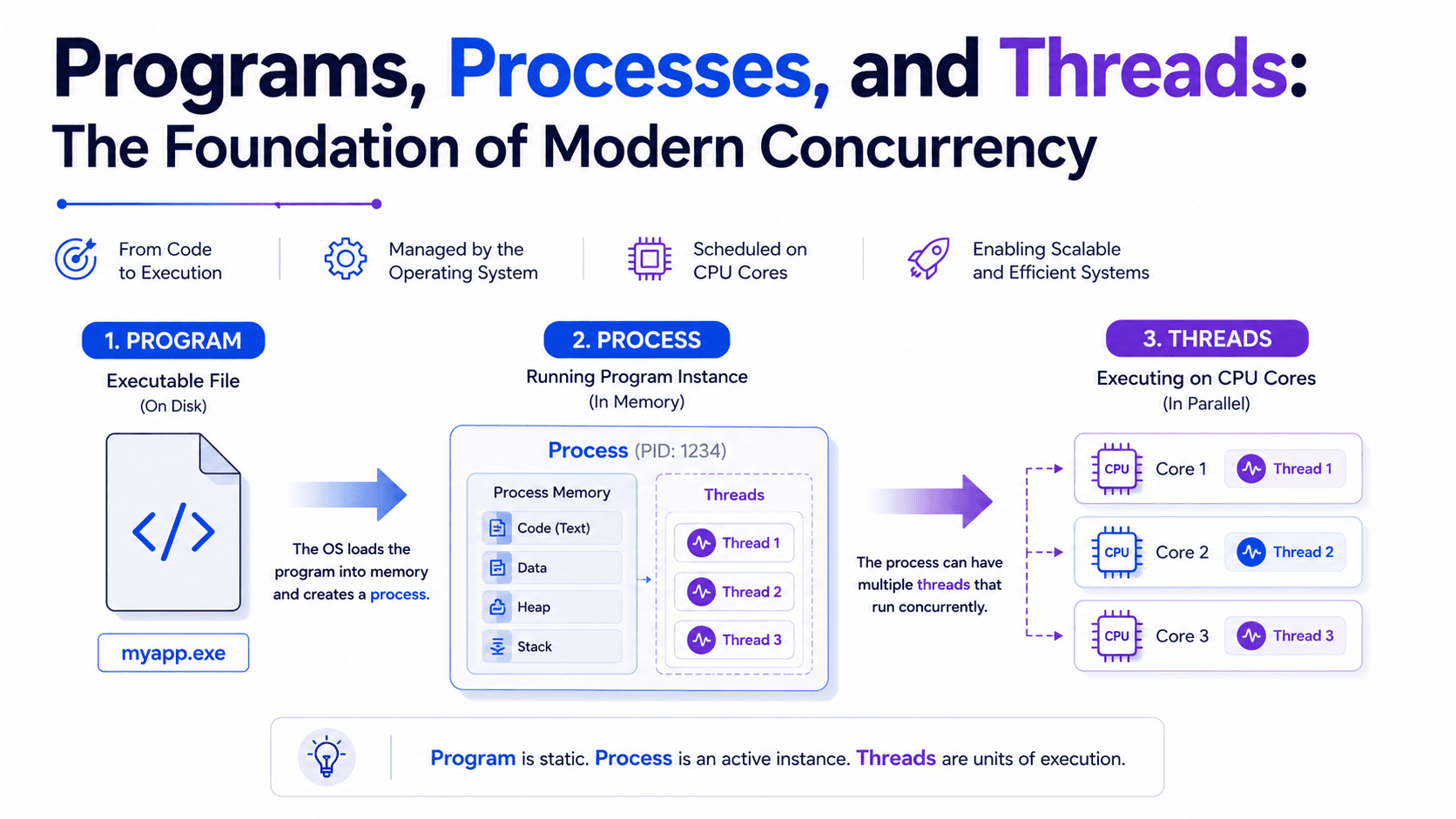
Concurrency from the Ground Up — Part 2 Programs, Processes, and Threads: The Foundation of Modern Concurrency
Introduction
When people first start learning concurrency, they usually jump directly into threads, locks, synchronization, or thread pools.
That is one of the biggest reasons why concurrency feels confusing.
Before we can understand how multiple threads work, we first need to understand what is actually running inside our computer.
Many developers use the terms Program, Process, and Thread interchangeably.
Although they sound similar, they describe completely different concepts.
If these concepts are not crystal clear, topics such as synchronization, memory sharing, deadlocks, race conditions, or thread safety become much harder to understand.
In this article, we will build another important layer of our concurrency foundation.
We will explore:
- What a Program is
- What happens when we launch a program
- What a Process actually is
- What resources belong to a process
- Why a process contains threads
- What a Thread really is
- Why threads are called lightweight processes
- How Programs, Processes, and Threads work together
- Why these concepts are the foundation of modern concurrency
We still won't write any Java concurrency code.
Our goal is to understand the operating system abstractions that make modern concurrent programming possible.
1. What Is a Program?
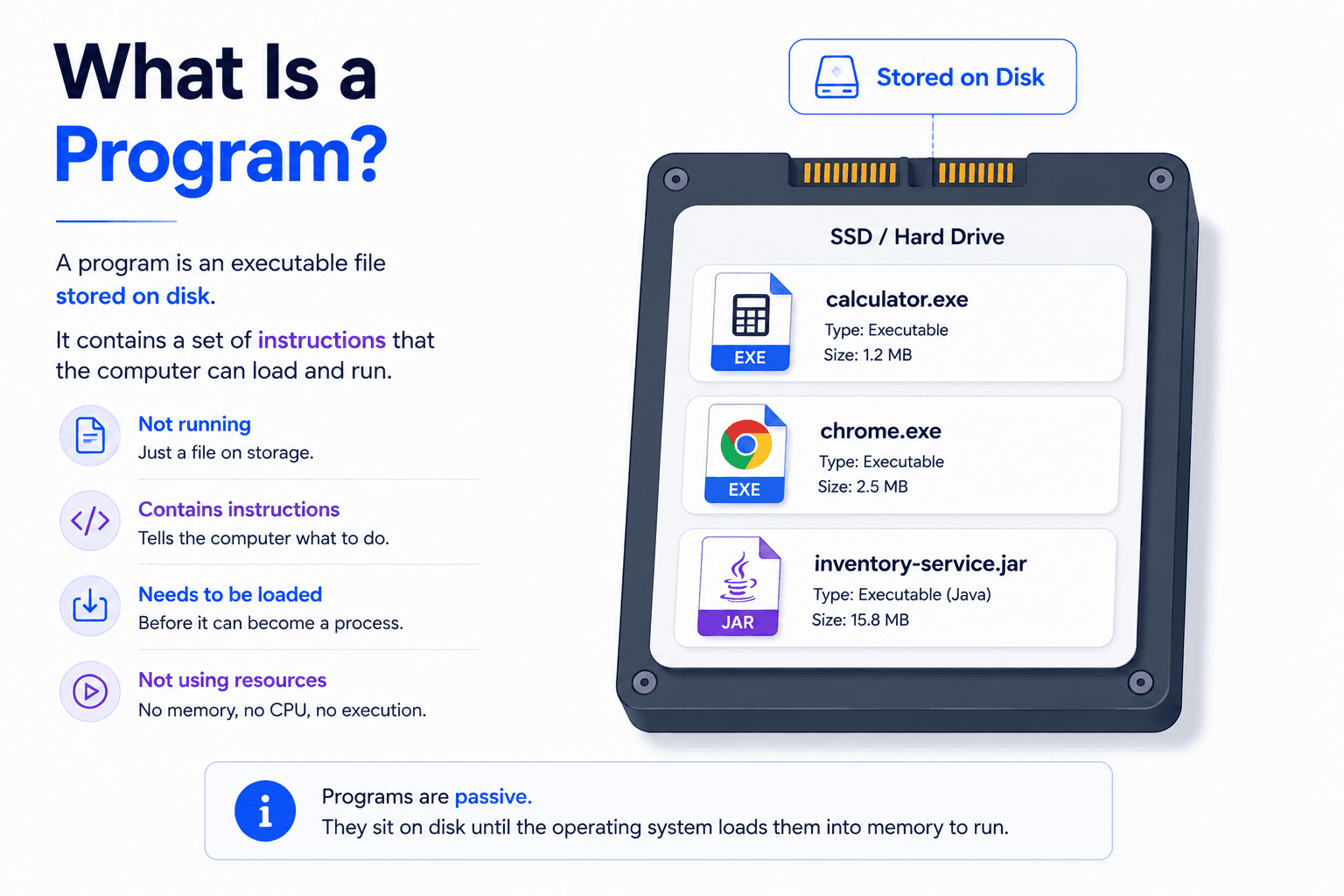
A program is simply a collection of instructions stored on disk.
It is not running.
It is not executing.
It is only a file waiting for someone to launch it.
For example, all of these are programs:
- Google Chrome
- Visual Studio Code
- IntelliJ IDEA
- Spotify
inventory-service.jarcalculator.exe
At this stage, the operating system is doing absolutely nothing with these files.
They simply occupy storage space.
You can think of a program like a recipe inside a cookbook.
The recipe contains instructions.
But nothing is actually being cooked.
The recipe only becomes useful when someone starts following it.
A program works exactly the same way.
It contains instructions.
Execution begins only after the operating system loads it into memory.
2. Launching a Program
Double-clicking an application looks like a tiny action.
Behind the scenes, however, the operating system performs a surprisingly large amount of work.
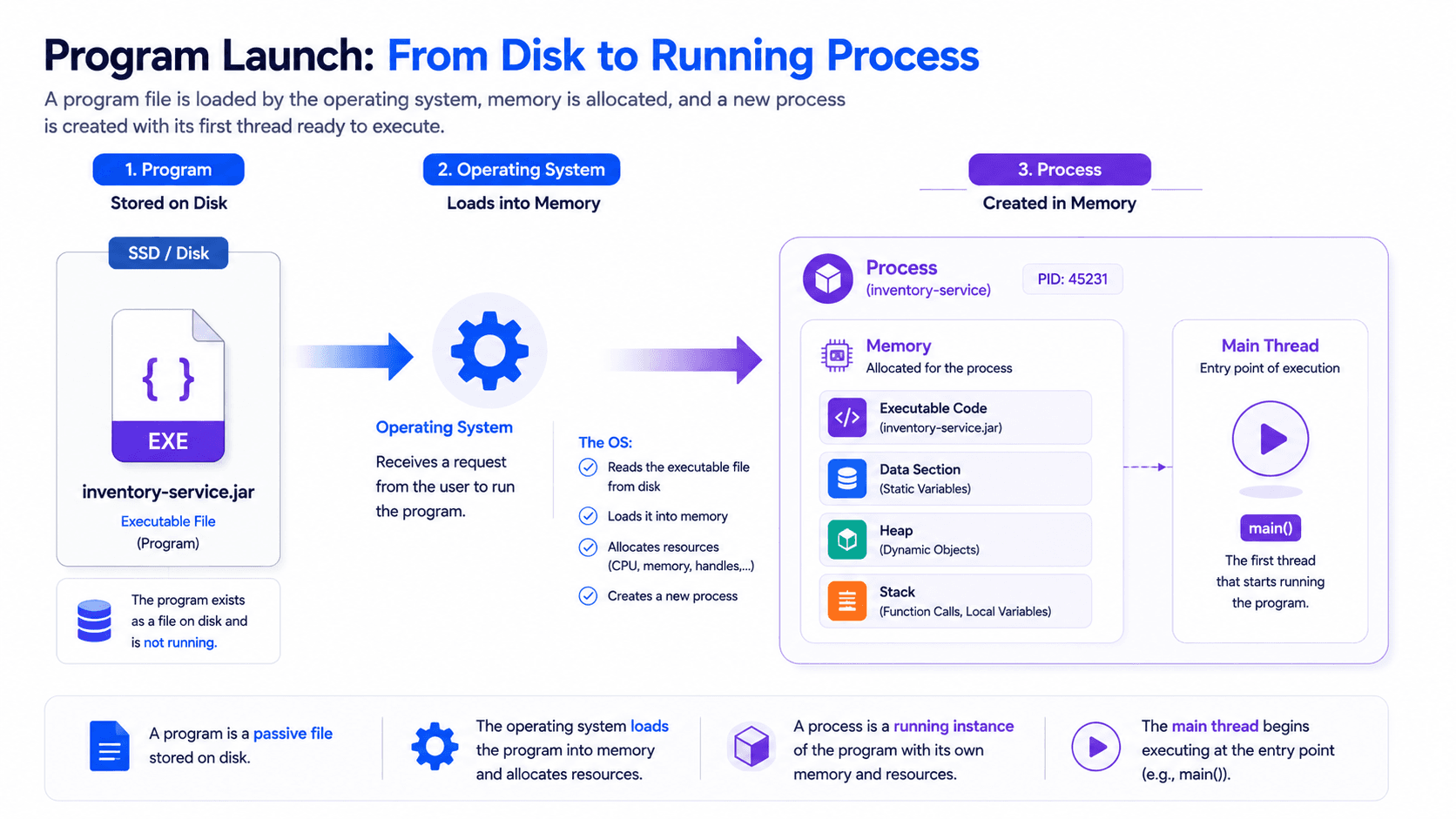
When you launch a program, the operating system does not execute the file directly from disk.
Instead, it creates an entirely new execution environment.
Some of the first tasks include:
- Allocating memory
- Loading executable instructions
- Loading required libraries
- Creating a process
- Creating the first thread
- Preparing CPU scheduling information
- Giving the process a unique identifier
Only after all of these steps can the CPU begin executing instructions.
Launching a program is therefore much more than simply "opening a file."
It is the creation of a completely new running environment.
3. What Is a Process?
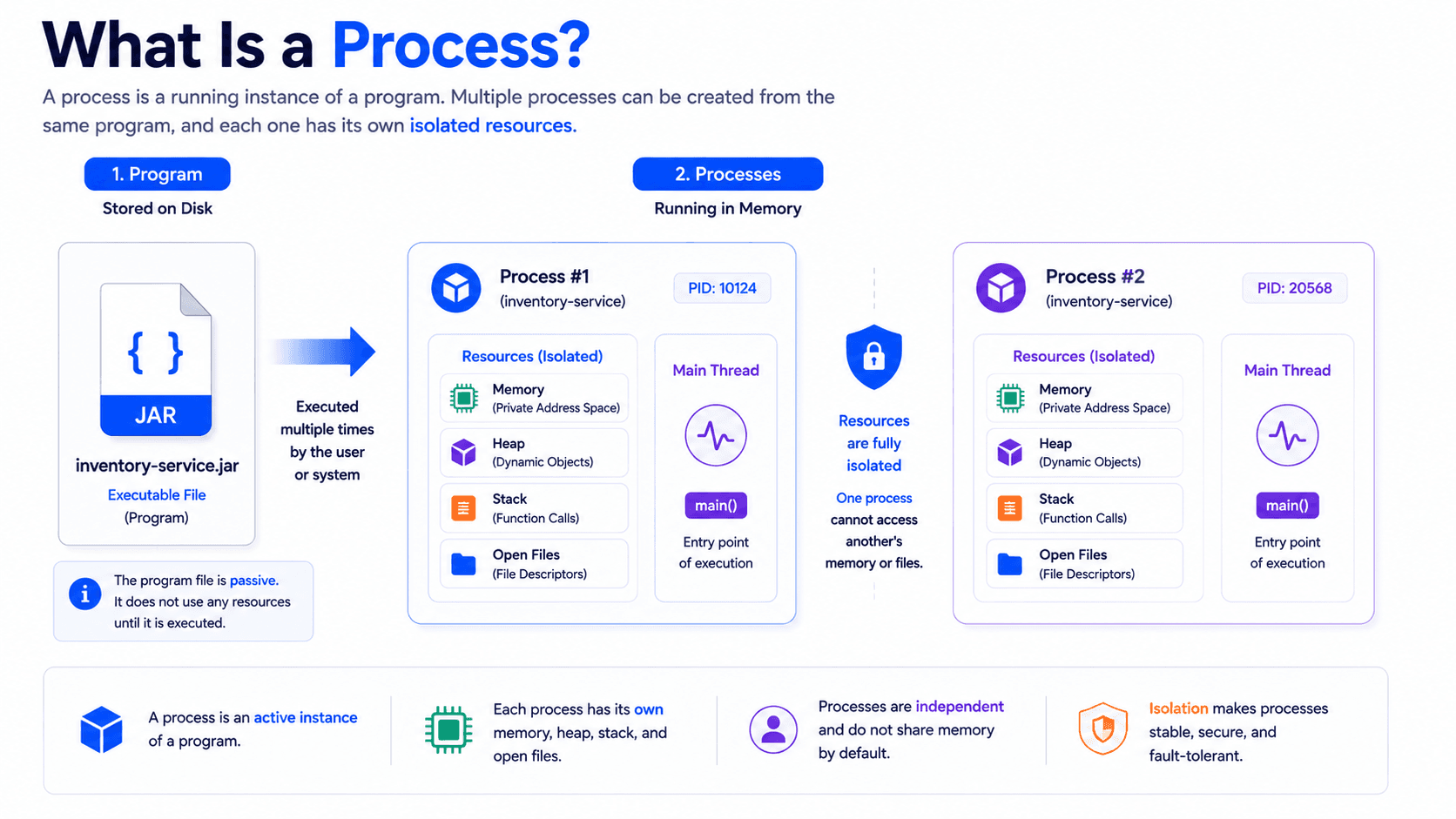
A process is a running instance of a program.
This is one of the most important definitions in computer science.
The program is only the blueprint.
The process is the actual running application.
For example:
You may have only one copy of Google Chrome installed on your computer.
However, every time you open another Chrome window, the operating system creates additional processes.
The same program can therefore produce multiple independent processes.
Each process has its own resources.
These typically include:
- Virtual memory
- Heap memory
- Stack memory
- Open files
- Network connections
- Security information
- Environment variables
- Process ID (PID)
- At least one running thread
Each process is isolated from other processes.
Normally, one process cannot directly access another process's memory.
This isolation improves both security and stability.
If one application crashes, the operating system can terminate only that process without affecting others.
Real-World Example
Imagine an apartment building.
The building represents the operating system.
Each apartment represents a process.
Inside every apartment are:
- Furniture
- Electricity
- Internet
- Personal belongings
Even though all apartments are inside the same building, the people living in one apartment cannot freely enter another apartment.
Processes work in a very similar way.
4. What Is a Thread?
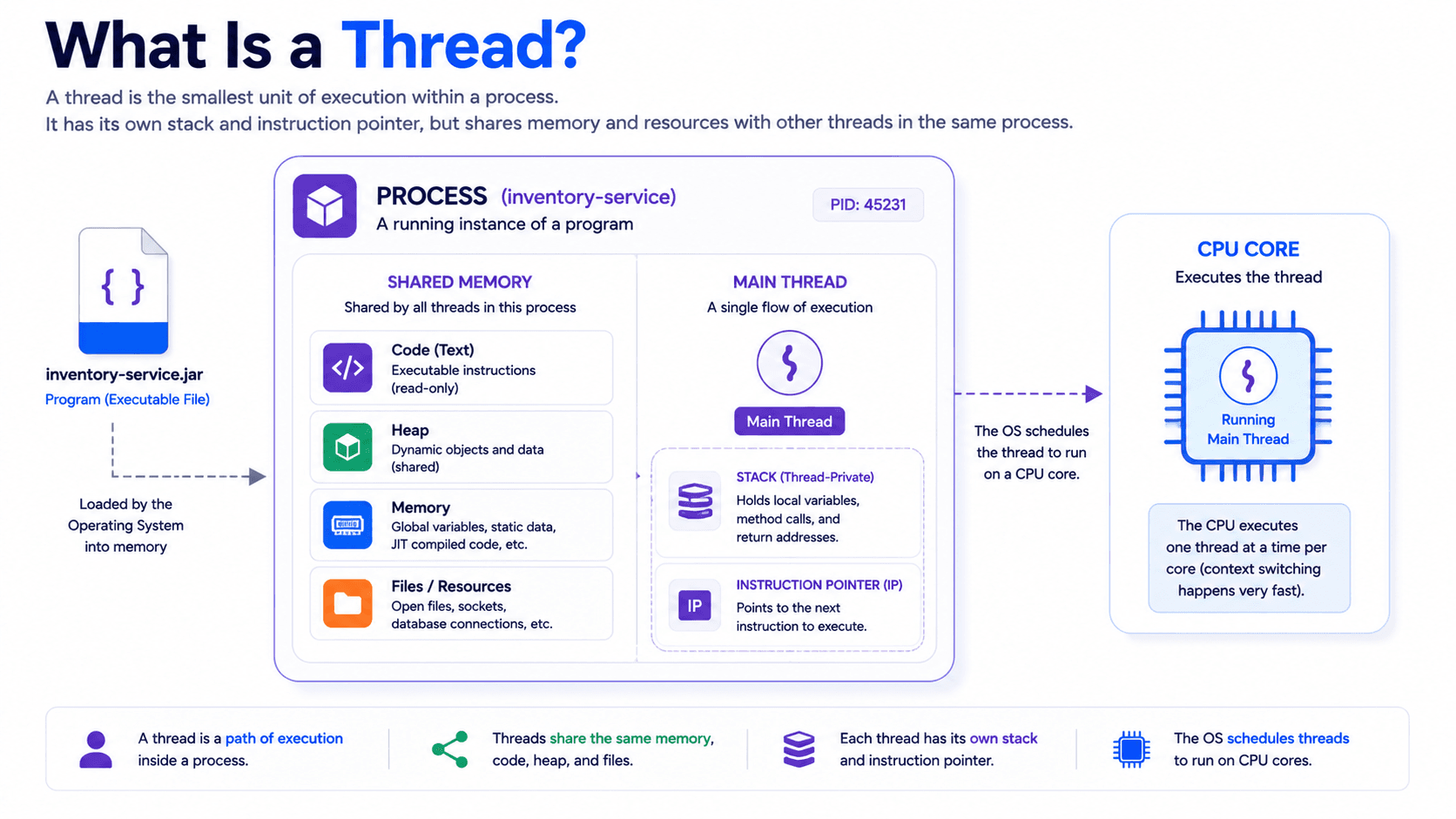
A thread is the smallest unit of execution inside a process.
A process provides the environment.
A thread performs the work.
When a program starts, the operating system creates a process. That process receives memory, code, files, and other resources.
However, these resources cannot execute themselves.
A thread is needed to read instructions and run them on the CPU.
This is the most important distinction:
- A process owns resources.
- A thread executes instructions.
A thread always exists inside a process.
It cannot exist independently.
Every process has at least one thread, usually called the Main Thread.
The Main Thread begins executing the application from its entry point.
For example, in Java, execution usually starts from the main method.
public static void main(String[] args) {
    System.out.println("Application started");
}
The operating system does not send the entire process to the CPU.
It schedules the thread that belongs to that process.
The thread receives CPU time and executes the instructions of the program.
Think of a Process as a Restaurant
Imagine a restaurant.
The restaurant has:
- A kitchen
- Tables
- Food
- Equipment
- Storage
- Electricity
These resources represent the process.
Now imagine that there are no employees.
The restaurant exists, but no work can happen.
The employees represent threads.
One employee may take orders.
Another may prepare food.
Another may process payments.
The restaurant provides the environment.
The employees perform the work.
A process and its threads work in the same way.
5. A Process Can Contain Multiple Threads
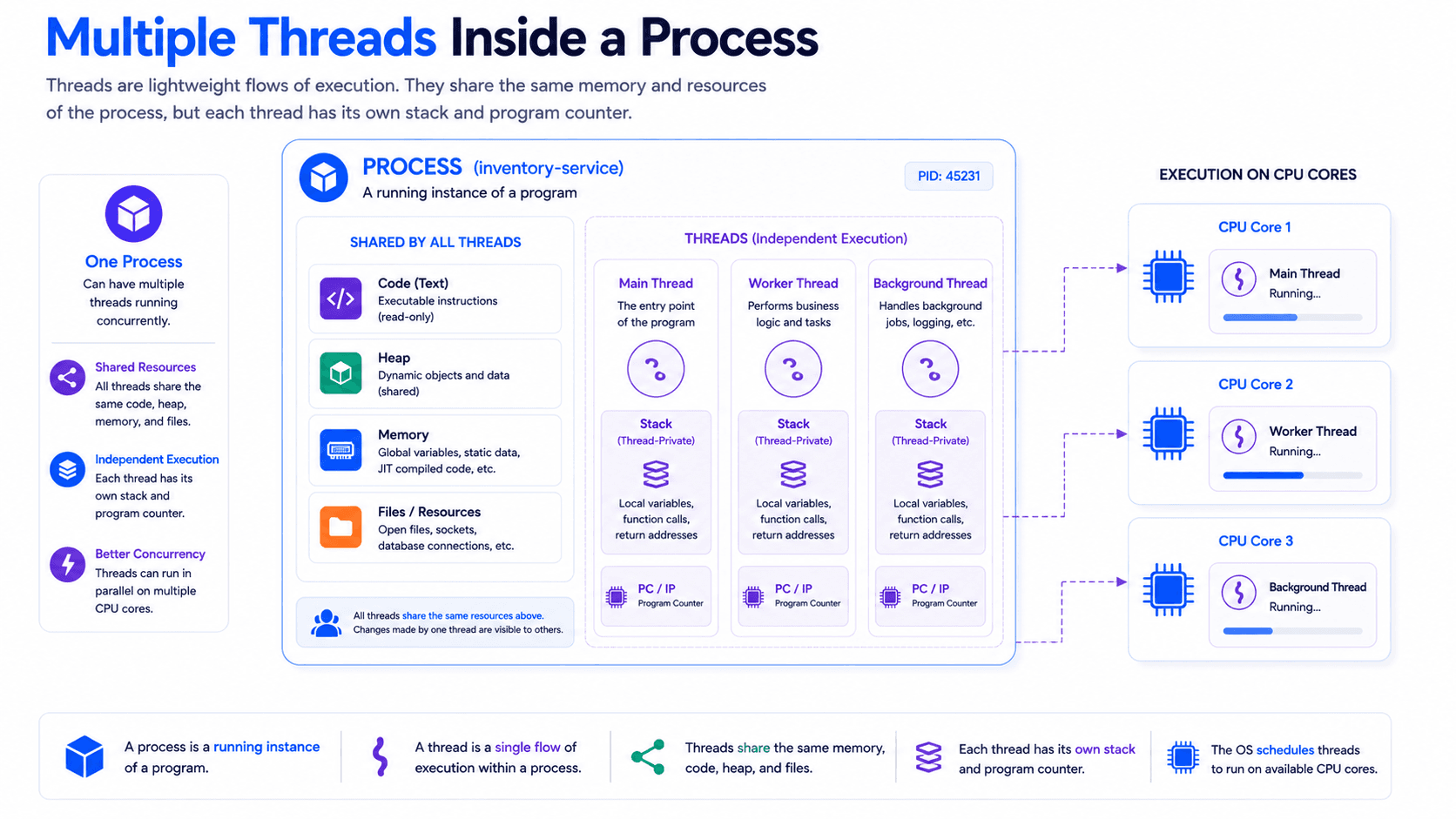
A process does not have to contain only one thread.
It can contain many threads.
Each thread represents a separate execution path inside the same application.
For example, a web browser may use different threads for:
- User interface rendering
- Network requests
- JavaScript execution
- File downloads
- Background tasks
A web server may use different threads for:
- Receiving requests
- Processing business logic
- Accessing a database
- Writing logs
- Sending responses
This allows the application to make progress on multiple tasks without waiting for one task to finish completely.
For example, imagine that an application uses only one thread.
That thread starts downloading a large file.
While the download is in progress, the thread cannot perform other work unless the operation is designed to be asynchronous.
The application may appear frozen.
With multiple threads, one thread can handle the download while another thread keeps the user interface responsive.
This is one of the main reasons why modern applications use multiple threads.
6. What Do Threads Share?
Threads inside the same process share most of the process resources.
These shared resources usually include:
- Program code
- Heap memory
- Global data
- Open files
- Network connections
- Process-level resources
This sharing makes communication between threads fast.
One thread can create an object in heap memory.
Another thread in the same process can access that object.
This is useful because threads do not need a complex communication mechanism just to access shared application data.
However, this is also where many concurrency problems begin.
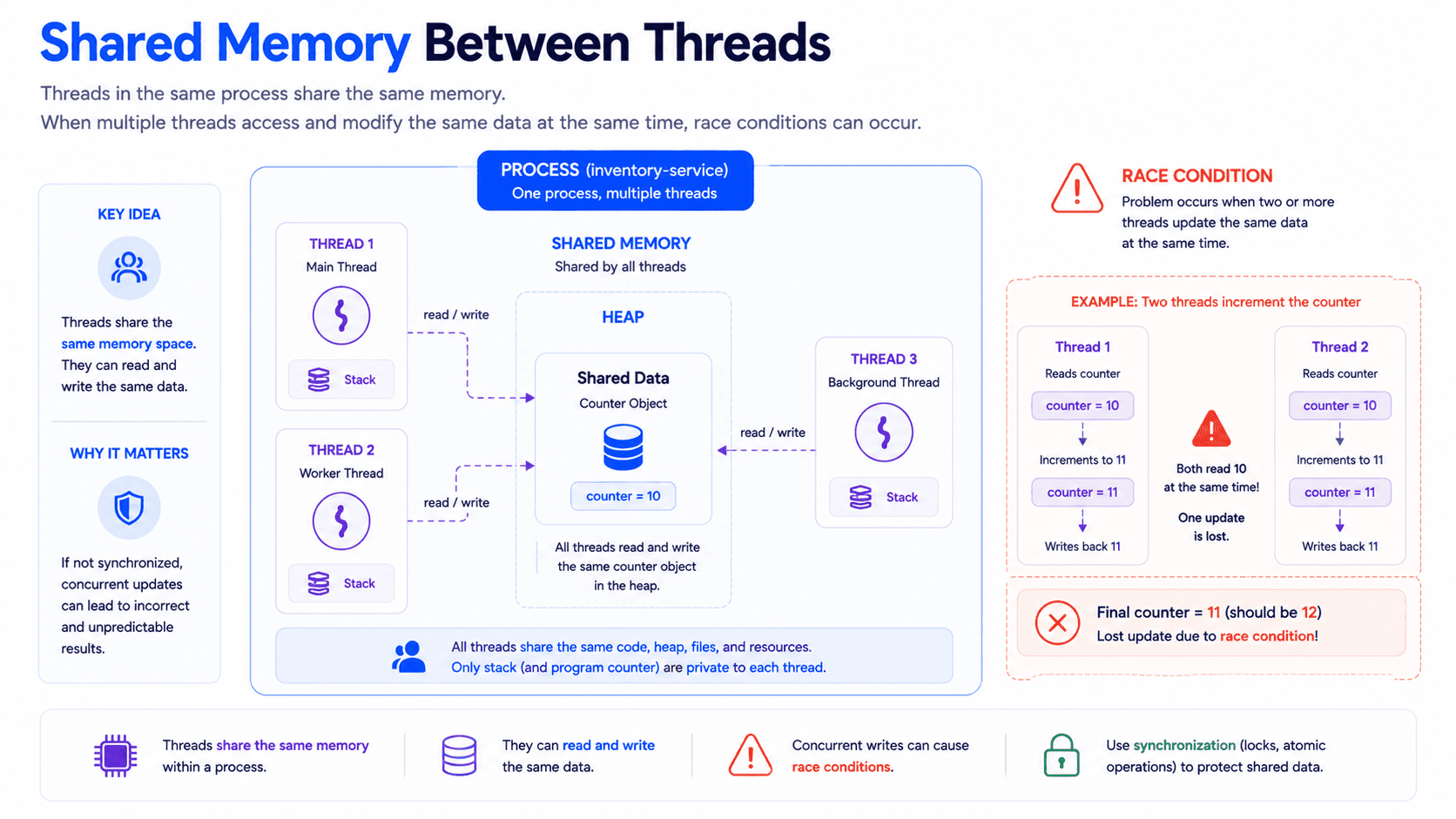
If two threads access the same shared data at the same time, they may interfere with each other.
For example:
counter++;
This line looks like one operation.
In reality, it may involve several smaller steps:
- Read the current value
- Add one
- Write the new value
If two threads perform these steps at the same time, one update may be lost.
This is called a race condition.
Shared memory makes threads powerful.
Shared memory also makes concurrency dangerous.
Key Idea
Threads are fast because they share resources.
Threads are difficult because they share resources.
The same feature that improves performance also creates synchronization problems.
7. What Does Each Thread Own?
Although threads share process resources, each thread also has its own private execution state.
Every thread typically has its own:
- Stack
- Program counter
- CPU register state
- Local variables
- Method call history
The most important private resource is the stack.
The stack stores information related to method execution.
It may contain:
- Method parameters
- Local variables
- Return addresses
- Temporary values
- Method call frames
For example:
void calculate() {
int localValue = 10;
}
The variable localValue belongs to the stack of the thread that executes the method.
Another thread has its own stack and its own local variables.
This separation prevents threads from directly overwriting each other's local execution state.
Shared Heap, Private Stack
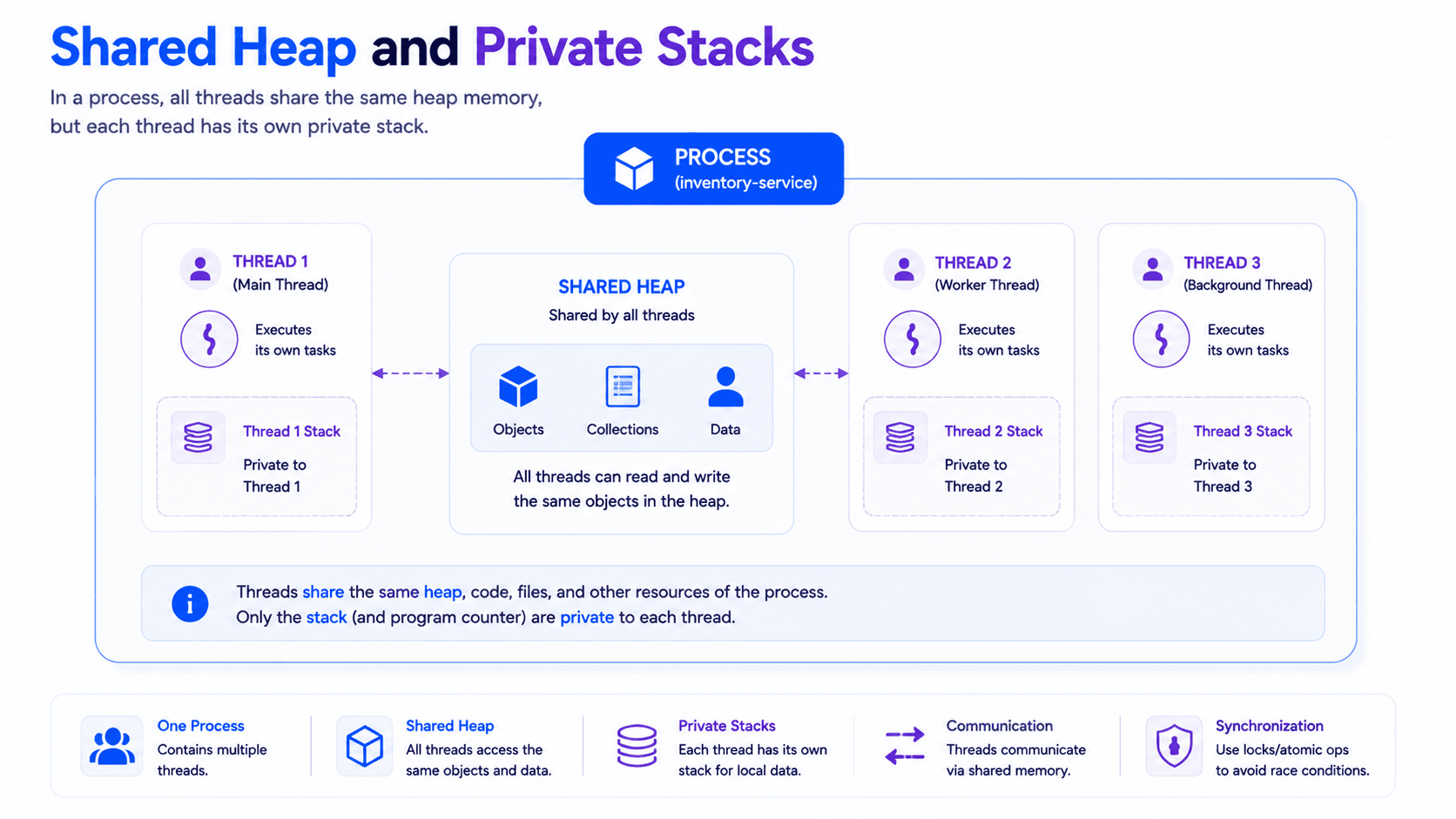
This is one of the most important ideas to remember.
Threads inside the same process usually share the heap.
Each thread has its own stack.
The heap contains shared objects.
The stack contains thread-specific execution information.
This is why local variables are usually safer than shared mutable objects.
A local variable belongs to one thread's stack.
A shared object may be accessed by many threads.
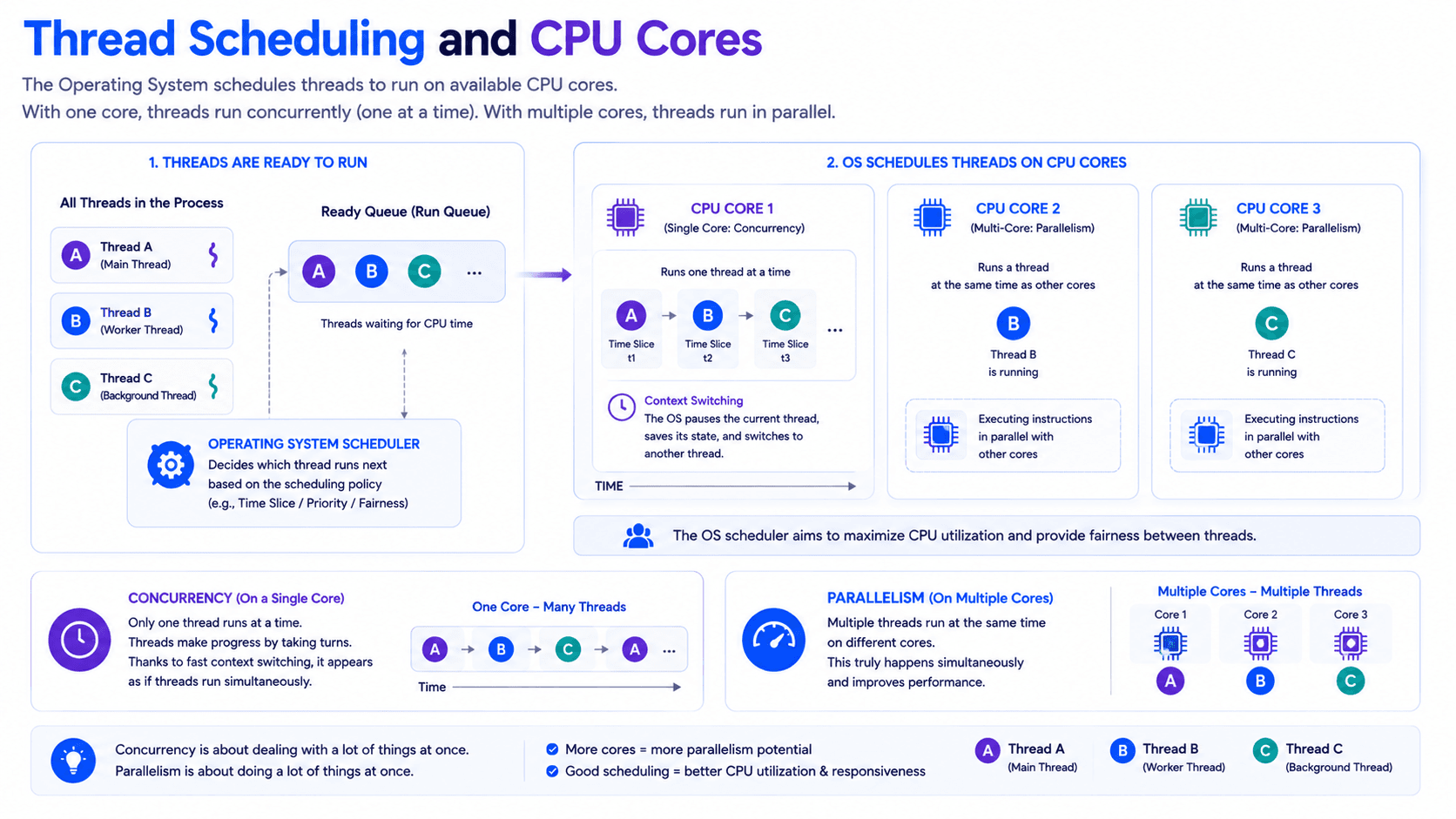
8. How Does the CPU Run Threads?
A thread does not run continuously forever.
The operating system controls when it can use the CPU.
A component called the scheduler decides which thread should run.
The scheduler may consider:
- Thread priority
- Thread state
- Available CPU cores
- System load
- Scheduling policy
- How long the thread has already been running
When a thread receives CPU time, it executes instructions.
After a short period, the operating system may pause it and allow another thread to run.
This is called a context switch.
During a context switch, the operating system saves the state of the current thread.
This state may include:
- Register values
- Program counter
- Stack information
- Execution position
Later, the thread can continue from the same point.
One Core Can Run Multiple Threads
A single CPU core can make many threads appear to run at the same time.
It does this by switching between them very quickly.
For example:
- Thread A runs briefly.
- Thread A is paused.
- Thread B runs briefly.
- Thread B is paused.
- Thread A continues.
The switching may happen so quickly that the user perceives both tasks as running simultaneously.
This is concurrency.
The tasks make progress during overlapping periods of time.
They do not necessarily execute at the exact same instant.
Multiple Cores Can Run Threads in Parallel
If the CPU has multiple cores, different threads can execute at the same time on different cores.
For example:
- Thread A runs on Core 1.
- Thread B runs on Core 2.
This is parallelism.
Concurrency and parallelism are related, but they are not identical.
Concurrency is about managing multiple tasks.
Parallelism is about executing multiple tasks at the same time.
9. Why Are Threads Called Lightweight?
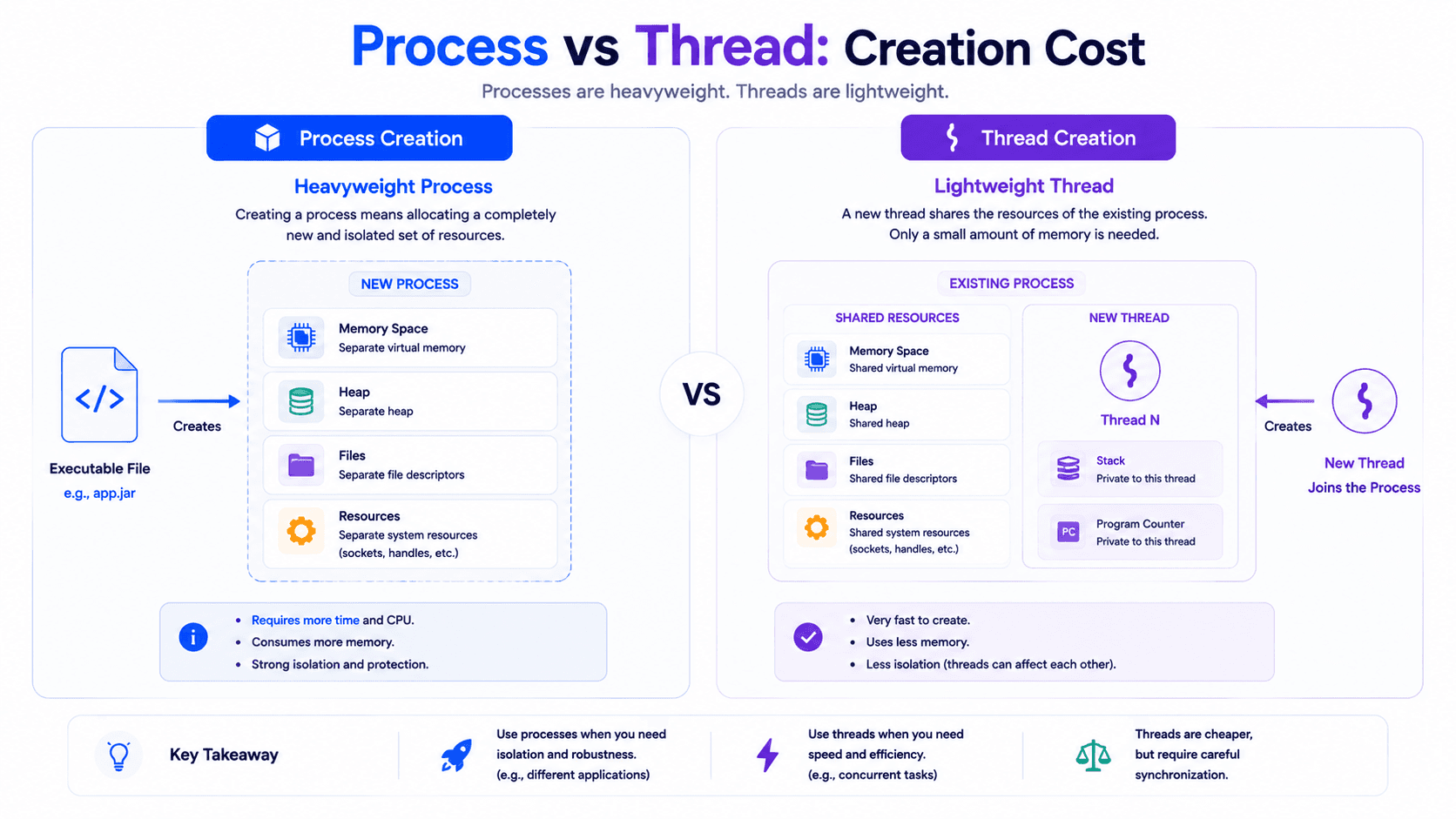
Threads are often called lightweight processes.
This does not mean that a thread is actually a process.
It means that creating and switching between threads is usually cheaper than creating and switching between processes.
A new process requires its own isolated environment.
It may need:
- Separate virtual memory
- Separate resource tables
- Separate security information
- Separate operating system management
A new thread uses the existing process environment.
It shares most of the resources that already exist.
Because of this, threads are usually:
- Faster to create
- Cheaper to manage
- Faster to communicate with
- More memory efficient
However, this efficiency comes with a cost.
Because threads share memory, developers must carefully control access to shared data.
Processes provide stronger isolation.
Threads provide faster communication.
10. Program vs Process vs Thread
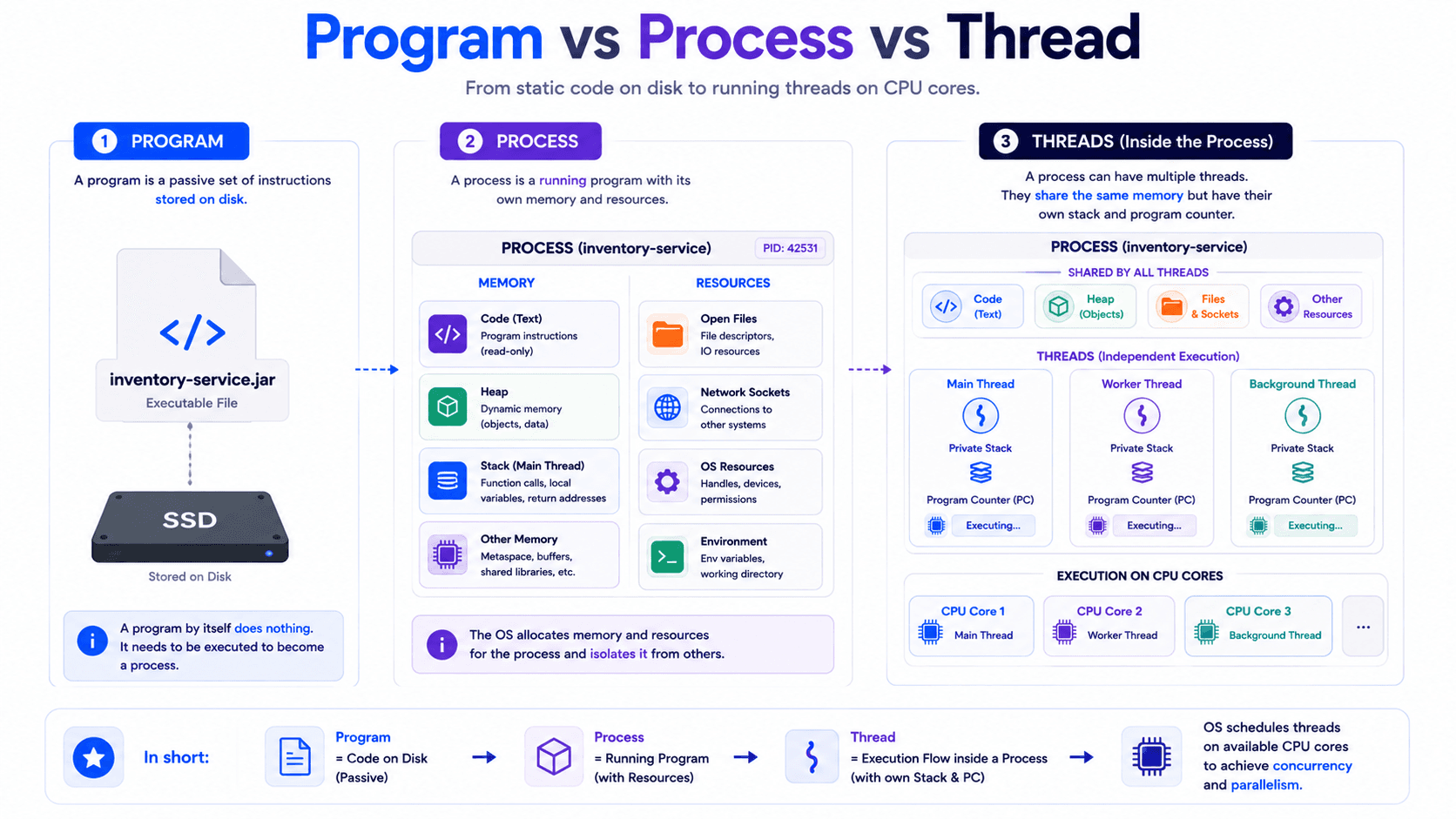
These three concepts are closely related, but they represent different things.
Program
A program is a file stored on disk.
It contains instructions.
It is passive.
It is not currently executing.
Examples include:
- A JAR file
- An executable file
- A browser application
- A command-line tool
Process
A process is a running instance of a program.
It owns resources.
It has its own memory space.
It is isolated from other processes.
A single program can create multiple processes.
Thread
A thread is an execution path inside a process.
It executes instructions on the CPU.
A process can contain one or more threads.
Threads inside the same process share resources.
Each thread has its own stack and execution state.
Simple Comparison
Concept
Meaning
Main Responsibility
Program
Instructions stored on disk
Defines what the application can do
Process
A running instance of a program
Owns memory and operating system resources
Thread
An execution path inside a process
Executes instructions on the CPU
11. Why This Matters for Concurrency
Concurrency problems do not begin with locks.
They begin with multiple execution paths accessing shared resources.
Threads make concurrency possible because multiple threads can make progress inside the same process.
However, threads also create several important questions.
- What happens if two threads update the same object?
- What happens if one thread reads data while another thread changes it?
- What happens if two threads wait for each other?
- What happens if a thread never sees another thread's update?
- What happens when too many threads are created?
- How does the operating system decide which thread runs?
These questions lead to the main topics of concurrency.
- Race conditions
- Synchronization
- Atomicity
- Visibility
- Deadlocks
- Locks
- Thread pools
- Memory models
- Concurrent collections
Understanding programs, processes, and threads gives us the foundation needed to study these topics correctly.
Without this foundation, concurrency tools feel like random rules.
With this foundation, they begin to make sense.
Final Summary
A program is a collection of instructions stored on disk.
A process is a running instance of that program.
A process owns memory, files, network connections, and other resources.
A thread is the execution path inside the process.
The operating system schedules threads on CPU cores.
Threads inside the same process share resources such as heap memory and open files.
Each thread has its own stack, registers, and execution state.
A single CPU core can switch between multiple threads.
Multiple CPU cores can execute multiple threads in parallel.
Threads are efficient because they share resources.
Threads are difficult because they share resources.
This shared-memory model is the foundation of modern concurrency.
Follow My Content
If you enjoy content about backend engineering, Java, concurrency, computer architecture, and system design, you can follow me on:
- Instagram: @the.code.architect
- Medium: medium.com/@sarvar55mszde
- LinkedIn: Follow me here for technical discussions, project lessons, and software engineering notes.
The next article in this series will explain:
Concurrency vs Parallelism: Why They Are Not the Same
Comments (0)
Loading comments...