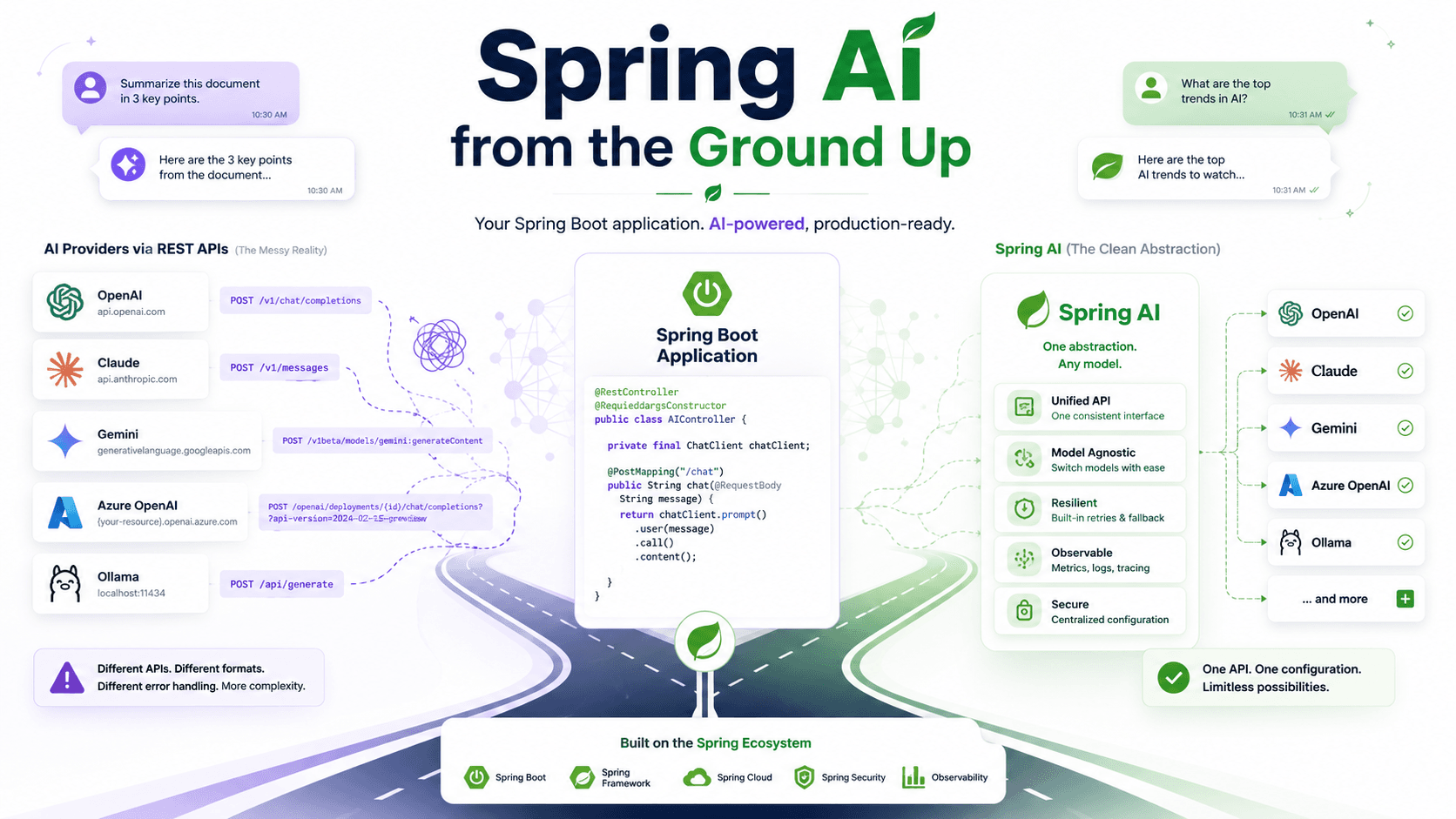
Before We Learn Spring AI, Let's Understand Why It Exists
Before We Learn Spring AI, Let's Understand Why It Exists
Every few years, software development gets a new buzzword.
Microservices.
Docker.
Kubernetes.
Serverless.
Now it's AI.
Almost every product team wants to add AI to their application. Whether it's a chatbot, a document summarizer, an intelligent search engine, or an AI assistant, the conversation usually starts with the same sentence.
"Can we add AI to this feature?"
For backend developers, the first reaction is often straightforward.
"Sure. We already know how to integrate third-party services."
We've connected payment gateways.
We've integrated email providers.
We've worked with SMS APIs.
We've built applications around cloud storage services.
Calling an AI model shouldn't be much different.
Open the provider's documentation.
Generate an API key.
Copy the sample request.
Replace the prompt.
Send an HTTP request.
Return the response.
Done.
If you're using Spring Boot, the implementation is surprisingly small.
@RestController
@RequiredArgsConstructor
public class ChatController {

    private final RestClient restClient;

    @PostMapping("/chat")
    public String ask(@RequestBody String question) {

        return restClient.post()
                .uri("https://api.openai.com/v1/chat/completions")
                .body(...)
                .retrieve()
                .body(String.class);
    }
}
Congratulations.
Your application now talks to an AI model.
If your project is a weekend experiment, you're probably finished.
And honestly...
that's perfectly okay.
One of the biggest mistakes developers make is introducing abstractions before they actually need them.
If your application has one endpoint...
one AI provider...
and one prompt...
calling the provider directly is probably the simplest solution.
At this point there isn't a problem to solve.
So why are we even talking about Spring AI?
Because software never stays this small.
A month later, your application becomes successful.
The AI feature saves users time.
People like it.
The business team notices.
And that's exactly when new ideas begin to appear.
"Can we summarize PDFs?"
Sure.
"Can we answer questions about uploaded documents?"
Sounds reasonable.
"Can we generate emails?"
Of course.
"Can we classify customer support tickets?"
Easy enough.
"Can we translate messages?"
Why not?
Every request sounds small.
Every feature is "just another prompt."
Every endpoint is "just another HTTP request."
Nothing feels difficult.
Until one day someone says something that completely changes your architecture.
"We're moving away from OpenAI."
Maybe Claude performs better.
Maybe Gemini is cheaper.
Maybe your company wants to run everything locally using Ollama.
Maybe a customer requires Azure OpenAI because of compliance policies.
It doesn't matter why.
What matters is that your application was written assuming one provider would always exist.
Now every service that communicates with OpenAI suddenly needs to change.
Different endpoint.
Different authentication.
Different request body.
Different response format.
Different streaming implementation.
The code still compiles.
But changing providers is no longer a configuration change.
It's an application change.
And that's where the first real problem appears.
Not performance.
Not scalability.
Not concurrency.
Coupling.
Your business logic has quietly become coupled to a specific AI provider.
That's usually the moment developers start asking a different question.
Instead of asking,
"How do I call OpenAI?"
they begin asking,
"How do I stop my application from depending on OpenAI?"
Interestingly, this isn't an AI problem.
We've solved this exact problem before.
Think about databases.
Most Spring Boot applications don't directly depend on PostgreSQL APIs.
They depend on Spring Data.
Today you can use PostgreSQL.
Tomorrow MySQL.
Later Oracle.
Your business logic barely changes.
Or think about authentication.
Most applications don't manually parse JWTs or implement every authentication mechanism from scratch.
Spring Security provides abstractions that allow your application to remain independent of the implementation details.
The Spring ecosystem has always followed the same philosophy.
Keep business logic independent from infrastructure.
So the obvious question becomes:
If Spring Data abstracts databases...
If Spring Security abstracts authentication...
Why shouldn't there be something that abstracts AI providers?
That question is exactly where Spring AI begins.
But supporting multiple providers is only one small part of the story.
Even if your company never changes providers, another problem starts growing inside your codebase.
It begins with something that looks completely harmless.
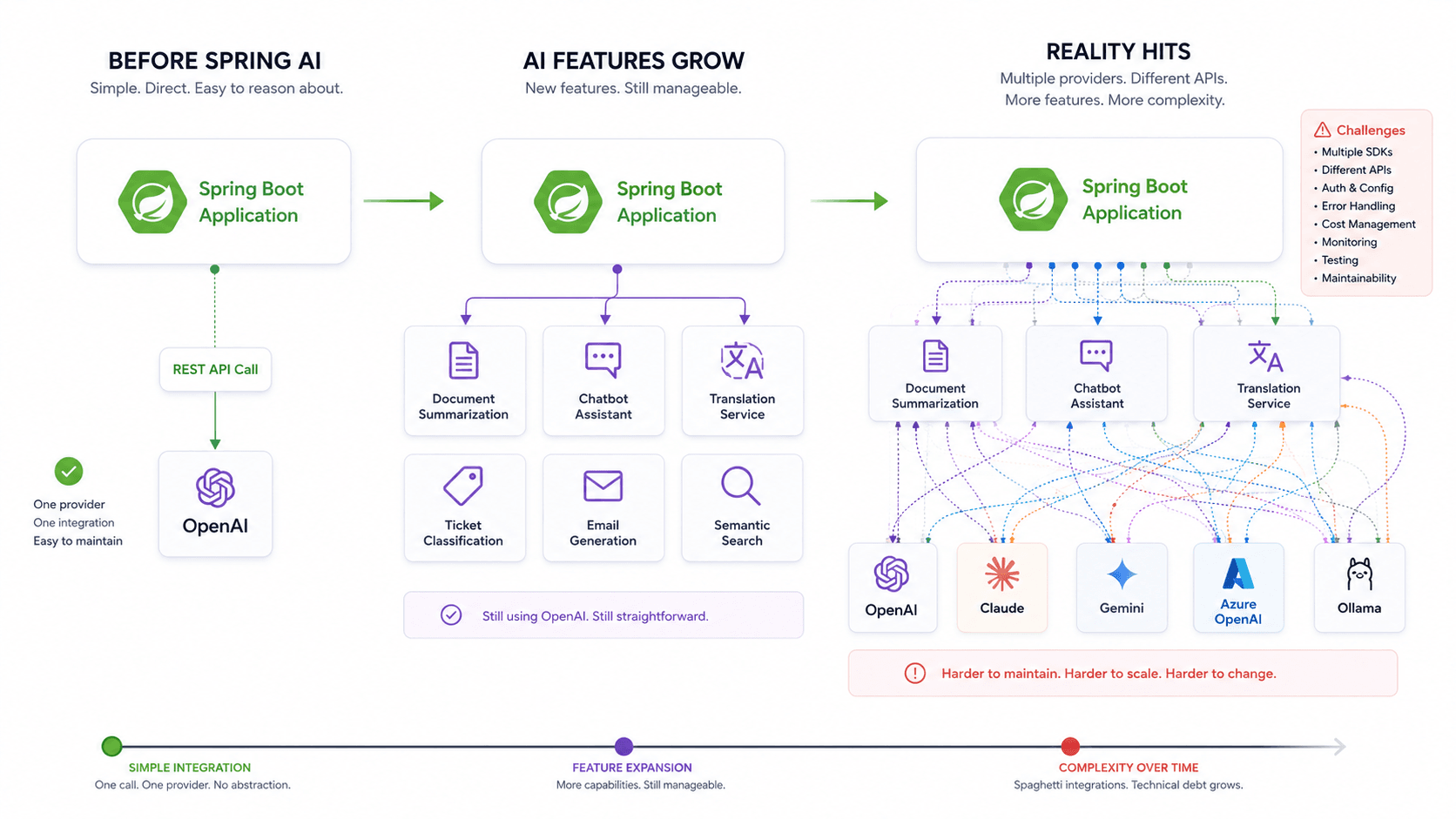
The first version of the application usually has one AI feature and one provider.
That's a comfortable place to be.
Every request goes to the same endpoint, every response has the same shape, and the entire integration lives in one small service. Even if the code isn't perfect, it's easy to understand because there's very little of it.
The interesting part is that nothing forces you to think about architecture at this stage.
As long as OpenAI is the only provider, writing code specifically for OpenAI doesn't feel like a bad decision. In fact, it often feels like the most practical one. Why introduce another abstraction when the provider already gives you an SDK?
At first glance, that decision is perfectly reasonable.
Most applications stay that way for a while.
Then something changes.
Sometimes it's a business decision.
Sometimes it's a pricing issue.
Sometimes another model simply performs better for a particular task.
Whatever the reason, eventually someone asks a question that sounded harmless the first time I heard it.
"Can we support Claude as well?"
Not replace OpenAI.
Support both.
That's an important difference.
Now your application isn't communicating with one model anymore. It's communicating with multiple providers, each exposing its own API, authentication mechanism, request format, and response structure.
If you've integrated more than one payment gateway before, this probably feels familiar.
The business capability is the same.
The implementation details are not.
The first reaction is usually straightforward.
"We'll create another service."
public class OpenAiService {

    public String generateSummary(String ticket) {
        // OpenAI implementation
    }
}
public class ClaudeService {

    public String generateSummary(String ticket) {
        // Claude implementation
    }
}
Nothing unusual.
Until another feature appears.
Generating summaries was only the beginning.
Now the application also needs translation.
Sentiment analysis.
Email generation.
Keyword extraction.
Question answering.
Document summarization.
Each feature now needs support for every provider.
The number of classes starts growing much faster than the number of features.
That isn't because the business became more complicated.
It's because provider-specific logic has started leaking into every part of the application.
The next solution usually looks like this.
if (provider == Provider.OPENAI) {
    return openAiService.generateSummary(ticket);
}

if (provider == Provider.CLAUDE) {
    return claudeService.generateSummary(ticket);
}
throw new UnsupportedOperationException();
There's nothing technically wrong with this code.
It works.
The tests pass.
The application behaves exactly as expected.
The problem isn't correctness.
The problem is repetition.
Every new AI capability now needs the same branching logic.
Every new provider means touching existing code.
Every new feature means remembering which providers support it.
The application slowly becomes organized around AI vendors instead of business capabilities.
That's where things become interesting.
The code still compiles.
The architecture is what starts to deteriorate.
A useful way to recognize architectural problems is to look at what changes together.
Suppose the business team asks for one more provider.
How many files need to change?
If the answer is "almost every AI-related service," you've probably coupled your business logic to infrastructure.
The feature you're building isn't "generate a summary using OpenAI."
The feature is simply "generate a summary."
OpenAI happens to be one possible implementation.
Claude is another.
Gemini is another.
Ollama is another.
Those details shouldn't spread across your application.
The application should care about what it needs.
Not who provides it.
If that distinction sounds familiar, it's because Spring has solved the same problem many times before.
Spring Data doesn't ask whether you're using PostgreSQL or MySQL before executing a repository.
Spring Security doesn't require every controller to know whether authentication came from JWT, OAuth2, or LDAP.
The framework separates business intent from implementation details.
At this point, AI integrations deserve the same treatment.
Not because OpenAI is bad.
Not because Claude is better.
But because providers are infrastructure.
Infrastructure changes.
Business requirements shouldn't.
There's one detail we still haven't discussed, though.
Supporting multiple providers is only part of the problem.
Even if your company decides to stay with OpenAI forever, another issue starts appearing as your application grows.
It has nothing to do with REST APIs.
It has nothing to do with HTTP clients.
It usually starts with a single string.
Then another.
Then another.
Eventually, those strings become some of the most important pieces of business logic in the entire application.
They're called prompts.
And once prompts stop fitting comfortably inside Java text blocks, you begin to understand why Spring AI introduced an entirely different way of building conversations.
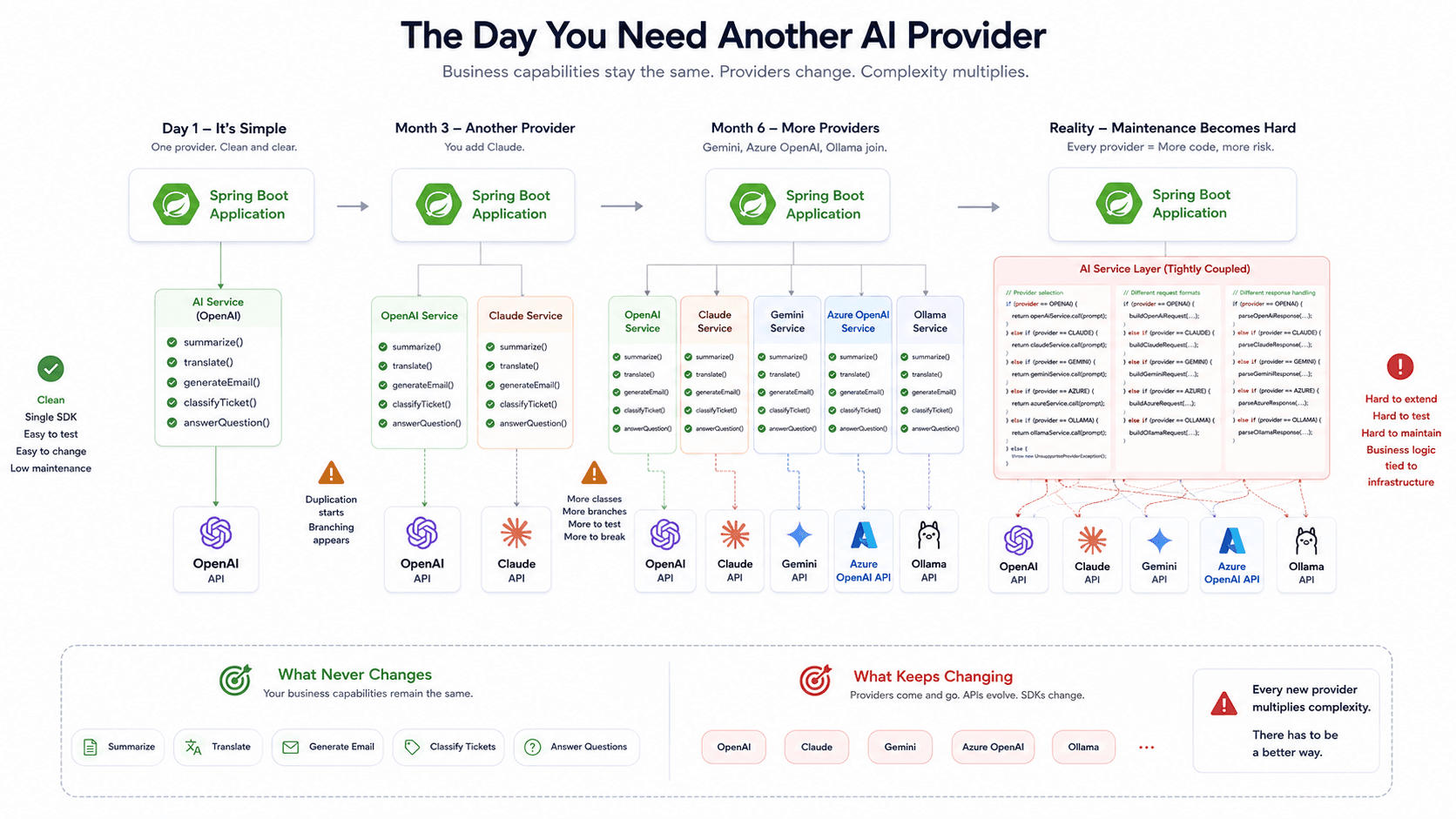
When a String Stops Being "Just a String"
Supporting multiple AI providers is one reason Spring AI exists.
It isn't the biggest one.
Even if your company never leaves OpenAI, another problem starts growing long before provider lock-in becomes painful.
The interesting part is that it doesn't begin with an API.
It begins with a String.
Most developers write their first prompt exactly the same way.
JAVACopy
String prompt = """ Summarize the following support ticket. %s """.formatted(ticket);
There's nothing wrong with this.
In fact, I'd encourage you to start exactly like this.
When your application has one prompt, introducing another abstraction would only make the code harder to read.
The problem starts when your application has twenty prompts.
Or fifty.
Or two hundred.
That's usually the point where prompts stop being implementation details and quietly become part of your business logic.
Consider a customer support platform.
The first AI feature summarizes tickets.
A few weeks later, another feature generates email responses.
Then marketing asks AI to write customer announcements.
HR wants help generating interview feedback.
Legal wants contract summaries.
Your application still talks to the same AI model.
The provider hasn't changed.
The infrastructure hasn't changed.
Only the prompts have.
That's what makes this problem easy to underestimate.
The REST call stays almost identical.
The HTTP client stays the same.
Even the endpoint rarely changes.
But the prompts grow larger every sprint.
The first few prompts usually fit comfortably inside Java text blocks.
JAVACopy
String prompt = """ You are a helpful customer support assistant. Summarize the ticket below in less than five bullet points. %s """.formatted(ticket);
Readable.
Simple.
Easy to understand.
Then someone asks for another rule.
"Don't include personal information."
A week later another one appears.
"Detect urgency before generating the summary."
Then another.
"Use professional language."
Then another.
"If the ticket is related to billing, mention unpaid invoices."
Eventually your text block looks less like a message and more like a configuration file.
JAVACopy
String prompt = """ You are... Always... Never... If... Unless... Except... Don't... When... Otherwise... ... """;
Nothing broke.
The code still works.
But something important has changed.
The prompt is no longer just text.
It's business behavior.
Changing a sentence inside that prompt changes how your application behaves.
That should sound familiar.
Because changing business behavior is usually something we treat carefully.
We review it.
We test it.
We version it.
Yet prompts often end up copied across services as anonymous text blocks.
That's where I started looking at prompts differently.
They're not strings.
They're instructions.
They're part of the application's behavior.
Once you accept that idea, another question naturally appears.
If prompts represent conversations rather than plain text...
why are we still treating them as Strings?
That question eventually leads to one of Spring AI's most important abstractions.
Not ChatClient.
Not ChatModel.
Prompt.
The first Spring AI examples usually look almost too simple. A ChatClient receives a question, sends it to a model, and returns a string. The application may contain only a controller, a service, and a few configuration properties.
public String ask(String question) {
    return chatClient.prompt()
            .user(question)
            .call()
            .content();
}
This is a good API for application code, but it hides most of the architecture behind the fluent method chain. The simplicity is useful when we want to build a feature quickly. It becomes a problem when we try to understand what Spring AI is actually doing.
A ChatClient is not the model. A Prompt is not merely the user’s question. A Message is not just a string with a different class name. An AssistantMessage is not only the final text returned to the frontend.
These objects represent different responsibilities inside the conversation.
Understanding those responsibilities first makes the rest of Spring AI much easier. Chat memory, advisors, tool calling, structured output, multimodal content, and RAG all build on the same basic request-and-response model.
The Big Picture
At the center of a Spring AI chat application is a model request.
Your application collects the information the model needs, structures that information as a prompt, sends the prompt through a model abstraction, and receives a response containing one or more generations.
At a high level, the flow looks like this:
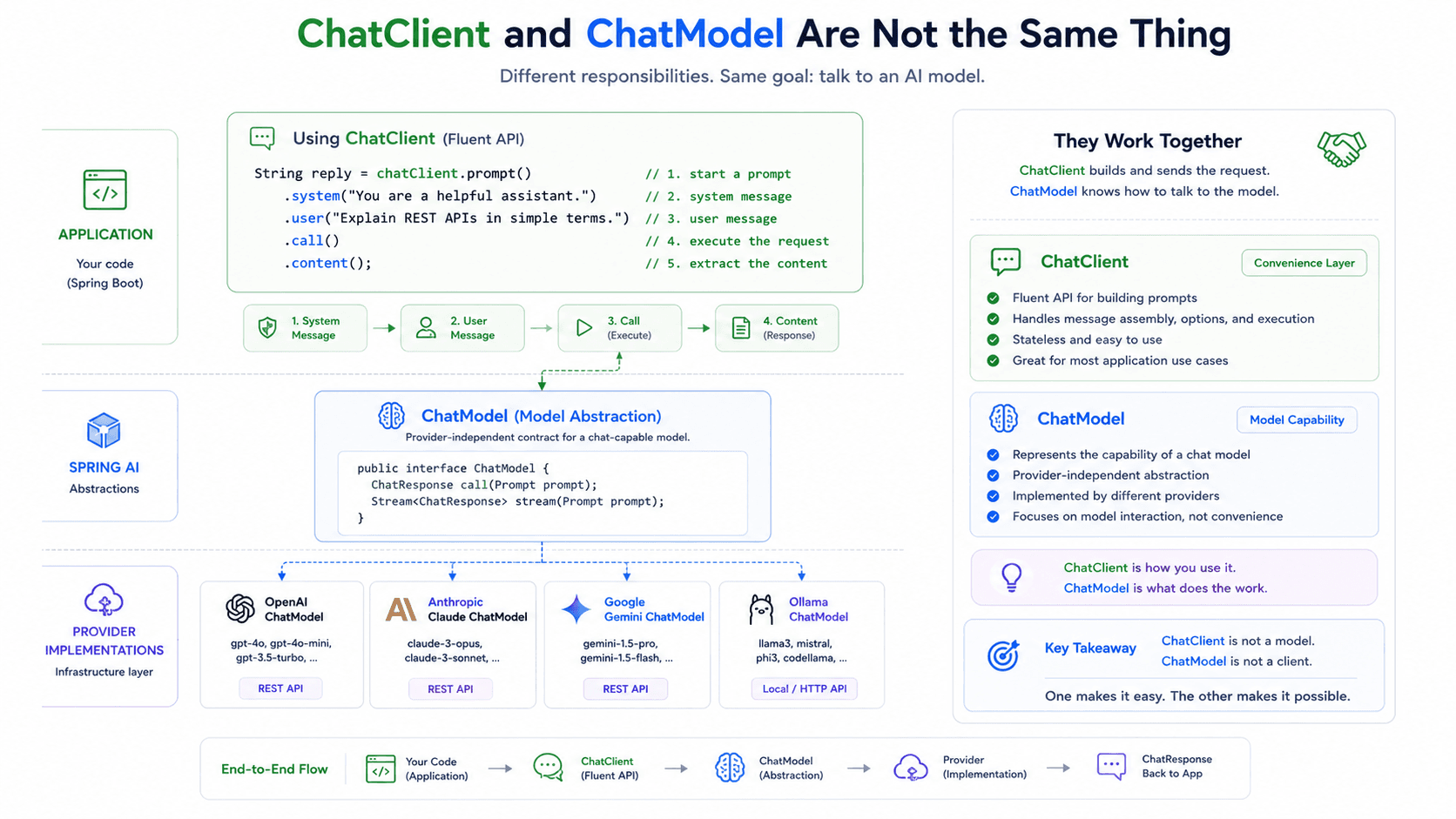
Each layer has a different job.
The application owns the business use case. It decides whether the feature is summarization, classification, customer support, document analysis, or something else.
ChatClient gives application code a fluent way to build and execute model requests. Spring AI describes it as a client for stateless AI model requests and supports both synchronous and streaming interactions.
Prompt represents the complete input for a model call. It can contain several messages as well as model options. Spring AI also provides methods for retrieving system, user, and tool-related messages from a prompt.
ChatModel is the portable model abstraction. Different providers can implement the same chat model contract while handling their own API formats internally. Spring AI’s broader model API is designed to provide portable interfaces across providers and model types.
ChatResponse contains the model result. A generated answer is represented through a Generation, whose output is normally an AssistantMessage.
The architecture is therefore not:
That distinction explains why Spring AI introduces several types for something that initially looked like a simple HTTP call.
Why Spring AI Has Both ChatClient and ChatModel
ChatClient and ChatModel are often confused because both can be used to send requests to an AI model.
The difference is similar to the difference between a convenient application-facing client and the lower-level abstraction that actually represents the model capability.
A ChatModel can be called directly
Prompt prompt = new Prompt(
        new UserMessage("Summarize this support ticket.")
);
ChatResponse response = chatModel.call(prompt);
This style exposes the main request and response objects. The application explicitly creates a Prompt, sends it to the model, and receives a ChatResponse.
That is useful when you need direct access to messages, options, response metadata, generated outputs, or provider-level behavior.
ChatClient sits at a more convenient level.
String response = chatClient.prompt()
        .system(""" You summarize customer support tickets. Preserve technical errors and payment references. """)
        .user(ticketDescription)
        .call()
        .content();
The fluent API reduces the amount of request-building code. It can also work with advisors, templates, tools, structured output conversion, streaming, and other application-level features.
The important part is that ChatClient does not replace ChatModel.
It uses a ChatModel.
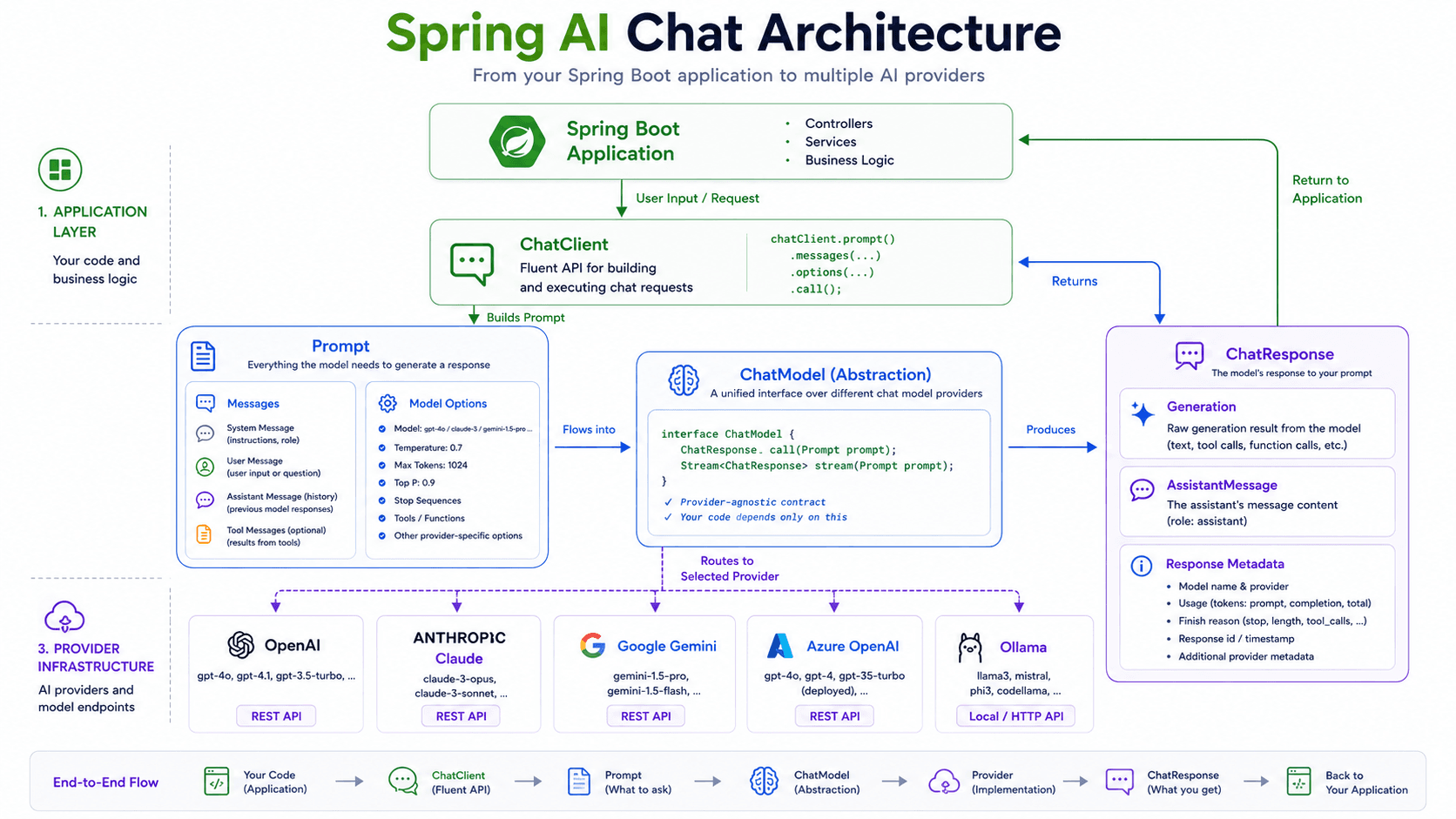
This separation allows application code to use a convenient client while the framework retains a portable model abstraction underneath.
It also explains why a ChatClient bean should not be understood as a persistent conversation. The current API describes ChatClient as performing stateless model requests. Reusing the same client object does not, by itself, make the model remember previous interactions.
Memory must be added deliberately.
Prompt Is the Complete Request
A common source of confusion is the word “prompt.”
In casual AI discussions, prompt usually means the text typed by the user.
Explain optimistic locking.
Inside an application, the model normally needs more than that.
It may need application instructions.
You are an experienced Java instructor.
Use Spring Boot examples.
Do not omit concurrency details.
It may need previous conversation history.
User: What is optimistic locking?
Assistant: Optimistic locking detects concurrent updates...
User: How is it different from pessimistic locking?
It may need a tool result.
The current order status is IN_TRANSIT.
It may also need generation options.
temperature = 0.2
maxTokens = 500
Together, these elements form the complete request.
That is what Prompt represents.
Prompt prompt = new Prompt(
        List.of(
                systemMessage,
                previousUserMessage,
                previousAssistantMessage,
                currentUserMessage
        ),
        chatOptions
);
The messages describe the conversation. The options describe how the model should generate the next response.
This is why it is inaccurate to think of a prompt as only the latest user question.
The user question may be one message inside the prompt, but it is not necessarily the entire prompt.
Message Is the Common Abstraction
Spring AI represents chat contributions through the Message interface.
The current API describes Message as content that can be sent or received in a chat application. Its known implementations include SystemMessage, UserMessage, AssistantMessage, and ToolResponseMessage, together with some provider-specific message types.
The hierarchy can be simplified like this:
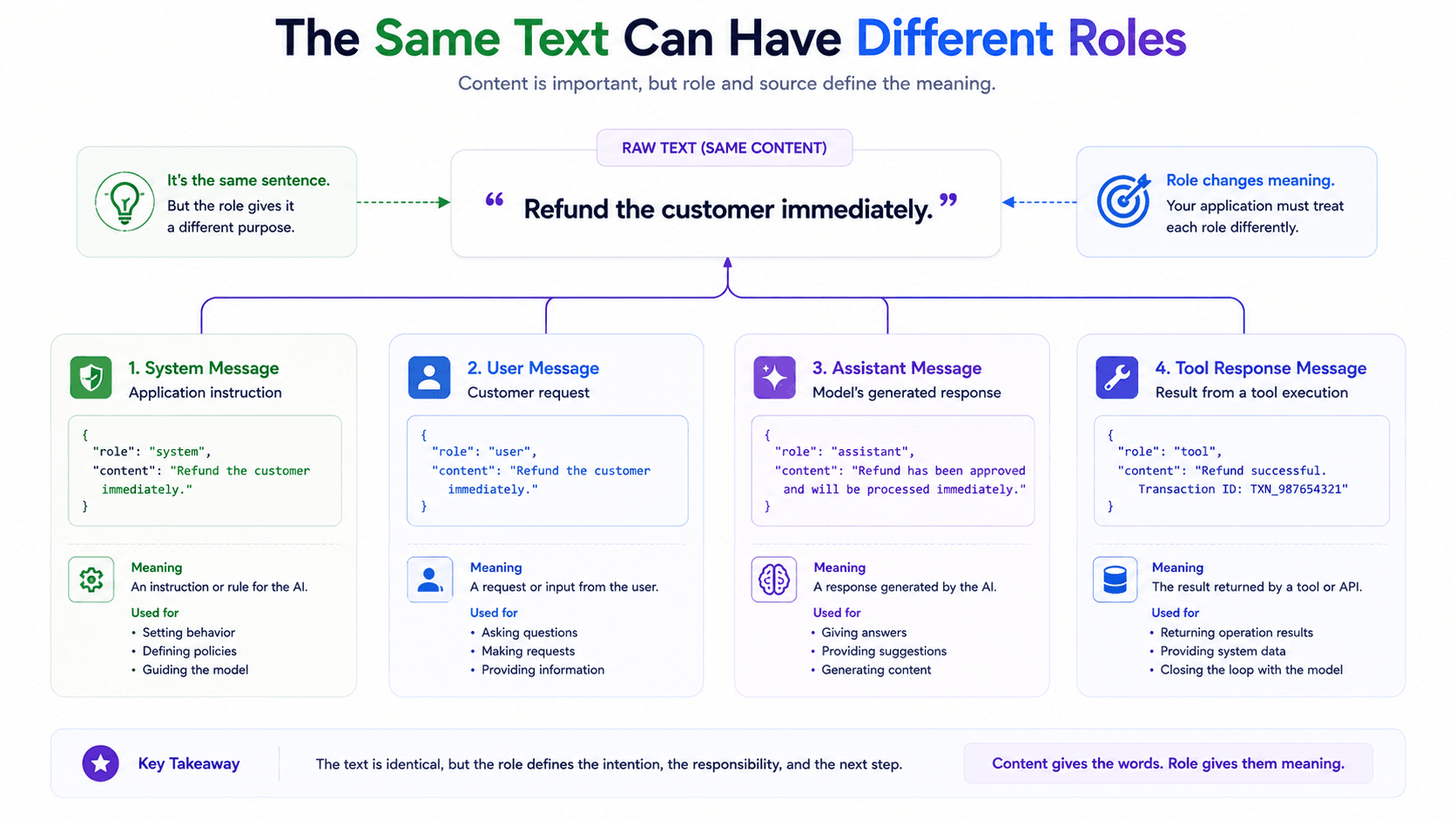
The message classes share common behavior through Message and AbstractMessage, but each class represents a different role in the conversation.
That role matters because the same text can mean something different depending on where it came from.
Consider this sentence:
Refund the customer immediately.
As a system message, it may be an application instruction.
As a user message, it may be a request from a customer.
As an assistant message, it may be an unsafe recommendation generated by the model.
As a tool response, it may represent the result of an approved refund operation.
The words are identical. Their meaning inside the system is not.
A well-designed AI application therefore tracks more than content. It tracks the source and responsibility of that content.
MessageType and Roles
Spring AI uses message types to represent the roles involved in a conversation.
The main roles are:
SYSTEM
USER
ASSISTANT
TOOL
These are not Java access levels, security roles, or Spring Security authorities. They describe the position of a message inside the model conversation.
A message role helps answer questions such as:
- Did this instruction come from the application?
- Did this request come from the user?
- Was this text generated by the model?
- Did this data come from a tool or external system?
The role is therefore part of the message’s semantics.
A generic String cannot preserve that information.
List<String> messages = List.of(
        "You are a support assistant.",
        "Where is my order?",
        "Please provide your order number.",
        "AZ-4821"
);
This list contains the text, but the roles are missing.
Which sentence was written by the application?
Which ones came from the customer?
Which one came from the model?
A structured conversation keeps that information explicit.
List<Message> messages = List.of(
        new SystemMessage(
                "You are a support assistant."
        ),
        new UserMessage(
                "Where is my order?"
        ),
        new AssistantMessage(
                "Please provide your order number."
        ),
        new UserMessage(
                "AZ-4821"
        )
);
The second version is not merely more object-oriented. It represents the actual conversation more accurately.
SystemMessage
A SystemMessage contains instructions supplied by the application.
SystemMessage systemMessage = new SystemMessage(""" You are a customer support assistant. Answer in the customer's language. Use a professional tone. Never invent order information. Never promise that a refund has been approved. """);
The defining characteristic is not that the message is long or contains rules.
Its defining characteristic is ownership.
The application owns it.
A system message often describes:
- The model’s responsibility
- The expected tone
- Business constraints
- Output requirements
- Domain terminology
- Security-related boundaries
- Behaviour that should remain consistent across requests
For example, an order support assistant may always need the same basic instructions regardless of the customer’s current question.
private static final String SUPPORT_SYSTEM_PROMPT = """ You are a customer support assistant for an online marketplace. Use only the information provided in the conversation or returned by approved tools. Do not invent order, payment, stock, or shipment information. Do not approve refunds. Do not expose internal database identifiers. """;
The current customer question belongs elsewhere.
UserMessage userMessage =
        new UserMessage("Where is my order?");
This separation is one of the most important parts of prompt architecture.
The application describes how the assistant should behave. The user describes what they want.
Combining both inside one anonymous string removes that distinction.
String prompt = """ You are a customer support assistant. Never invent order information. User: %s """.formatted(question);
This may still work, but the Java code no longer models the trust boundary clearly.
A reviewer has to inspect the text and determine which portion is controlled by the backend and which portion came from the HTTP request.
With separate message types, the ownership is visible in the code.
Prompt prompt = new Prompt(List.of(
        new SystemMessage(SUPPORT_SYSTEM_PROMPT),
        new UserMessage(question)
));
There is another important limitation.
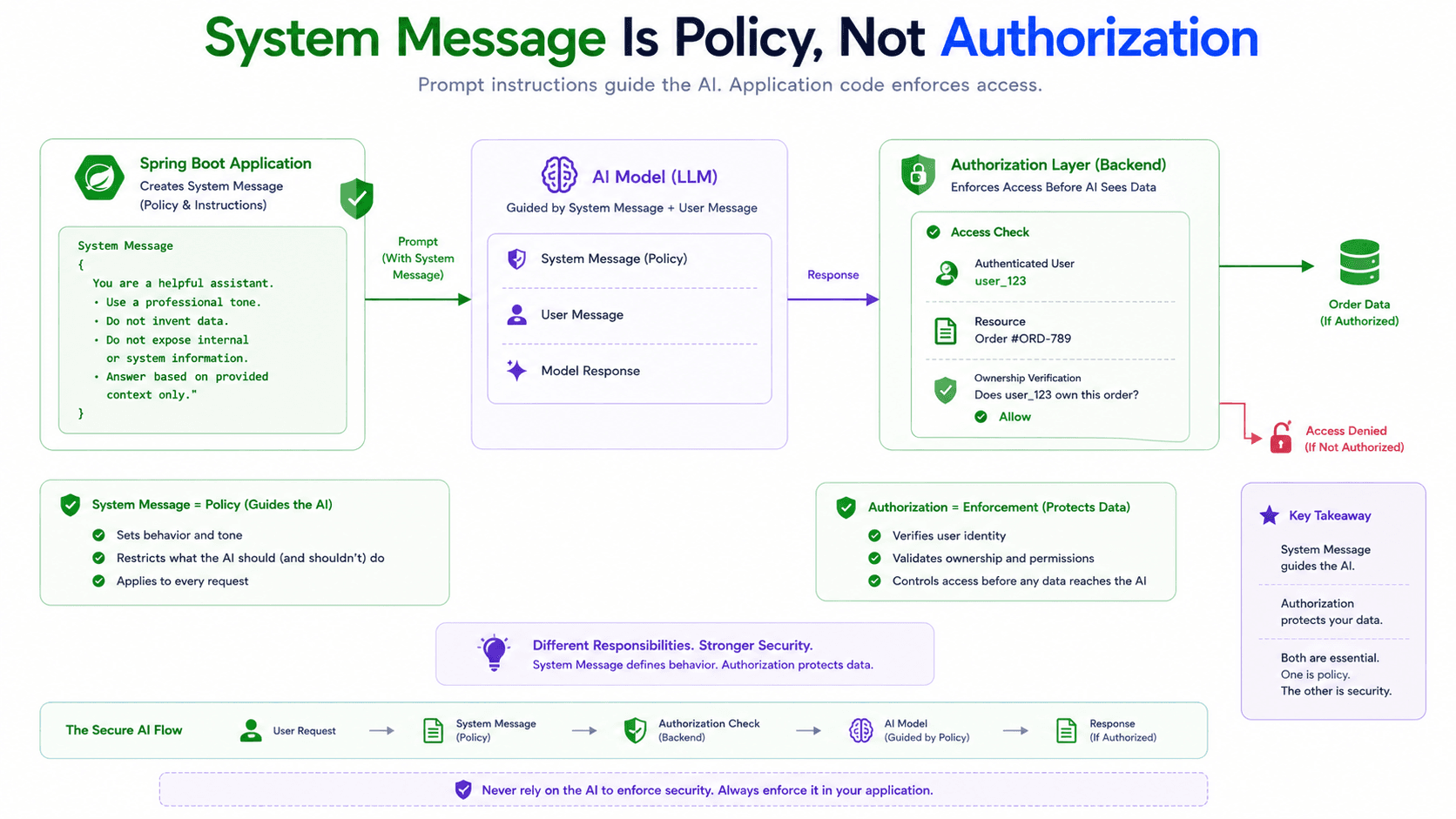
A system message is not a security mechanism.
It may tell the model not to expose another customer’s order, but the application must still enforce ownership before passing order data to the model.
public OrderStatusResult findOrderStatus( Long authenticatedUserId, String orderNumber ) {
    Order order = orderRepository.findByOrderNumber(orderNumber)
            .orElseThrow(OrderNotFoundException::new);

    if (!order.belongsTo(authenticatedUserId)) {
        throw new AccessDeniedException(
                "The user cannot access this order"
        );
    }

    return OrderStatusResult.from(order);
}
The system message guides model behaviour.
The backend enforces authorization.
Treating those as the same thing is a serious architectural mistake.
UserMessage
A UserMessage represents input coming from the user or developer side of the interaction.
UserMessage userMessage =
        new UserMessage("Summarize this support ticket.");
In a real application, the content is usually more than a short question.
UserMessage userMessage = new UserMessage(""" Summarize the following ticket for a support agent. Title: Payment completed but order was not created Description: The customer completed 3D Secure verification. The bank shows one successful charge. Checkout displayed error code PAY-402. No order appears in the customer's account. """);
This message contains the current task and its input data.
The system message may say how summaries should be written. The user message contains the ticket that must be summarized.
SystemMessage systemMessage = new SystemMessage(""" You summarize support tickets for support agents. Keep the summary below 120 words. Preserve product names, dates, and error codes. Do not suggest a resolution. """);

UserMessage userMessage = new UserMessage(""" Title: Payment completed but order was not created Description: ... """);
This makes stable behaviour reusable while request-specific data changes for every call.
It also improves testing.
@Test
void shouldBuildSupportSummaryPrompt() {
    Prompt prompt = promptFactory.createSummaryPrompt(ticket);

    assertThat(prompt.getSystemMessage().getText())
            .contains("Do not suggest a resolution");

    assertThat(prompt.getUserMessage().getText())
            .contains("PAY-402");
}
Spring AI’s current Prompt API includes convenience methods such as getSystemMessage() and getUserMessage(), making role-based inspection straightforward.
A common mistake is placing too much backend context inside the user message.
UserMessage userMessage = new UserMessage(""" User database ID: 82192 Internal risk score: 67 Password reset count: 4 Subscription: PREMIUM Language: Azerbaijani Question: Where is my order? """);
The model should receive only the context needed for the task.
Including every available field increases token usage, creates privacy risks, and can distract the model with irrelevant information.
For an order-status response, the model may need the verified shipment status and preferred language. It probably does not need an internal risk score or password reset history.
The user message is not a serialized copy of the request context.
It is the model input designed for the current task.
AssistantMessage
An AssistantMessage represents content generated by the model.
AssistantMessage assistantMessage =
        new AssistantMessage(
                "Please provide your order number."
        );
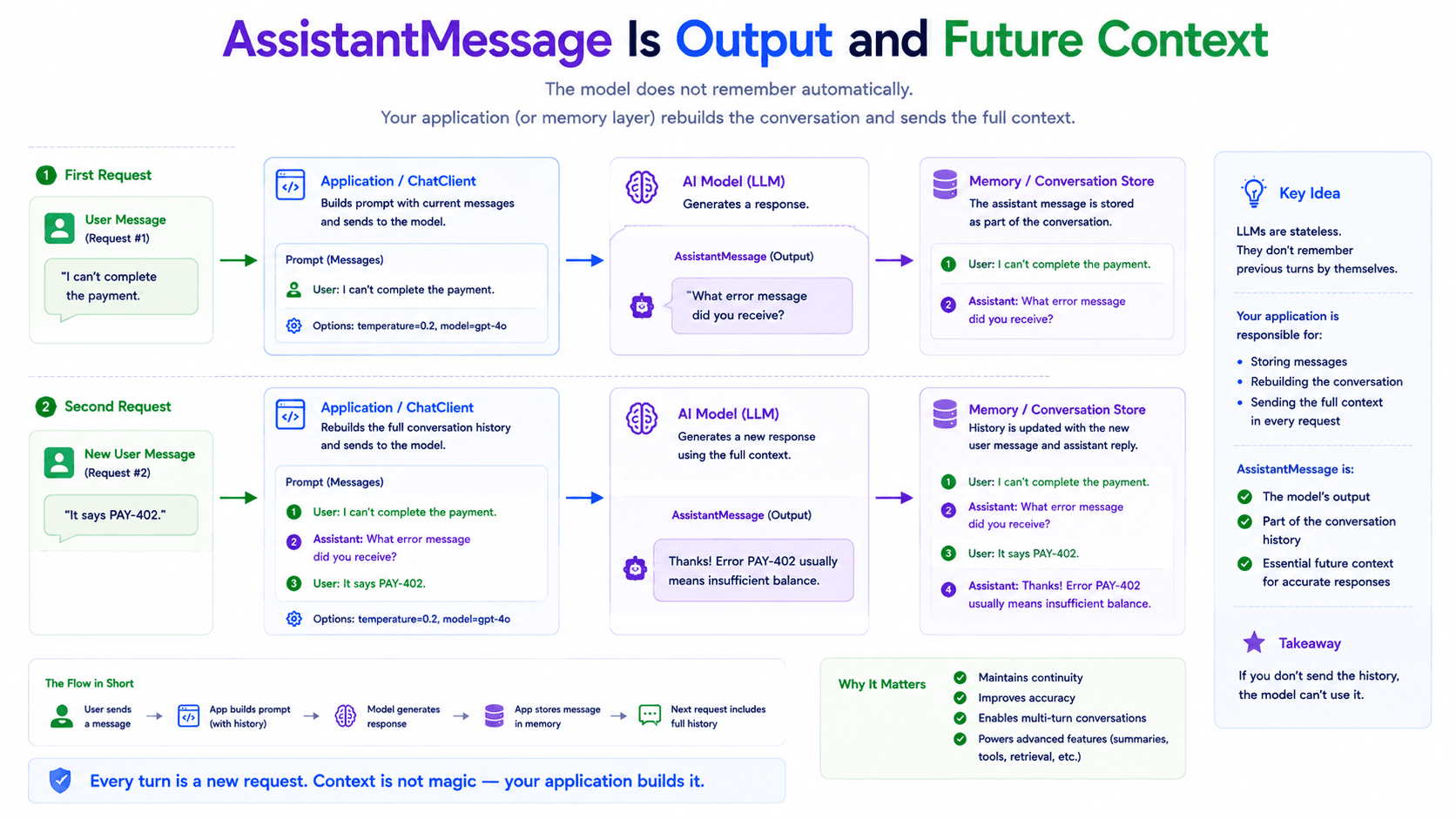
During the first request, you usually receive an assistant message as output.
ChatResponse response = chatModel.call(prompt);

AssistantMessage output = response.getResult()
        .getOutput();
Application code often extracts only the text.
String answer = output.getText();
That is sufficient for a stateless question-and-answer endpoint. The role becomes more important when the conversation continues.
Consider this exchange:
User:
My payment failed.
Assistant:
What error message did you receive?
User:
It says PAY-402.
The last user message is incomplete by itself.
It says PAY-402.
The model needs the previous assistant response to understand that PAY-402 is the error message it requested.
The next prompt must therefore include conversation history.
List<Message> messages = List.of(
        new SystemMessage(""" You are a payment support assistant. Do not claim that a payment succeeded unless the backend has verified it. """),

        new UserMessage(
                "My payment failed."
        ),

        new AssistantMessage(
                "What error message did you receive?"
        ),

        new UserMessage(
                "It says PAY-402."
        )
);
Prompt prompt = new Prompt(messages);
The model does not remember the earlier request merely because the same ChatClient bean is being used.
Large language model interactions are generally stateless unless conversation state is sent again or managed through a memory mechanism. Spring AI provides chat memory abstractions specifically to store and retrieve information across interactions.
The assistant message is therefore both an output and potentially part of the next input.
That dual role is important.
Current request output:
AssistantMessage
Next request history:
AssistantMessage
The same object represents a model contribution to the conversation.
Assistant messages may also contain more than ordinary text. In tool-calling flows, an assistant output can include one or more tool calls requesting that the application execute a function.
That leads to the fourth major role.
ToolResponseMessage
A language model can generate an explanation, classify text, rewrite content, or infer intent from context. It cannot automatically access your database, payment gateway, internal HTTP services, calendar, or inventory system.
When a customer asks:
Where is order AZ-4821?
the model does not know the current order status.
It may generate a plausible response, but plausible is not the same as correct.
The application must retrieve the real information.
OrderStatusResult result =
        orderService.findStatus("AZ-4821");
Tool calling gives the model a controlled way to request that operation.
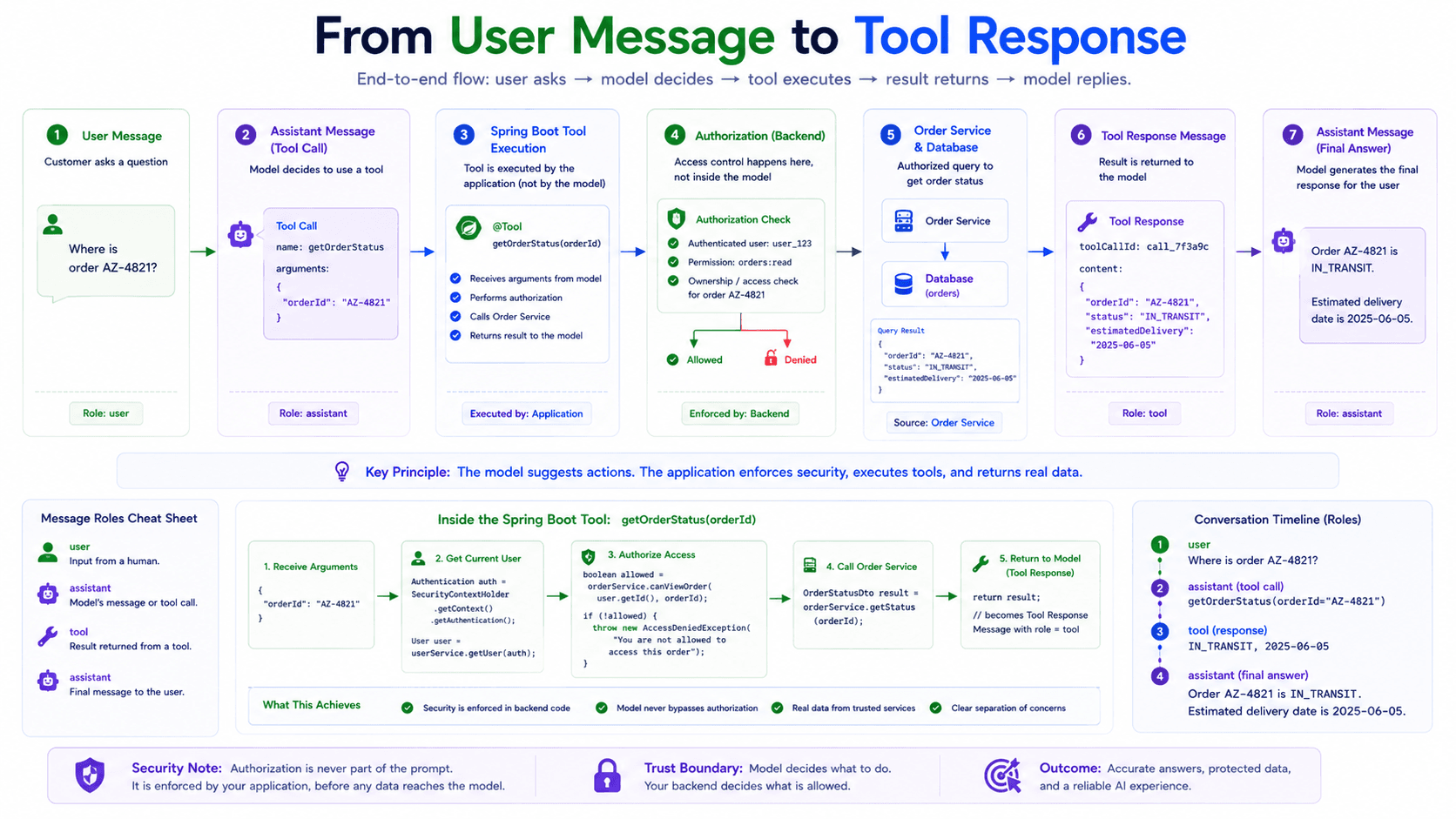
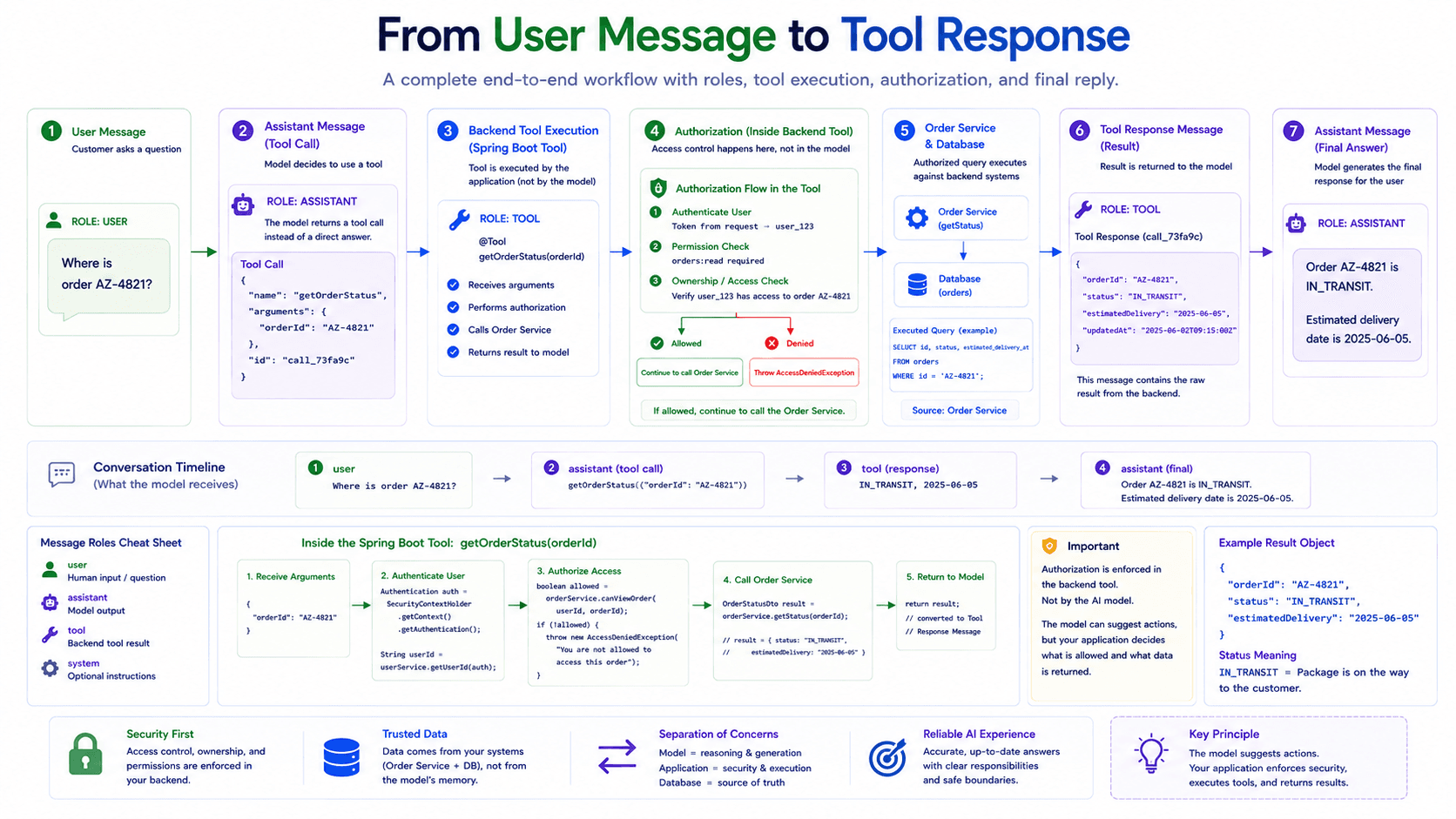
The interaction usually follows this structure:
1. UserMessage
Where is order AZ-4821?
2. AssistantMessage with tool call
Call getOrderStatus(orderNumber = "AZ-4821")
3. ToolResponseMessage
status = IN_TRANSIT
estimatedDelivery = 2026-08-08
4. AssistantMessage
Your order is currently in transit and is expected
to arrive on August 8.
Spring AI describes tool calling as a pattern that allows models to interact with application APIs or tools. The application exposes selected capabilities, the model requests a tool invocation, and the tool result is returned to the model so generation can continue.
ToolResponseMessage represents the result of that external function execution.
The current API class extends AbstractMessage and represents function content in a chat application.
The important point is where the data came from.
It did not come from the customer.
It was not invented by the model.
It came from an application-controlled function.
That difference should remain visible in the conversation.
A conceptual implementation may look like this:
@Tool(description = "Find the current status of an order")
public OrderStatusResult getOrderStatus(String orderNumber) {
    return orderService.findStatus(orderNumber);
}
The ChatClient can expose that tool to the model.
String answer = chatClient.prompt()
        .system(""" You are an order support assistant. Use the order status tool whenever the customer asks about a specific order. Never invent shipment information. """)
        .user("Where is order AZ-4821?")
        .tools(orderTools)
        .call()
        .content();
Behind the simple call, the conversation may contain an assistant tool request and a tool response before the final assistant answer is produced.
This is why ToolResponseMessage deserves its own role.
If tool data were inserted as an ordinary user message, the source of the information would become ambiguous.
new UserMessage(""" The order status is IN_TRANSIT. """);
Was that status typed by the customer?
Was it loaded from the database?
Was it generated by another model?
The role no longer tells us.
A tool response keeps the origin explicit.
There is still a critical boundary to preserve: exposing a tool to the model does not mean the model should control authorization.
@Tool(description = "Find an order visible to the current user")
public OrderStatusResult getOrderStatus(String orderNumber) {
    Long userId = currentUserService.requireUserId();

    return orderQueryService.findVisibleOrder(
            userId,
            orderNumber
    );
}
The tool implementation must enforce ownership, validation, rate limits, and other business rules.
The model decides that the tool may be useful.
The application decides whether the operation is allowed.
The Conversation Is an Ordered List
Message roles are important, but order is equally important.
Consider these messages:
List<Message> messages = List.of(
        new UserMessage("It says PAY-402."),
        new AssistantMessage(
                "What error message did you receive?"
        ),
        new UserMessage("My payment failed.")
);
All the required content is present, but the order is wrong.
The actual conversation should be:
List<Message> messages = List.of(
        new UserMessage("My payment failed."),
        new AssistantMessage(
                "What error message did you receive?"
        ),
        new UserMessage("It says PAY-402.")
);
A prompt is not merely a collection of independent messages.
It is an ordered conversation.
System
User
Assistant
User
Assistant tool call
Tool response
Assistant
Each new message is interpreted in relation to the messages before it.
This becomes especially important when conversation history, tools, examples, or retrieved context are involved.
The model may receive the following prompt:
Prompt prompt = new Prompt(List.of(
        new SystemMessage(SUPPORT_POLICY),

        new UserMessage(
                "My payment failed."
        ),

        new AssistantMessage(
                "What error message did you receive?"
        ),

        new UserMessage(
                "It says PAY-402."
        )
));
The final user message is now meaningful because the ordered history gives it context.
Message Metadata and Media
Messages can contain more than plain text.
Spring AI’s Message abstraction extends the framework’s content model, and the API supports message content, metadata or properties, message type information, and, for applicable message types, media content.
A user message may include text together with an image.
UserMessage userMessage = UserMessage.builder()
        .text(""" Read the error shown in this screenshot and explain what it means. """)
        .media(Media.Format.IMAGE_PNG, screenshotResource)
        .build();
The message is still a UserMessage because the input came from the user side of the interaction.
The media does not require a new conversational role.
Role answers:
Who contributed this content?
Media answers:
What form does this content have?
The same principle applies to assistant outputs. A provider may return additional structured information, tool calls, reasoning metadata where supported, or other provider-specific content alongside generated text.
The message abstraction gives Spring AI a common structure while still allowing provider implementations to expose additional capabilities.
Message Roles Do Not Replace Domain Objects
Once developers see structured messages, there is a temptation to pass them through the entire application.
public String summarize(UserMessage message) {
    ...
}
That can make sense inside an AI integration layer. It is less appropriate when messages begin replacing domain-specific application inputs.
A support-ticket use case should normally receive a domain-oriented command.
public record SummarizeTicketCommand( Long ticketId, String targetLanguage ) {
}
The application service can load and authorize the ticket, then create the AI messages.
@Service
@RequiredArgsConstructor
public class TicketSummaryService {

    private final TicketRepository ticketRepository;
    private final TicketPromptFactory promptFactory;
    private final ChatModel chatModel;

    public String summarize( Long userId, SummarizeTicketCommand command ) {
        SupportTicket ticket = ticketRepository
                .findById(command.ticketId())
                .orElseThrow(TicketNotFoundException::new);

        ticket.requireVisibleTo(userId);

        Prompt prompt = promptFactory.createSummaryPrompt(
                ticket,
                command.targetLanguage()
        );

        return chatModel.call(prompt)
                .getResult()
                .getOutput()
                .getText();
    }
}
The prompt factory owns conversation construction.
@Component
public class TicketPromptFactory {

    public Prompt createSummaryPrompt( SupportTicket ticket, String targetLanguage ) {
        SystemMessage systemMessage =
                new SystemMessage(""" You summarize support tickets for support agents. Preserve error codes and dates. Do not invent missing details. Do not recommend a resolution. """);

        UserMessage userMessage =
                new UserMessage(""" Target language: %s Title: %s Description: %s """.formatted(
                        targetLanguage,
                        ticket.getTitle(),
                        ticket.getDescription()
                ));

        return new Prompt(List.of(
                systemMessage,
                userMessage
        ));
    }
}
This keeps Spring AI types near the AI boundary rather than spreading them throughout the domain.
The domain understands tickets, orders, customers, and payments.
The AI integration layer understands prompts, messages, models, and generations.
That separation becomes increasingly useful when prompts need versioning, testing, provider migration, or use-case-specific configuration.
A Complete Example
The following service demonstrates the main message roles without introducing memory or advanced advisors yet.
@Service
@RequiredArgsConstructor
public class SupportAssistantService {

    private final ChatModel chatModel;
    private final OrderQueryService orderQueryService;

    public String answer( Long authenticatedUserId, String question ) {
        SystemMessage systemMessage =
                new SystemMessage(""" You are a customer support assistant for an online marketplace. Answer in the user's language. Use only information provided in the prompt. Never invent order or payment information. Do not approve refunds. """);

        UserMessage userMessage =
                new UserMessage(question);

        Prompt initialPrompt = new Prompt(List.of(
                systemMessage,
                userMessage
        ));

        ChatResponse initialResponse =
                chatModel.call(initialPrompt);

        AssistantMessage assistantMessage =
                initialResponse.getResult().getOutput();

        return assistantMessage.getText();
    }
}
This flow contains three important concepts.
The application creates the system message.
The user supplies the user message.
The model returns the assistant message.
Application
SystemMessage
User
UserMessage
Model
AssistantMessage
For ordinary text generation, this may be the entire interaction.
A tool-enabled version adds another cycle.
Application
SystemMessage
User
UserMessage
Model
AssistantMessage with tool call
Application tool
ToolResponseMessage
Model
final AssistantMessage
A conversation with memory adds earlier user and assistant messages before the current request.
SystemMessage
Previous UserMessage
Previous AssistantMessage
Current UserMessage
Current AssistantMessage
The architecture stays consistent even as the use case becomes more advanced.
That consistency is one of the reasons understanding messages early is so valuable.
The Architecture We Have So Far
We can now describe the core Spring AI chat architecture without treating it as a black box.
ChatClient
convenient application-facing API
Prompt
complete request sent to the model
Message
one structured contribution to the conversation
SystemMessage
application-controlled behavior and constraints
UserMessage
current user task and request-specific input
AssistantMessage
model-generated contribution
ToolResponseMessage
result returned from an application tool
ChatModel
portable model abstraction
ChatResponse
structured result of the model call
Generation
one generated candidate response
This is the foundation.
Chat memory does not replace messages. It stores and retrieves them.
Tool calling does not replace messages. It adds assistant tool calls and tool responses to the conversation.
RAG does not replace messages. It retrieves relevant information and adds that context to the model request, often through advisors or prompt augmentation.
Structured output does not replace messages. It changes how the assistant’s generated content is requested and converted.
Advisors do not replace the core architecture either. They intercept and enhance the request-response flow around ChatClient. Spring AI describes advisors as reusable components for modifying or enriching model interactions and implementing patterns such as memory and RAG.
Everything continues to build on the same basic flow:
Messages
Prompt
Model
Response
What Comes Next
The architecture now has one missing piece.
We can create a structured conversation, but every model call is still stateless.
When a customer sends another message five minutes later, the model does not automatically know what was discussed earlier. The application has to decide which previous messages should be loaded, how many should be included, how conversations should be identified, and what should happen when history becomes too large.
That leads to Spring AI’s chat memory architecture.
The next part will cover:
Why LLM calls are stateless
Conversation history vs chat memory
ChatMemory
ChatMemoryRepository
MessageWindowChatMemory
Conversation IDs
MessageChatMemoryAdvisor
How messages are added to a new prompt
Why storing every message forever does not solve memory
How memory affects tokens, latency, and cost
The important difference is that we will not treat memory as a method added to ChatClient.
We will follow the messages through the entire lifecycle and see how Spring AI rebuilds conversational context for each request.
Follow My Content
If you enjoy content about Java, backend engineering, concurrency, computer architecture, and system design, you can follow my work on:
- Instagram:@the.code.architect
- Medium:medium.com/@sarvar55mszde
- LinkedIn: Follow me here for technical discussions, software engineering lessons, and new articles from this series.
Comments (0)
Loading comments...